
About
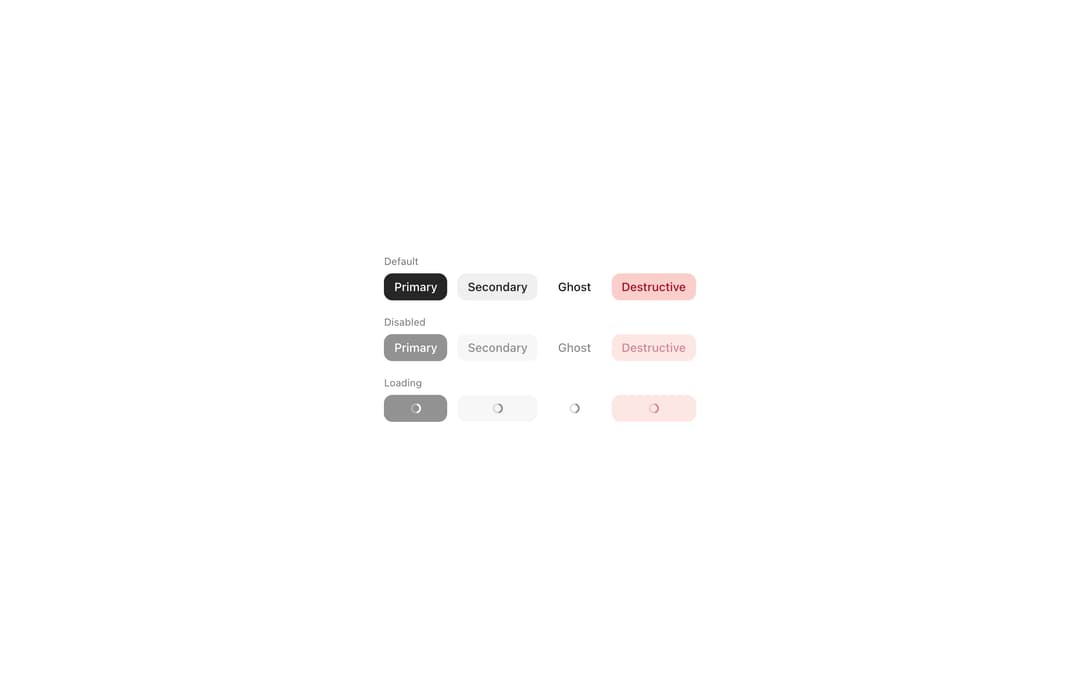
Button triggers actions with a clear visual hierarchy, from Meta's Astryx design system. Variants: primary, secondary, ghost, destructive; sizes sm/md/lg; disabled and loading states; leading icon and trailing endContent slots for badges or counts.
Built with React and Tailwind. Copy the prompt and paste it into Claude Code, Cursor or Lovable: your agent adds Astryx Button to your project and fits it to your theme.
Code
How Astryx Button is used: the demo's code. The component's own source comes with a free account.
Usage.tsx
'use client';

import Button from '@/components/ui/astryx-button';
import {Theme} from '@astryxdesign/core/theme';
import {neutralTheme} from '@astryxdesign/theme-neutral/built';
import {Stack} from '@astryxdesign/core/Layout';
import {Text} from '@astryxdesign/core/Text';

const VARIANTS = [
  {variant: 'primary' as const, label: 'Primary'},
  {variant: 'secondary' as const, label: 'Secondary'},
  {variant: 'ghost' as const, label: 'Ghost'},
  {variant: 'destructive' as const, label: 'Destructive'},
];

export default function ButtonVariants() {
  return (
    <Theme theme={neutralTheme}>
      <div
        style={{
          minHeight: '100dvh',
          display: 'grid',
          placeItems: 'center',
          padding: 24,
        }}>
        <Stack direction="vertical" gap={4}>
          <Stack direction="vertical" gap={1}>
            <Text type="supporting" color="secondary">
              Default
            </Text>
            <Stack direction="horizontal" gap={3} vAlign="center">
              {VARIANTS.map(({variant, label}) => (
                <Button key={variant} label={label} variant={variant} />
              ))}
            </Stack>
          </Stack>
          <Stack direction="vertical" gap={1}>
            <Text type="supporting" color="secondary">
              Disabled
            </Text>
            <Stack direction="horizontal" gap={3} vAlign="center">
              {VARIANTS.map(({variant, label}) => (
                <Button
                  key={variant}
                  label={label}
                  variant={variant}
                  isDisabled
                />
              ))}
            </Stack>
          </Stack>
          <Stack direction="vertical" gap={1}>
            <Text type="supporting" color="secondary">
              Loading
            </Text>
            <Stack direction="horizontal" gap={3} vAlign="center">
              {VARIANTS.map(({variant, label}) => (
                <Button
                  key={variant}
                  label={label}
                  variant={variant}
                  isLoading
                />
              ))}
            </Stack>
          </Stack>
        </Stack>
      </div>
    </Theme>
  );
}
Dependencies
More by Meta
View all

Astryx Banner
54
Astryx Avatar
26
Astryx Aspect Ratio
26
Astryx Button Group
22
Astryx Badge
22
Astryx Toggle Button
15
Astryx Avatar Group
7
Astryx Blockquote
3
More in Buttons
View all
Button Save
46

Button
20

Eclipse Button
5

Button
32

Button
6

Button
14

Button Group
37
Split Button
32

