About
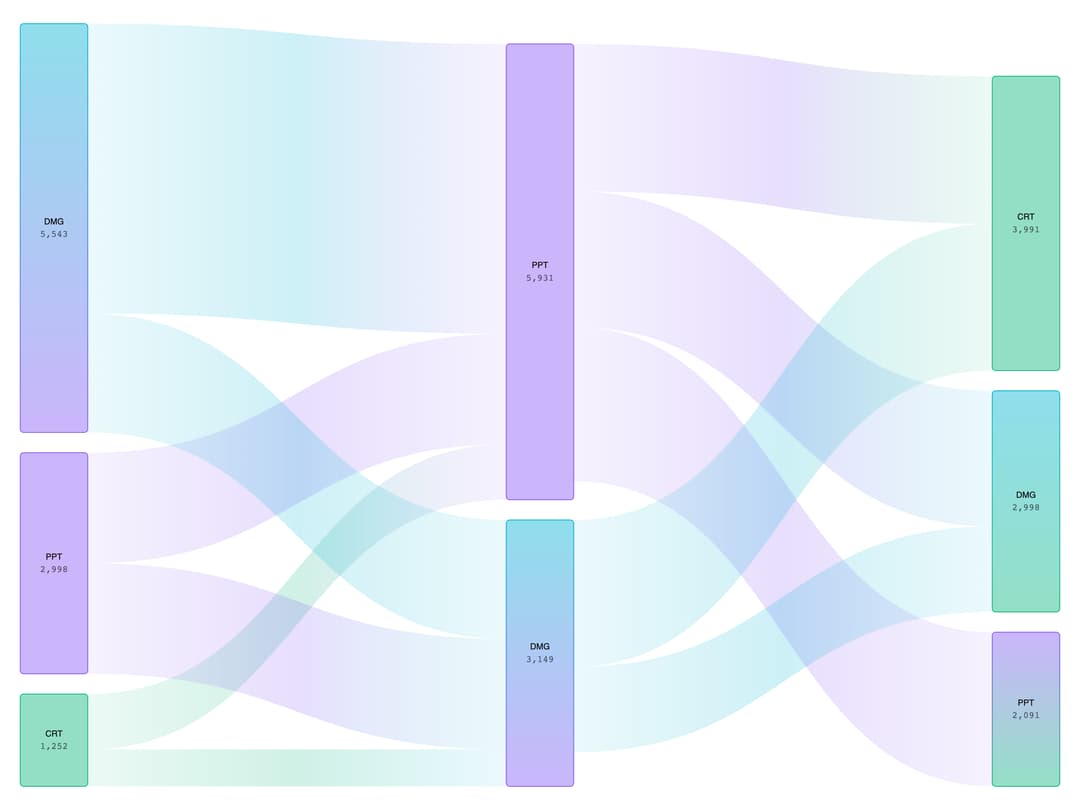
A flow diagram chart built on Apache ECharts that visualizes how a quantity moves between stages (e.g. funnel or budget flows) through animated, colored nodes and links.
Built with React and Tailwind. Copy the prompt and paste it into Claude Code, Cursor or Lovable: your agent adds ECharts Sankey Chart to your project and fits it to your theme.
Code
How ECharts Sankey Chart is used: the demo's code. The component's own source comes with a free account.
Usage.tsx
"use client";

import {
  EChartsSankeyChart,
  type SankeyData,
  type ChartConfig,
} from "@/components/ui/echarts-sankey-chart";

// Sales report data - similar to the design with CRT, PPT, DMG categories
const data: SankeyData = {
  nodes: [
    { name: "CRT_L" }, // Left CRT
    { name: "PPT_L" }, // Left PPT
    { name: "DMG_L" }, // Left DMG
    { name: "PPT_M" }, // Middle PPT
    { name: "DMG_M" }, // Middle DMG
    { name: "CRT_R" }, // Right CRT
    { name: "PPT_R" }, // Right PPT
    { name: "DMG_R" }, // Right DMG
  ],
  links: [
    // From left CRT to middle nodes
    { source: 0, target: 3, value: 750 },
    { source: 0, target: 4, value: 502 },

    // From left PPT to middle nodes
    { source: 1, target: 3, value: 1500 },
    { source: 1, target: 4, value: 1498 },

    // From left DMG to middle nodes
    { source: 2, target: 3, value: 3931 },
    { source: 2, target: 4, value: 1612 },

    // From middle PPT to right nodes
    { source: 3, target: 5, value: 2000 },
    { source: 3, target: 6, value: 2091 },
    { source: 3, target: 7, value: 1840 },

    // From middle DMG to right nodes
    { source: 4, target: 5, value: 1991 },
    { source: 4, target: 7, value: 1158 },
  ],
};

const chartConfig = {
  CRT_L: {
    label: "CRT",
    colors: {
      light: ["#10b981"],
      dark: ["#34d399"],
    },
  },
  PPT_L: {
    label: "PPT",
    colors: {
      light: ["#8b5cf6"],
      dark: ["#a78bfa"],
    },
  },
  DMG_L: {
    label: "DMG",
    colors: {
      light: ["#06b6d4", "#8b5cf6"],
      dark: ["#22d3ee", "#a78bfa"],
    },
  },
  PPT_M: {
    label: "PPT",
    colors: {
      light: ["#8b5cf6"],
      dark: ["#a78bfa"],
    },
  },
  DMG_M: {
    label: "DMG",
    colors: {
      light: ["#06b6d4", "#8b5cf6"],
      dark: ["#22d3ee", "#a78bfa"],
    },
  },
  CRT_R: {
    label: "CRT",
    colors: {
      light: ["#10b981"],
      dark: ["#34d399"],
    },
  },
  PPT_R: {
    label: "PPT",
    colors: {
      light: ["#8b5cf6", "#10b981"],
      dark: ["#a78bfa", "#34d399"],
    },
  },
  DMG_R: {
    label: "DMG",
    colors: {
      light: ["#06b6d4", "#10b981"],
      dark: ["#22d3ee", "#34d399"],
    },
  },
} satisfies ChartConfig;

export default function EChartsExampleSankeyChart() {
  return (
    <div className="w-full h-screen">
      <EChartsSankeyChart
        className="h-full w-full p-4"
        data={data}
        config={chartConfig}
        nodeWidth={80}
        nodePadding={24}
      >
        <EChartsSankeyChart.Node isClickable radius={4}>
          <EChartsSankeyChart.NodeLabel
            position="inside"
            showValues
            valueFormatter={(value) => value.toLocaleString()}
          />
        </EChartsSankeyChart.Node>
        <EChartsSankeyChart.Link variant="gradient" verticalPadding={8} />
        <EChartsSankeyChart.Tooltip />
      </EChartsSankeyChart>
    </div>
  );
}
Dependencies
More by Legion Dev
View all
CPU Architecture
1.9K
Database With REST API
1.2K
Radar Chart
351
Pie Chart
222
Line Chart
126
Area Chart
110
Bar Chart
98
LegionWebDev
86