
About
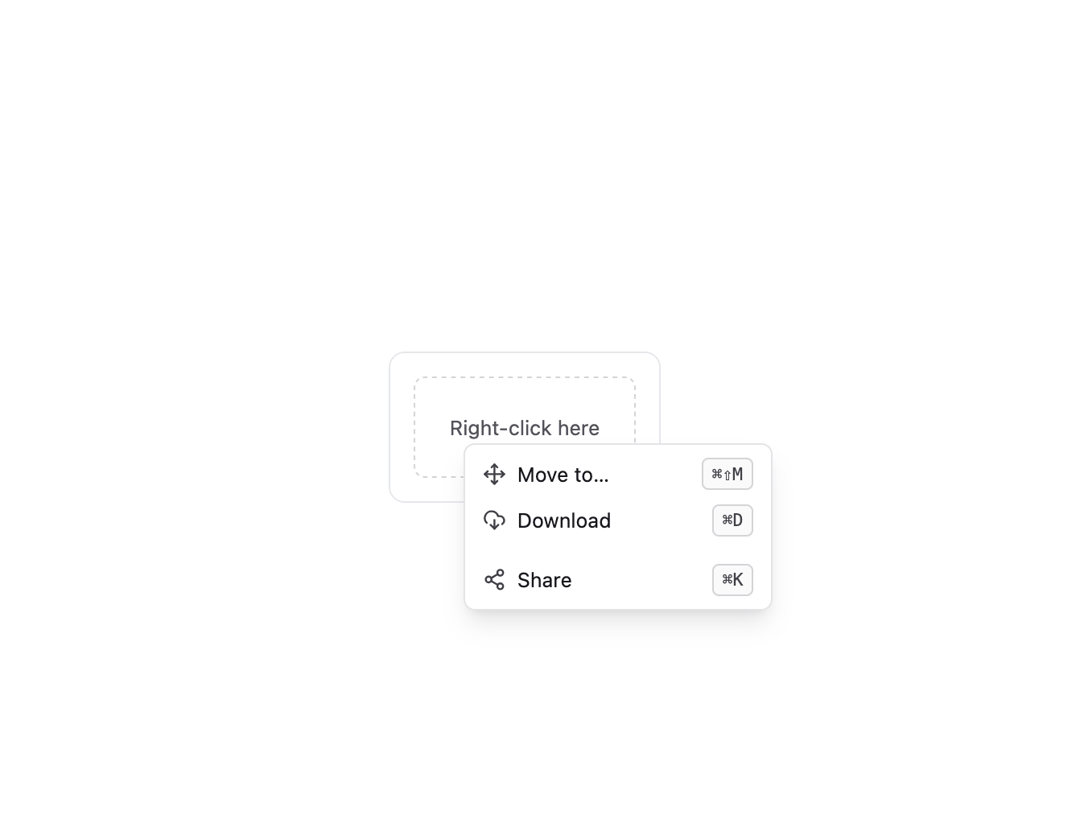
Here is Context Menu component
Built with React and Tailwind. Copy the prompt and paste it into Claude Code, Cursor or Lovable: your agent adds Context Menu to your project and fits it to your theme.
Code
How Context Menu is used: the demo's code. The component's own source comes with a free account.
Usage.tsx
import Component from "@/components/ui/context-menu-1";
import { FeatherMove, FeatherDownloadCloud, FeatherShare2 } from "@subframe/core";

function Kbd({ children }: { children: React.ReactNode }) {
  return (
    <kbd className="rounded border border-zinc-300 bg-zinc-50 px-1.5 py-0.5 text-xs text-zinc-700 dark:border-zinc-600 dark:bg-zinc-800 dark:text-zinc-200">
      {children}
    </kbd>
  );
}

export default function ContextMenuWithShortcuts() {
  return (
    <div className="max-w-sm rounded-lg p-4 ring-1 bg-white text-gray-900 ring-gray-200 dark:bg-gray-800 dark:text-gray-100 dark:ring-gray-700">
      <Component>
        <Component.Item icon={<FeatherMove />} rightSlot={<Kbd>⌘⇧M</Kbd>}>
          Move to…
        </Component.Item>
        <Component.Item icon={<FeatherDownloadCloud />} rightSlot={<Kbd>⌘D</Kbd>}>
          Download
        </Component.Item>
        <Component.Divider />
        <Component.Item icon={<FeatherShare2 />} rightSlot={<Kbd>⌘K</Kbd>}>
          Share
        </Component.Item>
      </Component>
    </div>
  );
}
Dependencies
More by SubframeApp
View all

Area Chart
108
Checkbox
16
Checkbox Card
14
Breadcrumb
12
Calendar
6
Checkbox Group
3
Accordion
3
Avatar
2