
About
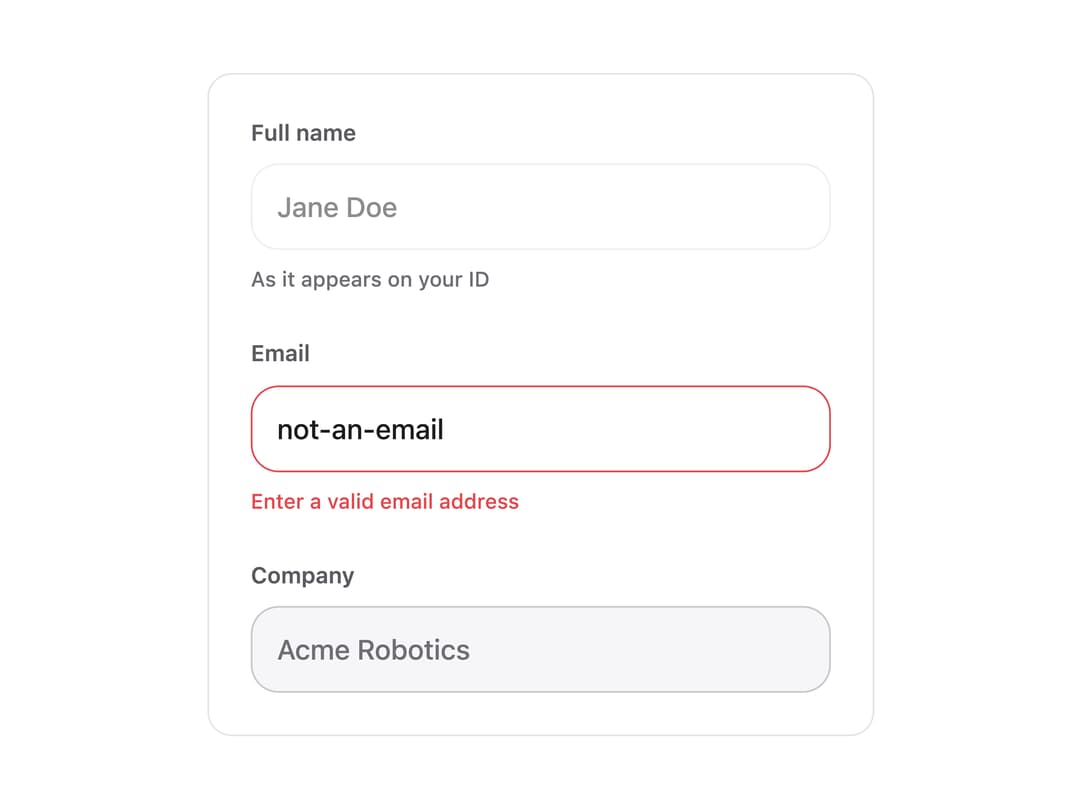
A single-line text input field with an optional label, helper hint text, and built-in default/focus/disabled/error states driven by a design-token theme.
Built with React and Tailwind. Copy the prompt and paste it into Claude Code, Cursor or Lovable: your agent adds Input to your project and fits it to your theme.
Code
How Input is used: the demo's code. The component's own source comes with a free account.
Usage.tsx
"use client";

import { Input } from "@/components/ui/input";
import { useState } from "react";

export default function InputDemo() {
  const [name, setName] = useState("");
  const [email, setEmail] = useState("not-an-email");
  const [company, setCompany] = useState("Acme Robotics");

  return (
    <div className="flex w-full max-w-sm flex-col gap-6 rounded-xl border border-border bg-background p-6 text-foreground">
      <Input
        label="Full name"
        placeholder="Jane Doe"
        value={name}
        onChange={setName}
        hint="As it appears on your ID"
      />
      <Input
        label="Email"
        placeholder="jane@example.com"
        value={email}
        onChange={setEmail}
        error="Enter a valid email address"
      />
      <Input label="Company" value={company} onChange={setCompany} disabled />
    </div>
  );
}
More by alexander-rukin
View all
Date Picker
More in Forms
View all

Premium Auth
500

Login 1
52
Authentication Card
47

Book A Demo 3
83
Book A Demo 1
69

Contact Card
1K

Login Card
32

Login 2
7
