About
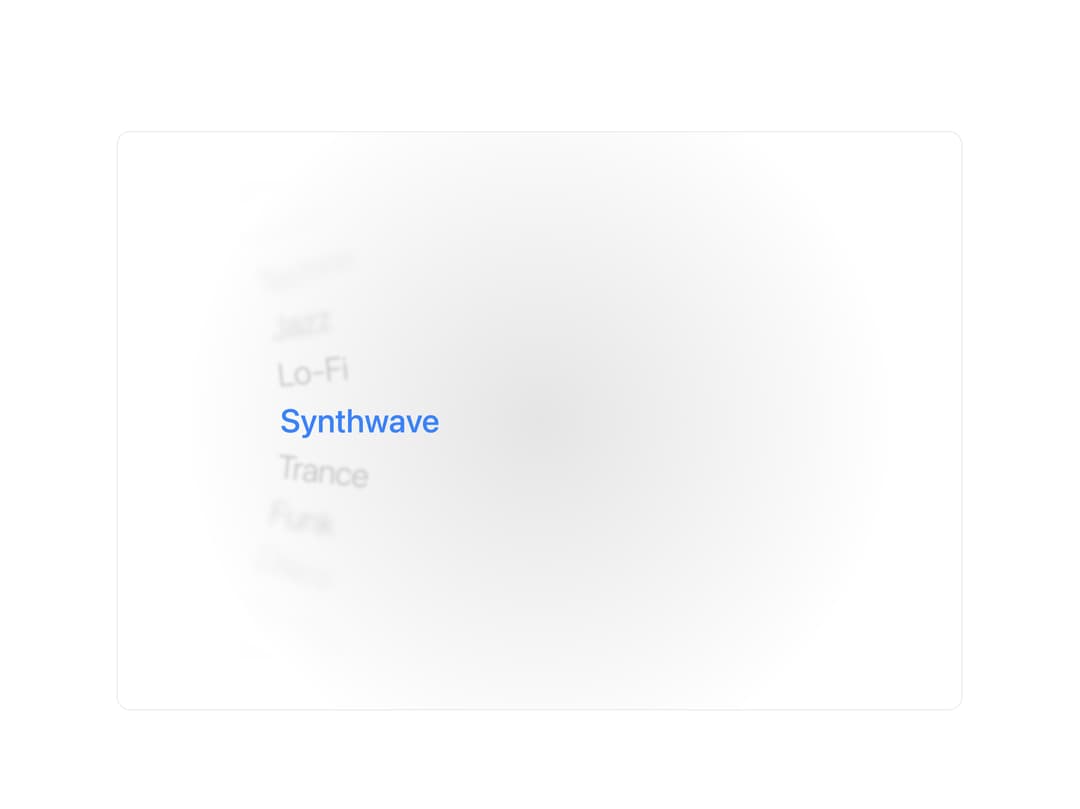
A vertical scroll-picker that curves a list of text options into a wheel, letting users pick one by dragging, scrolling, or arrow keys with smooth physics-based inertia.
Built with React and Tailwind. Copy the prompt and paste it into Claude Code, Cursor or Lovable: your agent adds Option Wheel to your project and fits it to your theme.
Code
How Option Wheel is used: the demo's code. The component's own source comes with a free account.
Usage.tsx
"use client";

import OptionWheel from "@/components/ui/option-wheel";

export default function Demo() {
  return (
    <div className="mx-auto w-full max-w-5xl pt-8 px-4 sm:pt-12">
      <div className="relative h-[600px] sm:h-[640px] md:h-[680px] w-full overflow-hidden rounded-2xl border bg-background flex flex-col items-center justify-center py-6 sm:py-8 md:py-10">
        <div className="absolute inset-0 bg-[radial-gradient(circle_at_50%_50%,rgba(0,0,0,0.1),transparent_70%)] dark:bg-[radial-gradient(circle_at_50%_50%,rgba(255,255,255,0.05),transparent_70%)]" />
        <div className="relative z-10 flex w-full max-w-3xl flex-1 px-4 py-4 sm:px-6 md:px-8">
          <OptionWheel
            items={[
              "Ambient",
              "House",
              "Techno",
              "Jazz",
              "Lo-Fi",
              "Synthwave",
              "Trance",
              "Funk",
              "Disco",
              "Hip-Hop",
              "Chillwave",
              "Drum & Bass",
            ]}
            side="left"
            fontSize={2.4}
            inset={48}
            activeColor="#3b82f6"
            onChange={(index, item) =>
              console.log(`Selected ${item} at index ${index}`)
            }
            className="h-full w-full"
          />
        </div>
      </div>
    </div>
  );
}
More by amitgajare2
View all

Proximity Sidebar
22
Code Block
1