
About
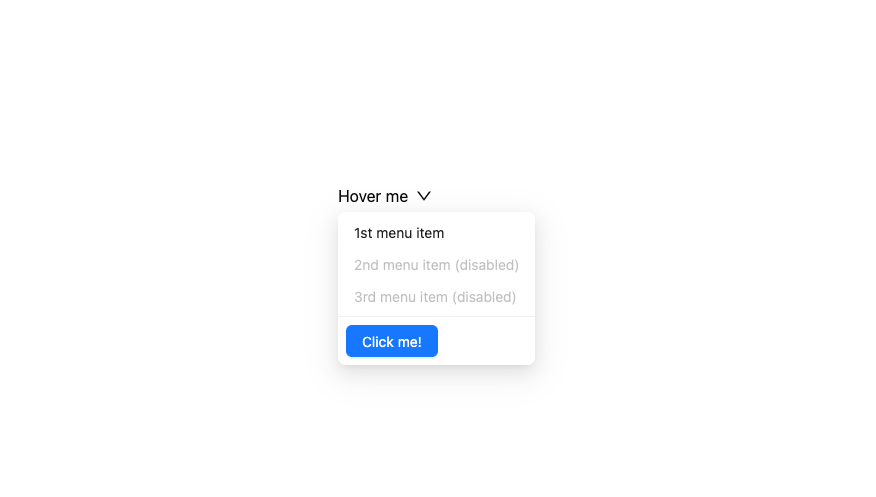
Here is Dropdown component
Built with React and Tailwind. Copy the prompt and paste it into Claude Code, Cursor or Lovable: your agent adds Dropdown to your project and fits it to your theme.
Code
How Dropdown is used: the demo's code. The component's own source comes with a free account.
Usage.tsx
import React from 'react';
import { DownOutlined } from '@ant-design/icons';
import { Button, Divider, Dropdown, Space, theme } from 'antd';
import type { MenuProps } from 'antd';

const { useToken } = theme;

const items: MenuProps['items'] = [
  {
    key: '1',
    label: (
      <a target="_blank" rel="noopener noreferrer" href="https://www.antgroup.com">
        1st menu item
      </a>
    ),
  },
  {
    key: '2',
    label: (
      <a target="_blank" rel="noopener noreferrer" href="https://www.aliyun.com">
        2nd menu item (disabled)
      </a>
    ),
    disabled: true,
  },
  {
    key: '3',
    label: (
      <a target="_blank" rel="noopener noreferrer" href="https://www.luohanacademy.com">
        3rd menu item (disabled)
      </a>
    ),
    disabled: true,
  },
];

const App: React.FC = () => {
  const { token } = useToken();

  const contentStyle: React.CSSProperties = {
    backgroundColor: token.colorBgElevated,
    borderRadius: token.borderRadiusLG,
    boxShadow: token.boxShadowSecondary,
  };

  const menuStyle: React.CSSProperties = {
    boxShadow: 'none',
  };

  return (
    <Dropdown
      menu={{ items }}
      popupRender={(menu) => (
        <div style={contentStyle}>
          {React.cloneElement(
            menu as React.ReactElement<{
              style: React.CSSProperties;
            }>,
            { style: menuStyle },
          )}
          <Divider style={{ margin: 0 }} />
          <Space style={{ padding: 8 }}>
            <Button type="primary">Click me!</Button>
          </Space>
        </div>
      )}
    >
      <a onClick={(e) => e.preventDefault()}>
        <Space>
          Hover me
          <DownOutlined />
        </Space>
      </a>
    </Dropdown>
  );
};

export default App;
Dependencies
More by antdesign
View all
Menu
22
Pagination Ant
16
Breadcrumb
10
FloatButton
7
Button Ant
5
Floating Action Menu
More in Buttons
View all

Button
14
Button
34
Texture Button
92
Button Save
46

Button
64

Button Group
3

Notification Button
103

Button

