
About
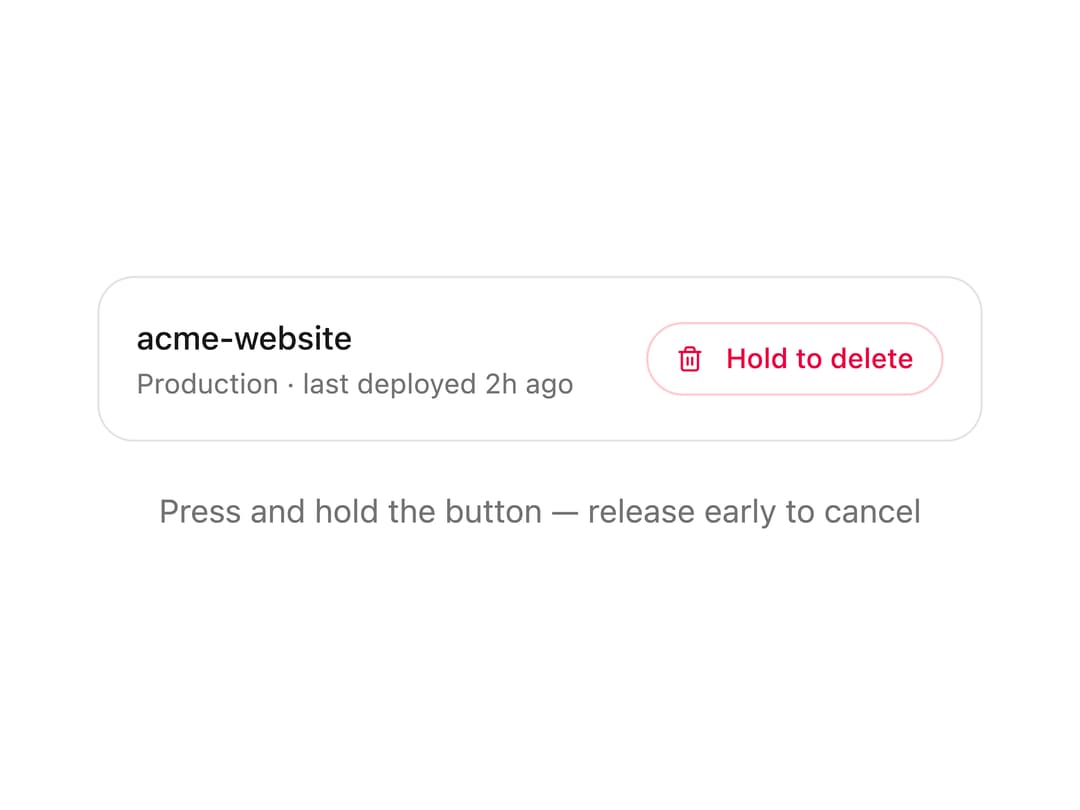
A press-and-hold confirmation button for destructive actions that fills a circular progress ring while held, springs back if released early, and morphs into a success checkmark when the hold completes.
Built with React and Tailwind. Copy the prompt and paste it into Claude Code, Cursor or Lovable: your agent adds Hold to Confirm Button to your project and fits it to your theme.
Code
How Hold to Confirm Button is used: the demo's code. The component's own source comes with a free account.
Usage.tsx
"use client";

import HoldToConfirmButton from "@/components/ui/hold-to-confirm";
import { AnimatePresence, motion } from "framer-motion";
import { useEffect, useRef, useState } from "react";

export default function HoldToConfirmDemo() {
  const [deleted, setDeleted] = useState(false);
  const timerRef = useRef<ReturnType<typeof setTimeout> | null>(null);

  useEffect(() => {
    return () => {
      if (timerRef.current) clearTimeout(timerRef.current);
    };
  }, []);

  const handleConfirm = () => {
    timerRef.current = setTimeout(() => setDeleted(true), 900);
  };

  return (
    <div className="flex w-full flex-col items-center gap-5 py-10">
      <div className="w-full max-w-sm">
        <AnimatePresence mode="wait" initial={false}>
          {!deleted ? (
            <motion.div
              key="project"
              exit={{ opacity: 0, y: -8 }}
              transition={{ duration: 0.2, ease: "easeOut" }}
              className="flex items-center justify-between gap-4 rounded-2xl border border-neutral-200 bg-white p-4 dark:border-neutral-800 dark:bg-neutral-900"
            >
              <div className="min-w-0">
                <p className="truncate text-sm font-medium text-neutral-900 dark:text-white">
                  acme-website
                </p>
                <p className="mt-0.5 text-xs text-neutral-500 dark:text-neutral-400">
                  Production · last deployed 2h ago
                </p>
              </div>
              <HoldToConfirmButton size="sm" onConfirm={handleConfirm} />
            </motion.div>
          ) : (
            <motion.div
              key="deleted"
              initial={{ opacity: 0, y: 8 }}
              animate={{ opacity: 1, y: 0 }}
              transition={{ duration: 0.2, ease: "easeOut" }}
              className="flex items-center justify-center gap-2 rounded-2xl border border-dashed border-neutral-200 p-4 dark:border-neutral-800"
            >
              <p className="text-sm text-neutral-500 dark:text-neutral-400">
                acme-website was deleted.
              </p>
              <button
                type="button"
                onClick={() => setDeleted(false)}
                className="text-sm font-medium text-neutral-900 underline underline-offset-4 hover:text-neutral-600 focus-visible:outline-hidden focus-visible:ring-1 focus-visible:ring-neutral-950 dark:text-white dark:hover:text-neutral-300 dark:focus-visible:ring-neutral-300"
              >
                Restore
              </button>
            </motion.div>
          )}
        </AnimatePresence>
      </div>
      <p className="text-sm text-neutral-500 dark:text-neutral-400">
        Press and hold the button — release early to cancel
      </p>
    </div>
  );
}
Dependencies
More by Arihant jain
View all
Footer section
1.9K
Multistep Form
698
Animated Drawer
686
Status Badge
495
Stacked Circular Footer
413
Input Modal
316
Large Name Footer
193
Profile Dropdown
187
More in Buttons
View all
Button Save
46

Button
20

Eclipse Button
5

Button
6

Button
14

Button Group
37

Button
32
Split Button
32

