
About
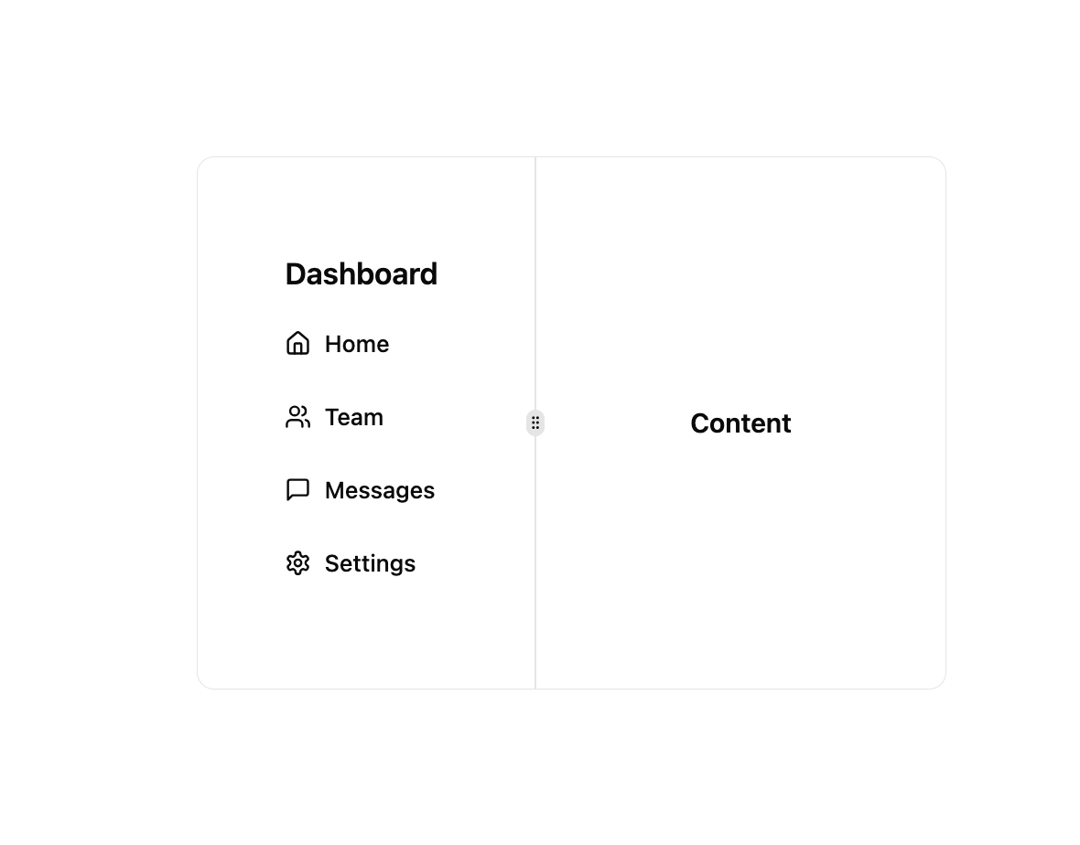
Here is Navbars component
Built with React and Tailwind. Copy the prompt and paste it into Claude Code, Cursor or Lovable: your agent adds Navbars to your project and fits it to your theme.
Code
How Navbars is used: the demo's code. The component's own source comes with a free account.
Usage.tsx
"use client";
import React, { useState } from "react";
import { Button } from "@/components/ui/button";
import { ScrollArea } from "@/components/ui/scroll-area";
import { Sheet, SheetContent, SheetTrigger } from "@/components/ui/sheet";
import { Home, Menu, MessageSquare, Settings, Users } from "lucide-react";
import {
  ResizableHandle,
  ResizablePanel,
  ResizablePanelGroup,
} from "@/components/ui/resizable";

export default function Navbardemo() {
  const [open, setOpen] = useState(false);

  return (
    <div className="flex ">
      <Sheet open={open} onOpenChange={setOpen}>
        <SheetTrigger asChild>
          <Button
            variant="outline"
            size="icon"
            className="fixed left-4 top-4 lg:hidden"
          >
            <Menu className="h-6 w-6" />
          </Button>
        </SheetTrigger>
        <SheetContent side="left" className="w-[240px] p-0">
          <VerticalNav />
        </SheetContent>
      </Sheet>
      <ResizablePanelGroup
        direction="horizontal"
        className="min-h-[200px] max-w-md rounded-lg border md:min-w-[450px]"
      >
        <ResizablePanel defaultSize={70}>
          <div className="flex h-full items-center justify-center p-6">
            <VerticalNav />
          </div>
        </ResizablePanel>
        <ResizableHandle withHandle />
        <ResizablePanel defaultSize={85}>
          <div className="flex h-full items-center justify-center p-6">
            <span className="font-semibold">Content</span>
          </div>
        </ResizablePanel>
      </ResizablePanelGroup>
    </div>
  );
}

function VerticalNav() {
  return (
    <ScrollArea className="h-full py-6">
      <div className="px-3 py-2">
        <h2 className="mb-2 px-4 text-lg font-semibold">Dashboard</h2>
        <div className="space-y-1">
          <Button variant="ghost" className="w-full justify-start">
            <Home className="mr-2 h-4 w-4" />
            Home
          </Button>
          <Button variant="ghost" className="w-full justify-start">
            <Users className="mr-2 h-4 w-4" />
            Team
          </Button>
          <Button variant="ghost" className="w-full justify-start">
            <MessageSquare className="mr-2 h-4 w-4" />
            Messages
          </Button>
          <Button variant="ghost" className="w-full justify-start">
            <Settings className="mr-2 h-4 w-4" />
            Settings
          </Button>
        </div>
      </div>
    </ScrollArea>
  );
}
Dependencies
More by Arihant jain
View all
Footer section
1.9K
Multistep Form
698
Animated Drawer
686
Status Badge
495
Stacked Circular Footer
413
Input Modal
316
Large Name Footer
193
Profile Dropdown
187
More in Navigation
View all

Sidebar
234

Tabs
60
Newsletter Signup Footer
16
Progress Bar Stepper
36

Footer 2
201
Navbar with Theme Toggle
43

Navbar
71

Pagination
86
