
About
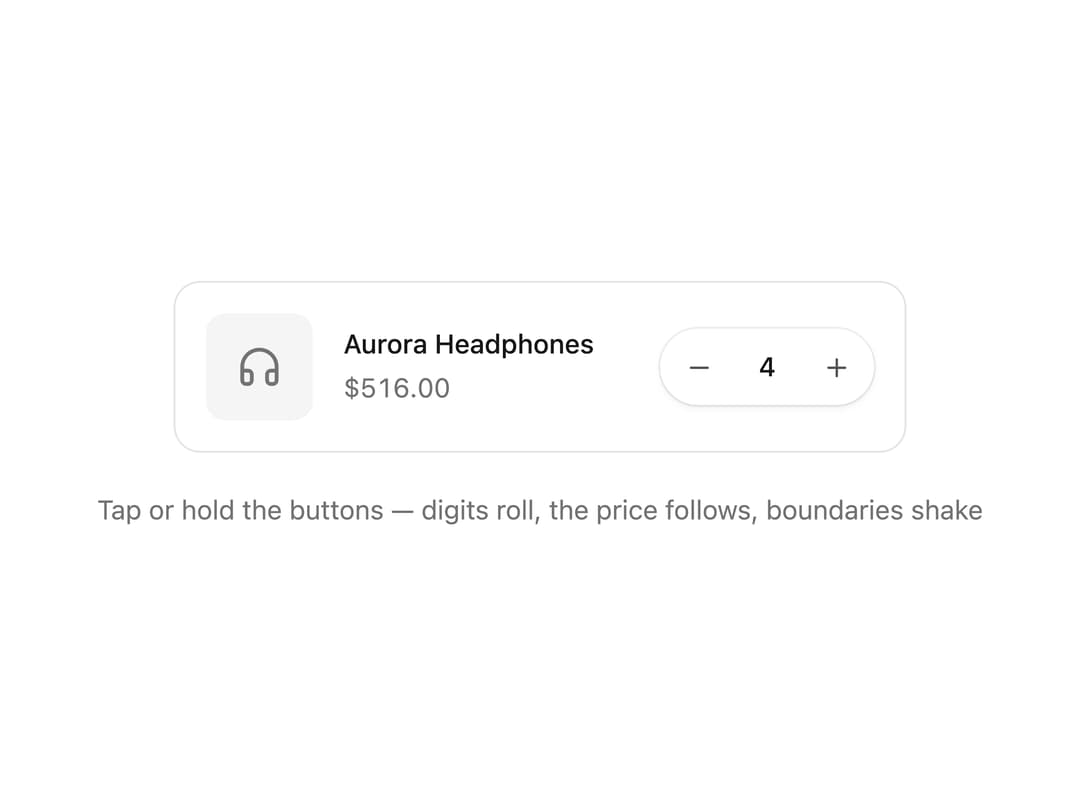
An animated quantity input for carts and forms with rolling digit transitions, press-and-hold acceleration, and a shake when the min or max is reached.
Built with React and Tailwind. Copy the prompt and paste it into Claude Code, Cursor or Lovable: your agent adds Quantity Stepper to your project and fits it to your theme.
Code
How Quantity Stepper is used: the demo's code. The component's own source comes with a free account.
Usage.tsx
"use client";

import { QuantityStepper } from "@/components/ui/quantity-stepper";
import { useState } from "react";
import { AnimatePresence, motion } from "framer-motion";
import { Headphones } from "lucide-react";

const UNIT_PRICE = 129;

export default function QuantityStepperDemo() {
  const [quantity, setQuantity] = useState(1);
  const total = quantity * UNIT_PRICE;

  return (
    <div className="flex w-full flex-col items-center gap-5 py-10">
      <div className="flex w-full max-w-sm items-center gap-4 rounded-xl border border-neutral-200 bg-white p-4 dark:border-neutral-800 dark:bg-neutral-900">
        <div className="flex h-14 w-14 shrink-0 items-center justify-center rounded-lg bg-neutral-100 text-neutral-500 dark:bg-neutral-800 dark:text-neutral-400">
          <Headphones size={24} aria-hidden="true" />
        </div>
        <div className="min-w-0 flex-1">
          <p className="truncate text-sm font-medium text-neutral-900 dark:text-neutral-100">
            Aurora Headphones
          </p>
          <span className="inline-flex overflow-hidden text-sm tabular-nums text-neutral-500 dark:text-neutral-400">
            <AnimatePresence mode="popLayout" initial={false}>
              <motion.span
                key={total}
                className="inline-block"
                initial={{ y: 12, opacity: 0 }}
                animate={{ y: 0, opacity: 1 }}
                exit={{ y: -12, opacity: 0 }}
                transition={{ duration: 0.15, ease: "easeOut" }}
              >
                ${total.toFixed(2)}
              </motion.span>
            </AnimatePresence>
          </span>
        </div>
        <QuantityStepper
          value={quantity}
          onValueChange={setQuantity}
          min={1}
          max={10}
        />
      </div>
      <p className="text-sm text-neutral-500 dark:text-neutral-400">
        Tap or hold the buttons — digits roll, the price follows, boundaries
        shake
      </p>
    </div>
  );
}
Dependencies
More by Arihant jain
View all
Footer section
1.9K
Multistep Form
696
Animated Drawer
684
Status Badge
491
Stacked Circular Footer
410
Input Modal
311
Large Name Footer
193
Profile Dropdown
186