
About
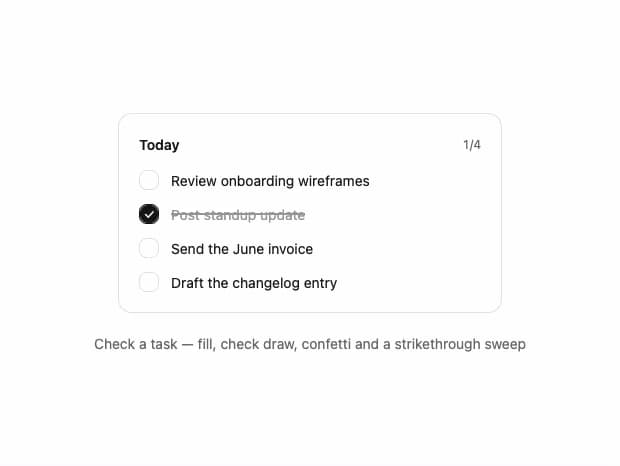
An animated todo checkbox row that fills with a spring, draws in a check mark, fires a confetti burst, and strikes through the label when a task is completed.
Built with React and Tailwind. Copy the prompt and paste it into Claude Code, Cursor or Lovable: your agent adds Task Checkbox to your project and fits it to your theme.
Code
How Task Checkbox is used: the demo's code. The component's own source comes with a free account.
Usage.tsx
"use client";

import { TaskCheckbox } from "@/components/ui/task-checkbox";
import * as React from "react";
import { AnimatePresence, motion } from "framer-motion";

const SOFT_SPRING = { type: "spring", stiffness: 260, damping: 22 } as const;

const TASKS = [
  { id: "wireframes", label: "Review onboarding wireframes" },
  { id: "standup", label: "Post standup update" },
  { id: "invoice", label: "Send the June invoice" },
  { id: "changelog", label: "Draft the changelog entry" },
];

export default function TaskCheckboxDemo() {
  const [done, setDone] = React.useState<Record<string, boolean>>({
    wireframes: false,
    standup: true,
    invoice: false,
    changelog: false,
  });

  const doneCount = TASKS.filter((task) => done[task.id]).length;
  const allDone = doneCount === TASKS.length;

  return (
    <div className="flex w-full flex-col items-center gap-5 py-10">
      <div className="w-full max-w-sm rounded-xl border border-neutral-200 bg-white p-5 dark:border-neutral-800 dark:bg-neutral-900">
        <div className="flex items-center justify-between">
          <h3 className="text-sm font-semibold text-neutral-900 dark:text-neutral-100">
            Today
          </h3>
          <span className="text-xs tabular-nums text-neutral-500 dark:text-neutral-400">
            {doneCount}/{TASKS.length}
          </span>
        </div>

        <AnimatePresence initial={false}>
          {allDone && (
            <motion.div
              key="all-done"
              className="mt-3 flex w-fit items-center gap-1.5 rounded-full border border-neutral-200 bg-white py-1 pl-2 pr-2.5 dark:border-neutral-800 dark:bg-neutral-900"
              initial={{ opacity: 0, scale: 0.8, y: 4 }}
              animate={{ opacity: 1, scale: 1, y: 0 }}
              exit={{ opacity: 0, scale: 0.9, transition: { duration: 0.15 } }}
              transition={SOFT_SPRING}
            >
              <svg
                viewBox="0 0 24 24"
                className="h-3 w-3 text-emerald-500"
                fill="none"
                stroke="currentColor"
                strokeWidth="3"
                strokeLinecap="round"
                strokeLinejoin="round"
                aria-hidden="true"
              >
                <path d="M5 12.5L10 17.5L19 7.5" />
              </svg>
              <span className="text-xs font-medium text-neutral-900 dark:text-neutral-100">
                All done
              </span>
            </motion.div>
          )}
        </AnimatePresence>

        <div className="mt-4 flex flex-col gap-3.5">
          {TASKS.map((task) => (
            <TaskCheckbox
              key={task.id}
              label={task.label}
              checked={done[task.id]}
              onCheckedChange={(checked) =>
                setDone((previous) => ({ ...previous, [task.id]: checked }))
              }
            />
          ))}
        </div>
      </div>

      <p className="text-sm text-neutral-500 dark:text-neutral-400">
        Check a task — fill, check draw, confetti and a strikethrough sweep
      </p>
    </div>
  );
}
Dependencies
More by Arihant jain
View all
Footer section
1.9K
Multistep Form
698
Animated Drawer
686
Status Badge
495
Stacked Circular Footer
413
Input Modal
316
Large Name Footer
193
Profile Dropdown
187