
About
Headless, composable numeric input field with drag-to-scrub, keyboard stepping, format/parse controls, and committed-value events for building any unit field.
Built with React and Tailwind. Copy the prompt and paste it into Claude Code, Cursor or Lovable: your agent adds Unit Field to your project and fits it to your theme.
Code
How Unit Field is used: the demo's code. The component's own source comes with a free account.
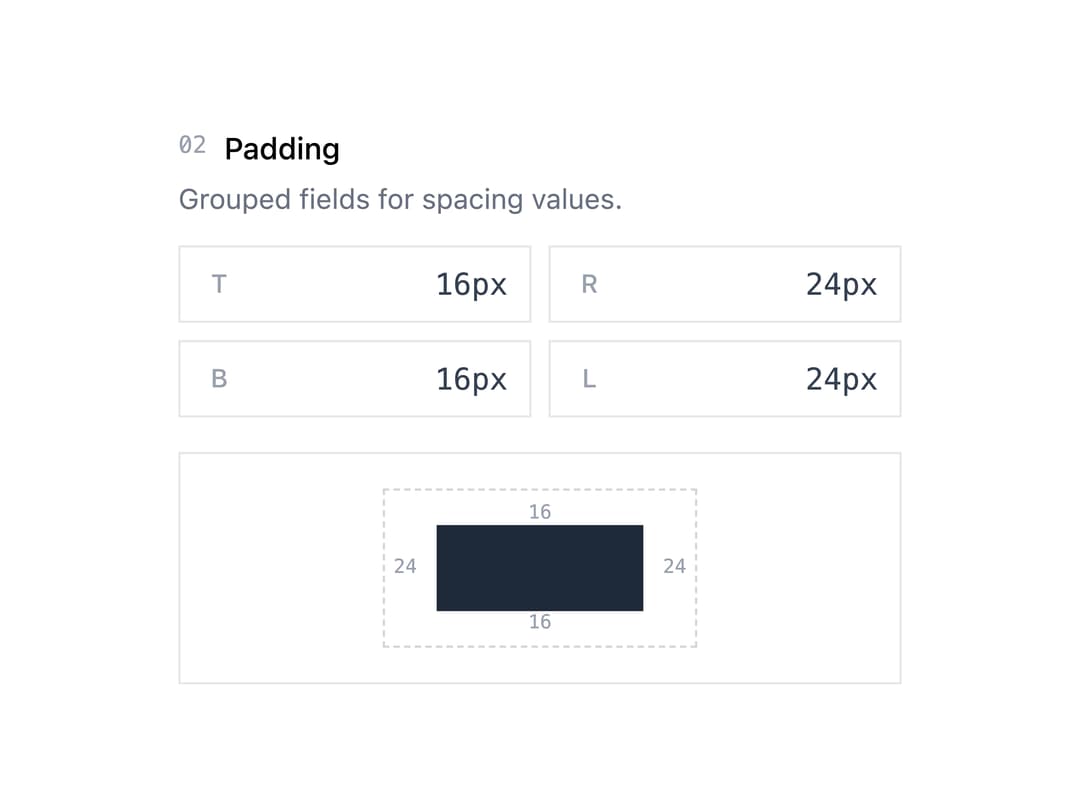
Usage.tsx
"use client";

import * as React from "react";
import { UnitField } from "@/components/ui/unit-field";

const INPUT =
  "w-full bg-transparent pr-2.5 text-right font-mono text-sm text-gray-700 tabular-nums outline-none placeholder:text-gray-300";

const DRAG_AREA =
  "flex aspect-square w-9 shrink-0 cursor-ew-resize items-center justify-center text-[12px] font-medium text-gray-400 select-none";

const ROOT =
  "relative flex h-9 w-full items-stretch border border-gray-200 transition-colors data-[focused=true]:border-gray-400";

function pxFormat(v: number) {
  return `${v}px`;
}

function pxParse(v: string) {
  const n = parseInt(v.replace("px", ""), 10);
  return isNaN(n) ? null : n;
}

export default function UnitFieldPaddingDemo() {
  const [top, setTop] = React.useState(16);
  const [right, setRight] = React.useState(24);
  const [bottom, setBottom] = React.useState(16);
  const [left, setLeft] = React.useState(24);

  return (
    <div className="mx-auto w-full max-w-sm bg-white p-6 text-gray-700">
      <header className="mb-3">
        <div className="flex items-center gap-2">
          <span className="font-mono text-[11px] text-gray-400">02</span>
          <h3 className="text-[14px] font-medium text-black">Padding</h3>
        </div>
        <p className="mt-1 text-[13px] text-gray-500">
          Grouped fields for spacing values.
        </p>
      </header>

      <div className="grid grid-cols-2 gap-2">
        <UnitField.Root
          className={ROOT}
          format={pxFormat}
          parse={pxParse}
          value={top}
          onValueChange={setTop}
          min={0}
          max={100}
        >
          <UnitField.DragArea className={DRAG_AREA}>T</UnitField.DragArea>
          <UnitField.Input className={INPUT} />
        </UnitField.Root>
        <UnitField.Root
          className={ROOT}
          format={pxFormat}
          parse={pxParse}
          value={right}
          onValueChange={setRight}
          min={0}
          max={100}
        >
          <UnitField.DragArea className={DRAG_AREA}>R</UnitField.DragArea>
          <UnitField.Input className={INPUT} />
        </UnitField.Root>
        <UnitField.Root
          className={ROOT}
          format={pxFormat}
          parse={pxParse}
          value={bottom}
          onValueChange={setBottom}
          min={0}
          max={100}
        >
          <UnitField.DragArea className={DRAG_AREA}>B</UnitField.DragArea>
          <UnitField.Input className={INPUT} />
        </UnitField.Root>
        <UnitField.Root
          className={ROOT}
          format={pxFormat}
          parse={pxParse}
          value={left}
          onValueChange={setLeft}
          min={0}
          max={100}
        >
          <UnitField.DragArea className={DRAG_AREA}>L</UnitField.DragArea>
          <UnitField.Input className={INPUT} />
        </UnitField.Root>
      </div>

      <div className="mt-4 flex items-center justify-center border border-gray-200 p-4">
        <div className="relative inline-block border border-dashed border-gray-300">
          <div
            style={{
              paddingTop: Math.min(top, 32),
              paddingRight: Math.min(right, 40),
              paddingBottom: Math.min(bottom, 32),
              paddingLeft: Math.min(left, 40),
              transition: "all 150ms ease",
            }}
          >
            <div className="h-10 w-24 bg-gray-800" />
          </div>
          <span className="absolute top-1/2 left-1 -translate-y-1/2 font-mono text-[9px] text-gray-400">
            {left}
          </span>
          <span className="absolute top-1/2 right-1 -translate-y-1/2 font-mono text-[9px] text-gray-400">
            {right}
          </span>
          <span className="absolute top-1 left-1/2 -translate-x-1/2 font-mono text-[9px] text-gray-400">
            {top}
          </span>
          <span className="absolute bottom-1 left-1/2 -translate-x-1/2 font-mono text-[9px] text-gray-400">
            {bottom}
          </span>
        </div>
      </div>
    </div>
  );
}
More by arikchakma
View all
Cromia Color Picker
42
Cromia Compact
18
Cromia Channels
14
Cromia Swatches
10