
About
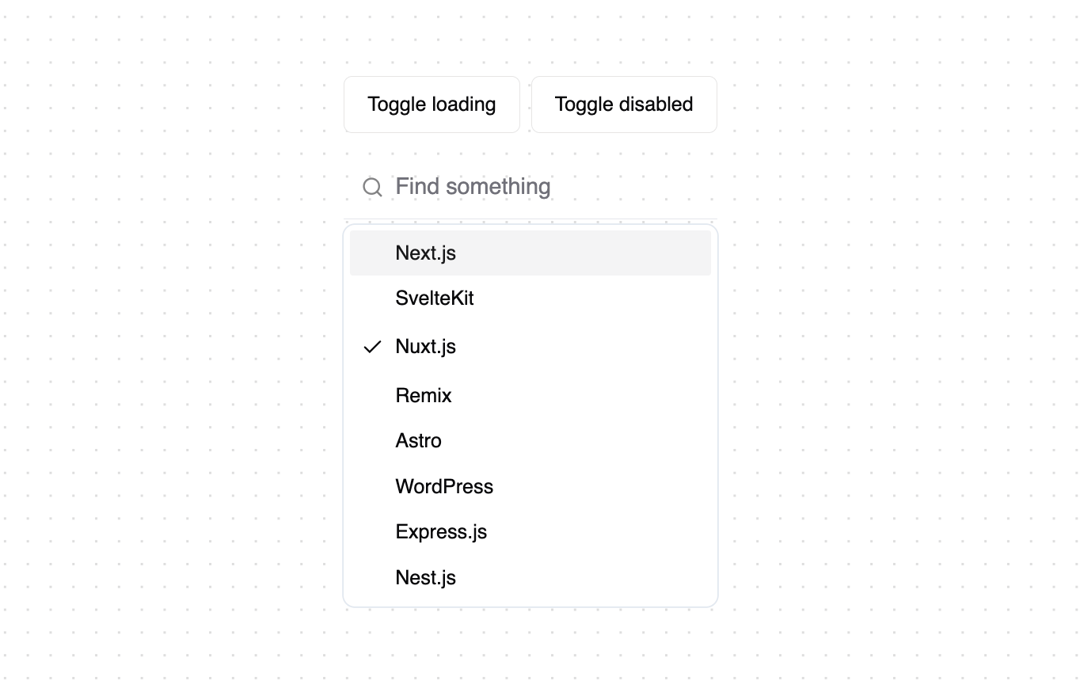
Custom autocomplete component built with Shadcn ui and Fancy Multi Select by Maximilian Kaske. Feel free to play around with it and customize it to your needs.
Built with React and Tailwind. Copy the prompt and paste it into Claude Code, Cursor or Lovable: your agent adds Autocomplete to your project and fits it to your theme.
Code
How Autocomplete is used: the demo's code. The component's own source comes with a free account.
Usage.tsx
import { AutoComplete, type Option } from "@/components/ui/autocomplete";
import { useState } from "react";

const FRAMEWORKS = [
  {
    value: "next.js",
    label: "Next.js",
  },
  {
    value: "sveltekit",
    label: "SvelteKit",
  },
  {
    value: "nuxt.js",
    label: "Nuxt.js",
  },
  {
    value: "remix",
    label: "Remix",
  },
  {
    value: "astro",
    label: "Astro",
  },
  {
    value: "wordpress",
    label: "WordPress",
  },
  {
    value: "express.js",
    label: "Express.js",
  },
  {
    value: "nest.js",
    label: "Nest.js",
  },
]

export function AutocompleteExample() {
  const [isLoading, setLoading] = useState(false)
  const [isDisabled, setDisbled] = useState(false)
  const [value, setValue] = useState<Option>()

  return (
    <div className="not-prose mt-8 flex flex-col gap-4">
      <div className="flex items-center gap-2">
        <button
          className="inline-flex h-10 items-center justify-center rounded-md border border-stone-200 bg-white px-4 py-2 text-sm font-medium ring-offset-white transition-colors hover:bg-stone-100 hover:text-slate-900 focus-visible:outline-none focus-visible:ring-2 focus-visible:ring-slate-400 focus-visible:ring-offset-2 disabled:pointer-events-none disabled:opacity-50"
          onClick={() => setLoading((prev) => !prev)}
        >
          Toggle loading
        </button>
        <button
          className="inline-flex h-10 items-center justify-center rounded-md border border-stone-200 bg-white px-4 py-2 text-sm font-medium ring-offset-white transition-colors hover:bg-stone-100 hover:text-slate-900 focus-visible:outline-none focus-visible:ring-2 focus-visible:ring-slate-400 focus-visible:ring-offset-2 disabled:pointer-events-none disabled:opacity-50"
          onClick={() => setDisbled((prev) => !prev)}
        >
          Toggle disabled
        </button>
      </div>
      <AutoComplete
        options={FRAMEWORKS}
        emptyMessage="No resulsts."
        placeholder="Find something"
        isLoading={isLoading}
        onValueChange={setValue}
        value={value}
        disabled={isDisabled}
      />
      <span className="text-sm">
        Current value: {value ? value?.label : "No value selected"}
      </span>
      <span className="text-sm">
        Loading state: {isLoading ? "true" : "false"}
      </span>
      <span className="text-sm">Disabled: {isDisabled ? "true" : "false"}</span>
    </div>
  )
}