
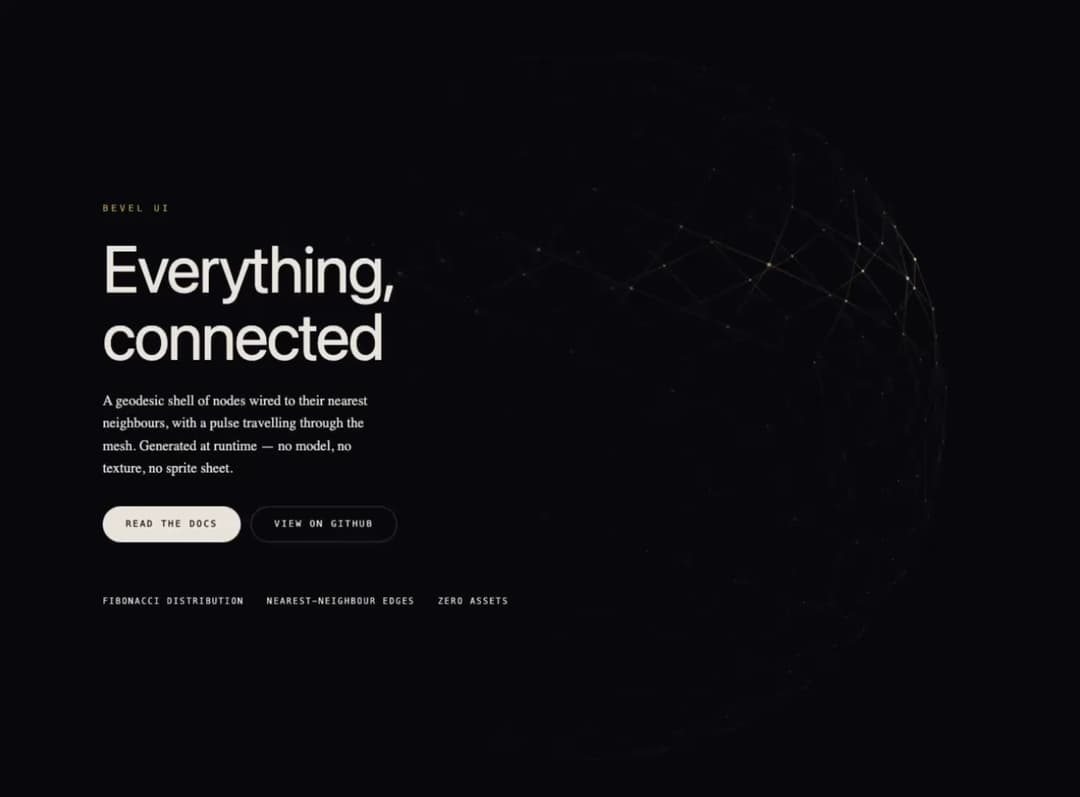
A full-viewport hero: a geodesic shell of nodes wired to their nearest neighbours, with a pulse of light travelling through the mesh. Node positions come from a Fibonacci sphere, edges from a nearest-neighbour pass at mount, and the glow sprite is drawn in the fragment shader - no model, no texture, no sprite sheet. Sizes to its container rather than the viewport, so it works dropped into a section as well as used as a full-screen hero, and the 3D layout switches on the same breakpoint as the copy. Layout and breakpoints are Tailwind classes; only the themeable colours are inline, and every one of them is a prop. Damped pointer parallax, adaptive quality tiers, reduced motion respected, and a staticTime prop that pins the sweep for deterministic covers.
Built with React and Tailwind. Copy the prompt and paste it into Claude Code, Cursor or Lovable: your agent adds Lattice Hero to your project and fits it to your theme.
Code
How Lattice Hero is used: the demo's code. The component's own source comes with a free account.
Usage.tsx
"use client"

import { LatticeHero } from "@/components/ui/lattice-hero"

export default function LatticeHeroDemo() {
  return (
    <LatticeHero
      eyebrow="Bevel UI"
      headline="Everything, connected"
      description="A geodesic shell of nodes wired to their nearest neighbours, with a pulse travelling through the mesh. Generated at runtime — no model, no texture, no sprite sheet."
      meta={["Fibonacci distribution", "Nearest-neighbour edges", "Zero assets"]}
      action={
        <a
          href="#"
          className="inline-flex h-11 items-center rounded-full bg-[#EDE8DF] px-7 font-mono text-[11px] uppercase tracking-[0.18em] text-[#08080B] transition-transform duration-300 hover:-translate-y-0.5"
        >
          Read the docs
        </a>
      }
      secondaryAction={
        <a
          href="#"
          className="inline-flex h-11 items-center rounded-full border border-[#EDE8DF3d] px-7 font-mono text-[11px] uppercase tracking-[0.18em] text-[#EDE8DF] transition-colors duration-300 hover:bg-white/5"
        >
          View on GitHub
        </a>
      }
    />
  )
}
Dependencies
More by BEVEL UI
View all
Prism Hero
866
Aurora Hero
29