
About
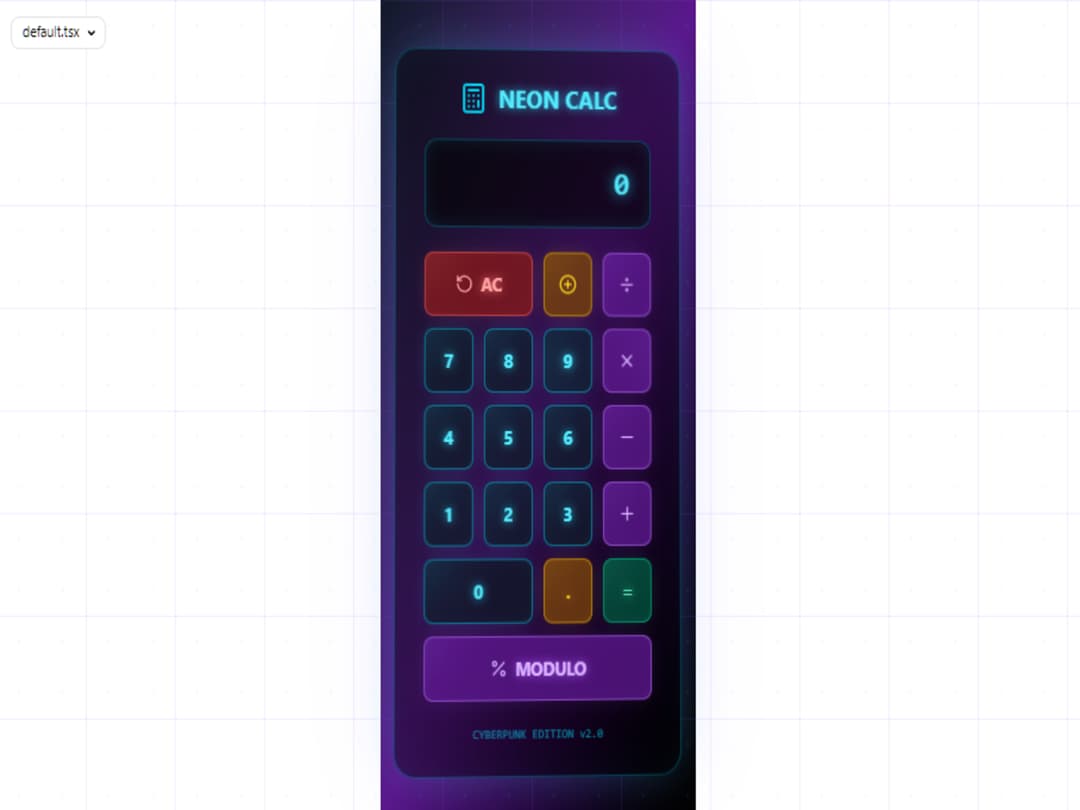
Calculator Neon 3D
Built with React and Tailwind. Copy the prompt and paste it into Claude Code, Cursor or Lovable: your agent adds Calculator Neon 3D to your project and fits it to your theme.
Code
How Calculator Neon 3D is used: the demo's code. The component's own source comes with a free account.
Usage.tsx
"use client";

import React, { useState, useEffect, useRef, useCallback } from 'react';
import { Calculator, RotateCcw, Plus, Minus, X, Divide, Percent, PlusCircle } from 'lucide-react';

interface CalculatorButtonProps {
  value: string;
  onClick: (value: string) => void;
  variant?: 'number' | 'operator' | 'equals' | 'clear' | 'special';
  className?: string;
  children?: React.ReactNode;
}

interface MousePosition {
  x: number;
  y: number;
}

interface CalculatorState {
  display: string;
  previousValue: string;
  operation: string;
  waitingForOperand: boolean;
}

const CalculatorButton: React.FC<CalculatorButtonProps> = ({
  value,
  onClick,
  variant = 'number',
  className = '',
  children
}) => {
  const [isPressed, setIsPressed] = useState(false);
  const [glowPosition, setGlowPosition] = useState({ x: 0, y: 0 });
  const buttonRef = useRef<HTMLButtonElement>(null);

  const variantStyles = {
    number: {
      bg: 'bg-gray-900/80',
      border: 'border-cyan-400/50',
      text: 'text-cyan-300',
      glow: '#22d3ee',
      hover: 'hover:bg-gray-800/90 hover:border-cyan-300'
    },
    operator: {
      bg: 'bg-purple-900/80',
      border: 'border-purple-400/50',
      text: 'text-purple-300',
      glow: '#a855f7',
      hover: 'hover:bg-purple-800/90 hover:border-purple-300'
    },
    equals: {
      bg: 'bg-emerald-900/80',
      border: 'border-emerald-400/50',
      text: 'text-emerald-300',
      glow: '#34d399',
      hover: 'hover:bg-emerald-800/90 hover:border-emerald-300'
    },
    clear: {
      bg: 'bg-red-900/80',
      border: 'border-red-400/50',
      text: 'text-red-300',
      glow: '#f87171',
      hover: 'hover:bg-red-800/90 hover:border-red-300'
    },
    special: {
      bg: 'bg-yellow-900/80',
      border: 'border-yellow-400/50',
      text: 'text-yellow-300',
      glow: '#fbbf24',
      hover: 'hover:bg-yellow-800/90 hover:border-yellow-300'
    }
  };

  const style = variantStyles[variant];

  const handleMouseMove = (e: React.MouseEvent<HTMLButtonElement>) => {
    if (!buttonRef.current) return;

    const rect = buttonRef.current.getBoundingClientRect();
    const x = e.clientX - rect.left;
    const y = e.clientY - rect.top;

    setGlowPosition({ x, y });
  };

  const handleClick = () => {
    setIsPressed(true);
    setTimeout(() => setIsPressed(false), 150);
    onClick(value);
  };

  return (
    <button
      ref={buttonRef}
      className={`
        relative overflow-hidden rounded-lg border-2 p-4 font-bold text-lg
        transition-all duration-200 transform active:scale-95
        ${style.bg} ${style.border} ${style.text} ${style.hover}
        ${isPressed ? 'scale-95' : 'hover:scale-105'}
        ${className}
      `}
      onMouseMove={handleMouseMove}
      onClick={handleClick}
      style={{
        boxShadow: `0 0 20px -5px ${style.glow}40, inset 0 0 20px -10px ${style.glow}20`,
        textShadow: `0 0 10px ${style.glow}`
      }}
    >
      <div
        className="absolute pointer-events-none z-0 h-20 w-20 rounded-full blur-xl transition-opacity duration-300 opacity-30"
        style={{
          background: `radial-gradient(circle, ${style.glow} 0%, rgba(0,0,0,0) 70%)`,
          left: `${glowPosition.x - 40}px`,
          top: `${glowPosition.y - 40}px`,
        }}
      />

      <div className="relative z-10 flex items-center justify-center">
        {children || value}
      </div>

      <div
        className="absolute inset-0 rounded-lg opacity-0 hover:opacity-100 transition-opacity duration-300"
        style={{
          border: `1px solid ${style.glow}`,
          boxShadow: `inset 0 0 10px ${style.glow}30`
        }}
      />
    </button>
  );
};

const FuturisticCalculator: React.FC = () => {
  const [state, setState] = useState<CalculatorState>({
    display: '0',
    previousValue: '',
    operation: '',
    waitingForOperand: false
  });

  const [mousePosition, setMousePosition] = useState<MousePosition>({ x: 0, y: 0 });
  const [rotation, setRotation] = useState({ x: 0, y: 0 });
  const calculatorRef = useRef<HTMLDivElement>(null);

  const handleMouseMove = useCallback((e: MouseEvent) => {
    if (!calculatorRef.current) return;

    const rect = calculatorRef.current.getBoundingClientRect();
    const centerX = rect.left + rect.width / 2;
    const centerY = rect.top + rect.height / 2;

    const mouseX = e.clientX - centerX;
    const mouseY = e.clientY - centerY;

    const rotateX = (mouseY / window.innerHeight) * -10;
    const rotateY = (mouseX / window.innerWidth) * 10;

    setRotation({ x: rotateX, y: rotateY });
    setMousePosition({ x: mouseX, y: mouseY });
  }, []);

  useEffect(() => {
    window.addEventListener('mousemove', handleMouseMove);
    return () => window.removeEventListener('mousemove', handleMouseMove);
  }, [handleMouseMove]);

  const calculate = (firstOperand: string, secondOperand: string, operation: string): string => {
    const first = parseFloat(firstOperand);
    const second = parseFloat(secondOperand);

    switch (operation) {
      case '+': return (first + second).toString();
      case '-': return (first - second).toString();
      case '×': return (first * second).toString();
      case '÷': return second !== 0 ? (first / second).toString() : 'Error';
      case '%': return (first % second).toString();
      default: return secondOperand;
    }
  };

  const handleButtonClick = (value: string) => {
    switch (value) {
      case 'AC':
        setState({
          display: '0',
          previousValue: '',
          operation: '',
          waitingForOperand: false
        });
        break;

      case '+/-':
        setState(prev => ({
          ...prev,
          display: prev.display.charAt(0) === '-'
            ? prev.display.slice(1)
            : '-' + prev.display
        }));
        break;

      case '.':
        if (state.waitingForOperand) {
          setState(prev => ({
            ...prev,
            display: '0.',
            waitingForOperand: false
          }));
        } else if (state.display.indexOf('.') === -1) {
          setState(prev => ({
            ...prev,
            display: prev.display + '.'
          }));
        }
        break;

      case '=':
        if (state.previousValue && state.operation) {
          const result = calculate(state.previousValue, state.display, state.operation);
          setState({
            display: result,
            previousValue: '',
            operation: '',
            waitingForOperand: true
          });
        }
        break;

      case '+':
      case '-':
      case '×':
      case '÷':
      case '%':
        if (state.previousValue && state.operation && !state.waitingForOperand) {
          const result = calculate(state.previousValue, state.display, state.operation);
          setState({
            display: result,
            previousValue: result,
            operation: value,
            waitingForOperand: true
          });
        } else {
          setState(prev => ({
            ...prev,
            previousValue: prev.display,
            operation: value,
            waitingForOperand: true
          }));
        }
        break;

      default:
        if (state.waitingForOperand) {
          setState(prev => ({
            ...prev,
            display: value,
            waitingForOperand: false
          }));
        } else {
          setState(prev => ({
            ...prev,
            display: prev.display === '0' ? value : prev.display + value
          }));
        }
    }
  };

  const formatDisplay = (value: string): string => {
    if (value === 'Error') return value;
    const num = parseFloat(value);
    if (isNaN(num)) return value;
    return num.toLocaleString('en-US', { maximumFractionDigits: 8 });
  };

  return (
    <div className="min-h-screen bg-gradient-to-br from-gray-900 via-purple-900 to-black flex items-center justify-center p-4">
      <div className="absolute inset-0 overflow-hidden">
        <div className="absolute inset-0" style={{
          backgroundImage: 'radial-gradient(circle, rgba(34, 211, 238, 0.1) 1px, transparent 1px)',
          backgroundSize: '50px 50px'
        }}/>
        <div className="absolute inset-0" style={{
          backgroundImage: 'linear-gradient(to right, rgba(168, 85, 247, 0.1) 1px, transparent 1px), linear-gradient(to bottom, rgba(168, 85, 247, 0.1) 1px, transparent 1px)',
          backgroundSize: '100px 100px'
        }}/>
      </div>

      <div
        ref={calculatorRef}
        className="relative z-10 bg-black/40 backdrop-blur-xl rounded-3xl p-8 border border-cyan-400/30 shadow-2xl"
        style={{
          transform: `perspective(1000px) rotateX(${rotation.x}deg) rotateY(${rotation.y}deg)`,
          transition: 'transform 0.1s ease-out',
          boxShadow: `
            0 0 50px -10px rgba(34, 211, 238, 0.3),
            0 0 100px -20px rgba(168, 85, 247, 0.2),
            inset 0 0 50px -20px rgba(34, 211, 238, 0.1)
          `
        }}
      >
        <div className="flex items-center justify-center mb-6">
          <Calculator className="text-cyan-400 mr-3" size={32} />
          <h1 className="text-2xl font-bold text-cyan-300" style={{ textShadow: '0 0 10px #22d3ee' }}>
            NEON CALC
          </h1>
        </div>

        <div
          className="bg-black/60 rounded-xl p-6 mb-6 border border-cyan-400/30 min-h-[80px] flex items-center justify-end"
          style={{
            boxShadow: 'inset 0 0 20px -5px rgba(34, 211, 238, 0.2)',
          }}
        >
          <div className="text-right">
            {state.previousValue && state.operation && (
              <div className="text-sm text-cyan-400/60 mb-1">
                {formatDisplay(state.previousValue)} {state.operation}
              </div>
            )}
            <div
              className="text-3xl font-mono font-bold text-cyan-300 break-all"
              style={{ textShadow: '0 0 15px #22d3ee' }}
            >
              {formatDisplay(state.display)}
            </div>
          </div>
        </div>

        <div className="grid grid-cols-4 gap-3">
          <CalculatorButton value="AC" onClick={handleButtonClick} variant="clear" className="col-span-2">
            <RotateCcw size={20} className="mr-2" />
            AC
          </CalculatorButton>
          <CalculatorButton value="+/-" onClick={handleButtonClick} variant="special">
            <PlusCircle size={20} />
          </CalculatorButton>
          <CalculatorButton value="÷" onClick={handleButtonClick} variant="operator">
            <Divide size={20} />
          </CalculatorButton>

          <CalculatorButton value="7" onClick={handleButtonClick} variant="number" />
          <CalculatorButton value="8" onClick={handleButtonClick} variant="number" />
          <CalculatorButton value="9" onClick={handleButtonClick} variant="number" />
          <CalculatorButton value="×" onClick={handleButtonClick} variant="operator">
            <X size={20} />
          </CalculatorButton>

          <CalculatorButton value="4" onClick={handleButtonClick} variant="number" />
          <CalculatorButton value="5" onClick={handleButtonClick} variant="number" />
          <CalculatorButton value="6" onClick={handleButtonClick} variant="number" />
          <CalculatorButton value="-" onClick={handleButtonClick} variant="operator">
            <Minus size={20} />
          </CalculatorButton>

          <CalculatorButton value="1" onClick={handleButtonClick} variant="number" />
          <CalculatorButton value="2" onClick={handleButtonClick} variant="number" />
          <CalculatorButton value="3" onClick={handleButtonClick} variant="number" />
          <CalculatorButton value="+" onClick={handleButtonClick} variant="operator">
            <Plus size={20} />
          </CalculatorButton>

          <CalculatorButton value="0" onClick={handleButtonClick} variant="number" className="col-span-2" />
          <CalculatorButton value="." onClick={handleButtonClick} variant="special" />
          <CalculatorButton value="=" onClick={handleButtonClick} variant="equals">
            =
          </CalculatorButton>

          <CalculatorButton value="%" onClick={handleButtonClick} variant="operator" className="col-span-4">
            <Percent size={20} className="mr-2" />
            MODULO
          </CalculatorButton>
        </div>

        <div className="mt-6 text-center">
          <div className="text-xs text-cyan-400/60 font-mono">
            CYBERPUNK EDITION v2.0
          </div>
        </div>
      </div>
    </div>
  );
};

export default FuturisticCalculator;
More by RUBY
View all

IA Siri Chat
406
More in Buttons
View all
Button Save
46

Button
20

Eclipse Button
5

Button
32

Button
6

Button
14

Button Group
37
Split Button
32

