
About
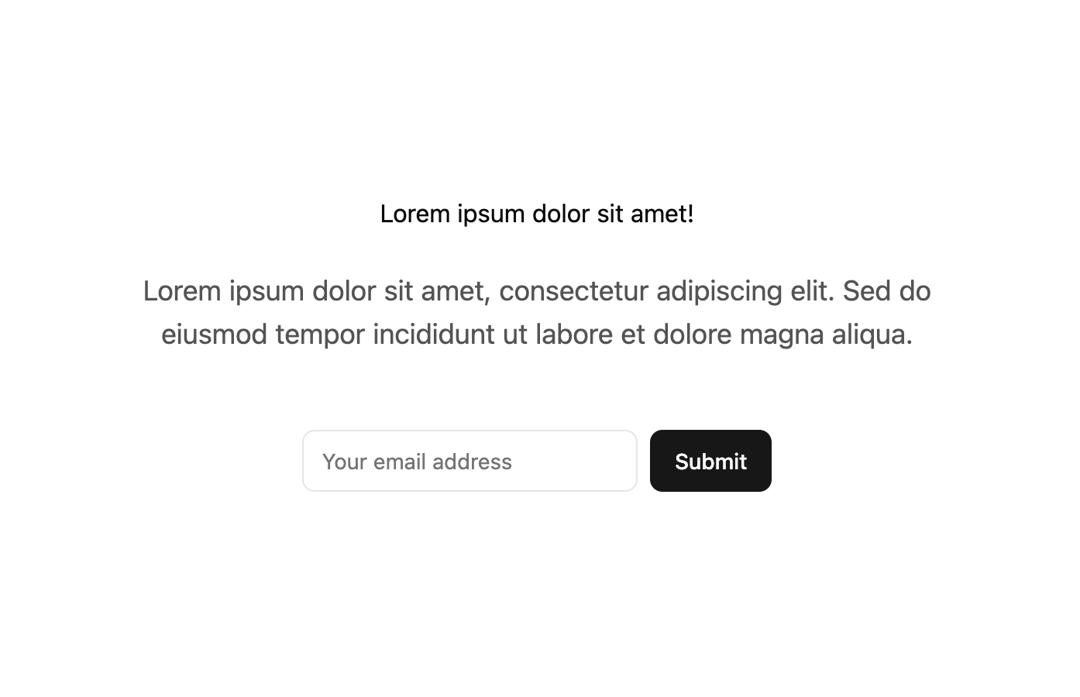
Here is Call to Action component
Built with React and Tailwind. Copy the prompt and paste it into Claude Code, Cursor or Lovable: your agent adds Call to Action to your project and fits it to your theme.
Code
How Call to Action is used: the demo's code. The component's own source comes with a free account.
Usage.tsx
// app/components/CTA.tsx
"use client";

import React from "react";
import * as z from "zod";
import { useForm } from "react-hook-form";
import { zodResolver } from "@hookform/resolvers/zod";
import Balancer from "react-wrap-balancer";

// shadcn/ui (or your UI lib) imports
import { Button } from "@/components/ui/button";
import {
  Form,
  FormControl,
  FormField,
  FormItem,
  FormLabel,
  FormMessage,
} from "@/components/ui/form";
import { Input } from "@/components/ui/input";

// --- minimal craft-ds inline -----------------------------------
import clsx, { type ClassValue } from "clsx";
import { twMerge } from "tailwind-merge";
const cn = (...inputs: ClassValue[]) => twMerge(clsx(inputs));

type SectionProps = { children: React.ReactNode; className?: string; id?: string };
type ContainerProps = { children: React.ReactNode; className?: string; id?: string };

const Section = ({ children, className, id }: SectionProps) => (
  <section className={cn("py-8 md:py-12", className)} id={id}>
    {children}
  </section>
);

const Container = ({ children, className, id }: ContainerProps) => (
  <div className={cn("mx-auto max-w-5xl p-6 sm:p-8", className)} id={id}>
    {children}
  </div>
);
// ----------------------------------------------------------------

const formSchema = z.object({
  email: z.string().email({
    message: "Please enter a valid email address.",
  }),
});

export default function CTA() {
  const form = useForm<z.infer<typeof formSchema>>({
    resolver: zodResolver(formSchema),
    defaultValues: { email: "" },
  });

  function onSubmit(values: z.infer<typeof formSchema>) {
    // Do something with the form values (e.g., call an API)
    console.log(values);
  }

  return (
    <Section>
      <Container className="flex flex-col items-center gap-6 text-center">
        <h2 className="!my-0">Lorem ipsum dolor sit amet!</h2>
        <p className="text-lg opacity-70 md:text-2xl">
          <Balancer>
            Lorem ipsum dolor sit amet, consectetur adipiscing elit. Sed do
            eiusmod tempor incididunt ut labore et dolore magna aliqua.
          </Balancer>
        </p>

        <Form {...form}>
          <form
            onSubmit={form.handleSubmit(onSubmit)}
            className="mt-6 flex h-fit items-center justify-center gap-2"
          >
            <FormField
              control={form.control}
              name="email"
              render={({ field }) => (
                <FormItem>
                  <FormLabel className="sr-only">Email</FormLabel>
                  <FormControl>
                    <Input
                      className="!mt-0 md:w-64"
                      placeholder="Your email address"
                      {...field}
                    />
                  </FormControl>
                  <FormMessage />
                </FormItem>
              )}
            />
            <Button type="submit">Submit</Button>
          </form>
        </Form>
      </Container>
    </Section>
  );
}
Dependencies
More by brijr
View all
Pricing Section
109
Hero Modern
76
Feature Modern
20
Accordion
17
More in Buttons
View all
Button Save
46

Button
20

Eclipse Button
5

Button
6

Button
14

Button Group
37

Button
32
Split Button
32

