
About
Header One Components
Built with React and Tailwind. Copy the prompt and paste it into Claude Code, Cursor or Lovable: your agent adds Header One Components to your project and fits it to your theme.
Code
How Header One Components is used: the demo's code. The component's own source comes with a free account.
Usage.tsx
"use client";

import {HeaderOneNavbar, Particles, SplitText, Button, HeroPill} from "@/components/ui/header-one-components";
import {motion} from "framer-motion"

const HeaderOne = () => {
  return (
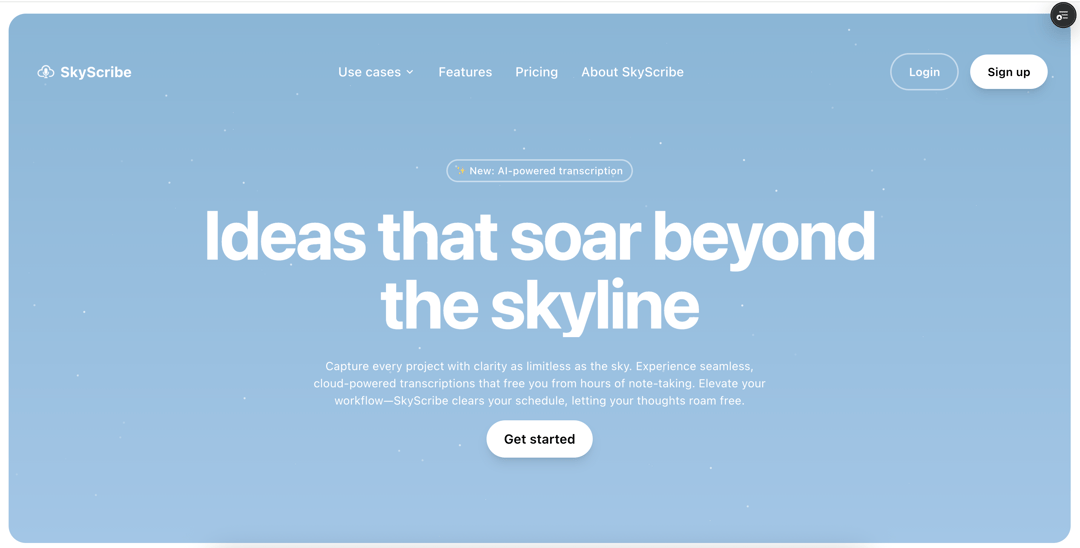
    <main className="bg-gradient-to-b from-[#8bb6d6] to-[#a3c6e6] min-h-[calc(100vh-2rem)] m-2 md:m-4 rounded-2xl md:rounded-3xl flex flex-col items-center justify-center relative overflow-hidden">
      <HeaderOneNavbar />
      <Particles className="absolute top-0 left-0 w-full h-full" />
      <div className="relative z-10 flex flex-col gap-y-4 items-center text-center justify-center my-10 md:my-20 text-white w-full px-2 sm:px-4">
        <motion.div
          initial={{ opacity: 0, y: -20 }}
          animate={{ opacity: 1, y: 0 }}
          transition={{ duration: 0.8, delay: 0.2 }}
        >
          <HeroPill text="✨ New: AI-powered transcription" />
        </motion.div>
        <h1
          className="font-bold text-center max-w-full sm:max-w-3xl md:max-w-5xl leading-tight
          text-3xl sm:text-4xl md:text-6xl lg:text-[6rem]"
        >
          <SplitText
            text="Ideas that soar beyond the skyline"
            splitType="words"
            delay={100}
            duration={0.8}
            from={{ opacity: 0, y: 50 }}
            to={{ opacity: 1, y: 0 }}
            className="inline-block"
          />
        </h1>
        <div className="flex flex-col gap-y-4 w-full max-w-full sm:max-w-xl md:max-w-2xl px-0 sm:px-2">
          <SplitText
            text="Capture every project with clarity as limitless as the sky. Experience seamless, cloud-powered transcriptions that free you from hours of note-taking. Elevate your workflow—SkyScribe clears your schedule, letting your thoughts roam free."
            splitType="words"
            delay={50}
            duration={1}
            from={{ opacity: 0, y: 30 }}
            to={{ opacity: 1, y: 0 }}
            className="inline-block"
            threshold={0.1}
          />
        </div>
        <motion.div
          initial={{ opacity: 0, y: 30 }}
          animate={{ opacity: 1, y: 0 }}
          transition={{ duration: 0.8, delay: 1.2 }}
        >
          <Button
            variant="primary"
            className="w-full sm:w-auto text-base sm:text-lg px-6 py-3"
          >
            Get started
          </Button>
        </motion.div>
      </div>
    </main>
  );
};

export default HeaderOne;
Dependencies
More by Chetan Verma
View all
Floating Action Menu
1.5K
Animated Tabs
1.5K
Video Player
1.3K
Stacked Cards Interaction
796
Dropdowm Menu
548
Input With Tags
524
Avatar Group
505
Stacking Navbar
334
More in Heroes
View all

SaaS Template
2.4K

Responsive Hero Banner
2K

Hero
1.2K
Centered Hero with Image Fan
931
Editorial Collage Hero
430
Glass Fold
212

Minimalist Hero Fashion
285

HeroSectionWithGradient
336
