
About
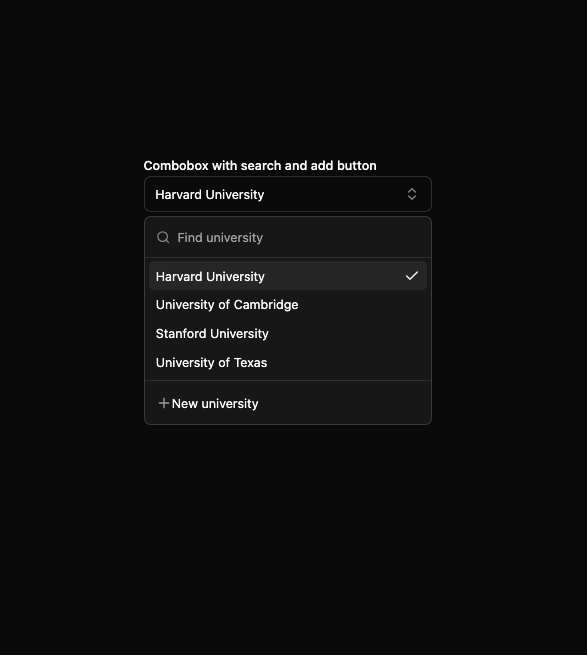
Here is Combobox component
Built with React and Tailwind. Copy the prompt and paste it into Claude Code, Cursor or Lovable: your agent adds Combobox to your project and fits it to your theme.
Code
How Combobox is used: the demo's code. The component's own source comes with a free account.
Usage.tsx
'use client'

import { useId, useState } from 'react'

import { CheckIcon, ChevronsUpDownIcon, PlusIcon } from 'lucide-react'

import { Button } from '@/components/ui/button'
import {
  Command,
  CommandEmpty,
  CommandGroup,
  CommandInput,
  CommandItem,
  CommandList,
  CommandSeparator
} from '@/components/ui/command'
import { Label } from '@/components/ui/label'
import { Popover, PopoverContent, PopoverTrigger } from '@/components/ui/popover'

import { cn } from '@/lib/utils'

const universities = [
  {
    value: 'harvard',
    label: 'Harvard University'
  },
  {
    value: 'cambridge',
    label: 'University of Cambridge'
  },
  {
    value: 'stanford',
    label: 'Stanford University'
  },
  {
    value: 'texas',
    label: 'University of Texas'
  }
]

const ComboboxWithSearchAndButtonDemo = () => {
  const id = useId()
  const [open, setOpen] = useState<boolean>(false)
  const [value, setValue] = useState<string>('harvard')

  return (
    <div className='w-full max-w-xs space-y-2'>
      <Label htmlFor={id}>Combobox with search and add button</Label>
      <Popover open={open} onOpenChange={setOpen}>
        <PopoverTrigger asChild>
          <Button
            id={id}
            variant='outline'
            role='combobox'
            aria-expanded={open}
            className='bg-background hover:bg-background border-input w-full justify-between px-3 font-normal outline-offset-0 outline-none focus-visible:outline-[3px]'
          >
            <span className={cn('truncate', !value && 'text-muted-foreground')}>
              {value ? (
                universities.find(university => university.value === value)?.label
              ) : (
                <span className='text-muted-foreground'>Select university</span>
              )}
            </span>
            <ChevronsUpDownIcon size={16} className='text-muted-foreground/80 shrink-0' aria-hidden='true' />
          </Button>
        </PopoverTrigger>
        <PopoverContent className='border-input w-full min-w-[var(--radix-popper-anchor-width)] p-0' align='start'>
          <Command>
            <CommandInput placeholder='Find university' />
            <CommandList>
              <CommandEmpty>No university found.</CommandEmpty>
              <CommandGroup>
                {universities.map(university => (
                  <CommandItem
                    key={university.value}
                    value={university.value}
                    onSelect={currentValue => {
                      setValue(currentValue === value ? '' : currentValue)
                      setOpen(false)
                    }}
                  >
                    {university.label}
                    {value === university.value && <CheckIcon size={16} className='ml-auto' />}
                  </CommandItem>
                ))}
              </CommandGroup>
              <CommandSeparator />
              <CommandGroup>
                <Button variant='ghost' className='w-full justify-start font-normal'>
                  <PlusIcon size={16} className='-ms-2 opacity-60' aria-hidden='true' />
                  New university
                </Button>
              </CommandGroup>
            </CommandList>
          </Command>
        </PopoverContent>
      </Popover>
    </div>
  )
}

export default ComboboxWithSearchAndButtonDemo
Dependencies
More by Clevision
View all

Calendar
106
Card Studio
99
Collapsible
43
Button Group
37
Buttons
33
Radio Group 1
30
Basic Avatar
24
Switch
23
More in Forms
View all

Premium Auth
500

Login 2
7
Authentication Card
47

Login 1
52

Contact Card
1K
Login Form
6

Form
16

Book A Demo 3
83
