
About
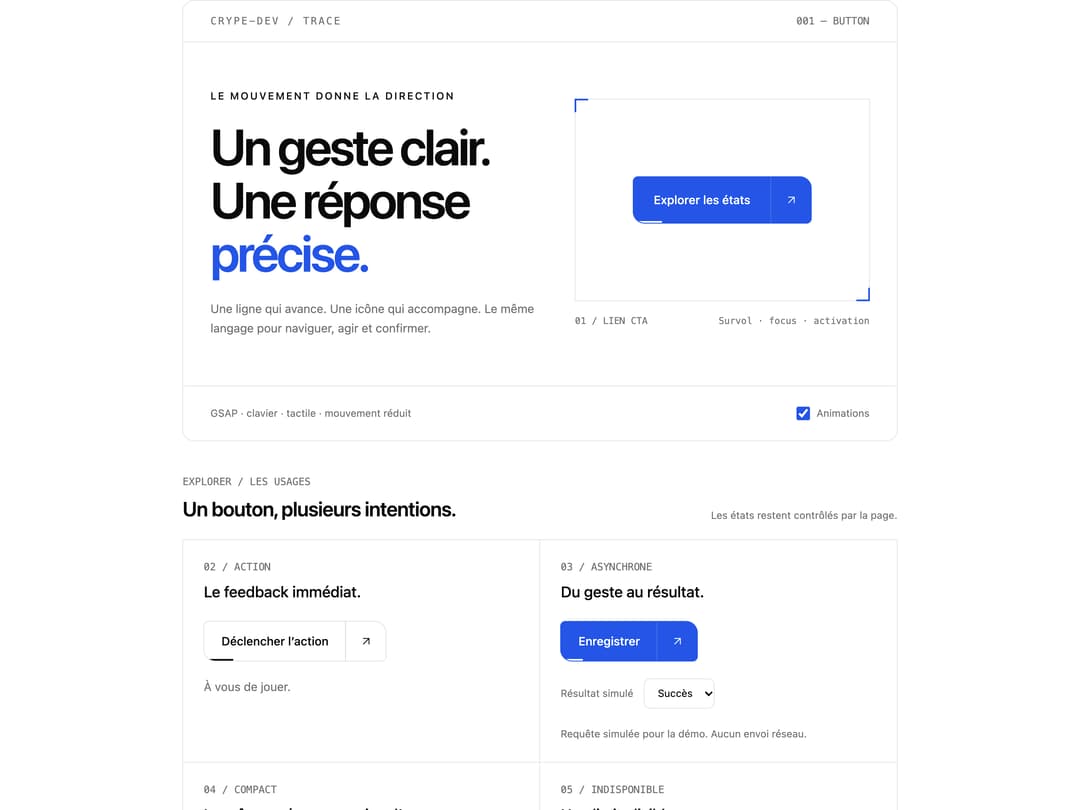
A directional GSAP button for calls to action, navigation and async feedback. Includes keyboard focus, reduced motion, solid and outline styles, and controlled loading, success and error states.
Built with React and Tailwind. Copy the prompt and paste it into Claude Code, Cursor or Lovable: your agent adds Trace Button to your project and fits it to your theme.
Code
How Trace Button is used: the demo's code. The component's own source comes with a free account.
Usage.tsx
'use client'

import { useEffect, useRef, useState } from 'react'
import type { CSSProperties } from 'react'
import TraceButton from '@/components/ui/trace-button'
import type { TraceButtonStatus } from '@/components/ui/trace-button'

const settings = {
  label: 'Explorer les états',
  duration: 0.3,
  accent: '#2455e6',
}

export default function TraceButtonDemo(props: Partial<typeof settings>) {
  const options = { ...settings, ...props }
  const [motion, setMotion] = useState(true)
  const [status, setStatus] = useState<TraceButtonStatus>('idle')
  const [outcome, setOutcome] = useState<'success' | 'error'>('success')
  const [count, setCount] = useState(0)
  const [mounted, setMounted] = useState(true)
  const timer = useRef<ReturnType<typeof setTimeout> | null>(null)

  useEffect(
    () => () => {
      if (timer.current !== null) clearTimeout(timer.current)
    },
    [],
  )

  function selectStatus(value: TraceButtonStatus) {
    if (timer.current !== null) clearTimeout(timer.current)
    timer.current = null
    setStatus(value)
  }

  function simulateRequest() {
    if (timer.current !== null) return
    setStatus('loading')
    // Only the demo simulates a request; the reusable button owns no timers.
    timer.current = setTimeout(() => {
      timer.current = null
      setStatus(outcome)
    }, 1200)
  }

  const animation = { motion, duration: options.duration }
  const labels = {
    loading: 'Enregistrement…',
    success: 'Enregistré',
    error: 'Réessayer',
  }
  const focus =
    'focus-visible:outline-2 focus-visible:outline-offset-4 focus-visible:outline-ring'

  return (
    <div
      data-trace-demo
      className="space-y-10"
      style={
        {
          '--primary': options.accent,
          '--primary-foreground': '#ffffff',
        } as CSSProperties
      }
    >
      <section className="relative overflow-hidden rounded-xl border border-border bg-card text-card-foreground">
        <header className="flex flex-wrap items-center justify-between gap-3 border-b border-border px-6 py-4 sm:px-8">
          <span className="font-mono text-xs tracking-[0.16em] text-muted-foreground">
            CRYPE-DEV / TRACE
          </span>
          <span className="font-mono text-xs text-muted-foreground">
            001 — BUTTON
          </span>
        </header>

        <div className="grid gap-10 px-6 py-10 sm:px-8 sm:py-14 lg:grid-cols-[1.1fr_1fr] lg:gap-12">
          <div>
            <p className="mb-5 text-xs font-medium tracking-[0.16em] text-foreground uppercase">
              Le mouvement donne la direction
            </p>
            <h2 className="text-4xl leading-[1.05] font-semibold tracking-[-0.05em] sm:text-6xl">
              Un geste clair.
              <br />
              Une réponse
              <br />
              <span className="text-primary">précise.</span>
            </h2>
            <p className="mt-6 max-w-sm text-sm leading-relaxed text-muted-foreground">
              Une ligne qui avance. Une icône qui accompagne. Le même langage
              pour naviguer, agir et confirmer.
            </p>
          </div>

          <div className="flex min-w-0 flex-col justify-center">
            <div className="relative flex min-h-48 items-center justify-center border border-border px-5 py-10 sm:min-h-60">
              <span
                aria-hidden="true"
                className="absolute -top-px -left-px size-4 border-t-2 border-l-2 border-primary"
              />
              <span
                aria-hidden="true"
                className="absolute -right-px -bottom-px size-4 border-r-2 border-b-2 border-primary"
              />
              <TraceButton href="#trace-states" size="lg" {...animation}>
                {options.label}
              </TraceButton>
            </div>
            <div className="mt-4 flex justify-between gap-4 font-mono text-[11px] text-muted-foreground">
              <span>01 / LIEN CTA</span>
              <span>Survol · focus · activation</span>
            </div>
          </div>
        </div>

        <footer className="flex flex-wrap items-center justify-between gap-4 border-t border-border px-6 py-4 text-xs text-muted-foreground sm:px-8">
          <span>GSAP · clavier · tactile · mouvement réduit</span>
          <label className="flex min-h-8 cursor-pointer items-center gap-2">
            <input
              type="checkbox"
              checked={motion}
              onChange={(event) => setMotion(event.target.checked)}
              className="size-4 accent-primary"
            />
            Animations
          </label>
        </footer>
      </section>

      <section id="trace-states" className="scroll-mt-6 space-y-5">
        <div className="flex flex-wrap items-end justify-between gap-3">
          <div>
            <p className="mb-2 font-mono text-xs text-muted-foreground">
              EXPLORER / LES USAGES
            </p>
            <h3 className="text-2xl font-semibold tracking-tight">
              Un bouton, plusieurs intentions.
            </h3>
          </div>
          <p className="text-xs text-muted-foreground">
            Les états restent contrôlés par la page.
          </p>
        </div>

        <div className="grid border-t border-l border-border sm:grid-cols-2">
          <article className="flex flex-col items-start gap-5 border-r border-b border-border p-6">
            <div>
              <p className="font-mono text-xs text-muted-foreground">
                02 / ACTION
              </p>
              <h4 className="mt-2 text-lg font-medium">
                Le feedback immédiat.
              </h4>
            </div>
            <TraceButton
              id="trace-action"
              variant="outline"
              onClick={() => setCount((value) => value + 1)}
              {...animation}
            >
              Déclencher l’action
            </TraceButton>
            <output
              id="trace-action-result"
              className="text-sm text-muted-foreground"
            >
              {count === 0
                ? 'À vous de jouer.'
                : `Action déclenchée ${count} fois.`}
            </output>
          </article>

          <article className="flex flex-col items-start gap-5 border-r border-b border-border p-6">
            <div>
              <p className="font-mono text-xs text-muted-foreground">
                03 / ASYNCHRONE
              </p>
              <h4 className="mt-2 text-lg font-medium">
                Du geste au résultat.
              </h4>
            </div>
            <TraceButton
              id="trace-request"
              status={status}
              statusLabels={labels}
              onClick={simulateRequest}
              {...animation}
            >
              Enregistrer
            </TraceButton>
            <div className="flex w-full flex-wrap items-center gap-3 text-xs">
              <label htmlFor="trace-outcome" className="text-muted-foreground">
                Résultat simulé
              </label>
              <select
                id="trace-outcome"
                value={outcome}
                onChange={(event) =>
                  setOutcome(event.target.value as 'success' | 'error')
                }
                className={`min-h-9 rounded-md border border-border bg-background px-3 ${focus}`}
              >
                <option value="success">Succès</option>
                <option value="error">Erreur</option>
              </select>
            </div>
            <p className="text-xs leading-relaxed text-muted-foreground">
              Requête simulée pour la démo. Aucun envoi réseau.
            </p>
          </article>

          <article className="flex flex-col items-start gap-5 border-r border-b border-border p-6">
            <div>
              <p className="font-mono text-xs text-muted-foreground">
                04 / COMPACT
              </p>
              <h4 className="mt-2 text-lg font-medium">
                La même présence, moins d’espace.
              </h4>
            </div>
            <div className="flex flex-wrap items-center gap-4">
              <TraceButton
                iconOnly
                aria-label="Ajouter une action"
                onClick={() => setCount((value) => value + 1)}
                {...animation}
              />
              <TraceButton
                size="sm"
                variant="outline"
                onClick={() => setCount((value) => value + 1)}
                {...animation}
              >
                Continuer
              </TraceButton>
            </div>
          </article>

          <article className="flex flex-col items-start gap-5 border-r border-b border-border p-6">
            <div>
              <p className="font-mono text-xs text-muted-foreground">
                05 / INDISPONIBLE
              </p>
              <h4 className="mt-2 text-lg font-medium">Une limite lisible.</h4>
            </div>
            <TraceButton id="trace-disabled" disabled {...animation}>
              Bientôt disponible
            </TraceButton>
            <TraceButton
              id="trace-disabled-link"
              href="#trace-states"
              variant="outline"
              disabled
              {...animation}
            >
              Lien indisponible
            </TraceButton>
          </article>
        </div>
      </section>

      <section
        aria-label="Contrôle des états"
        className="flex flex-wrap items-center justify-between gap-4 rounded-lg border border-border p-5"
      >
        <label htmlFor="trace-state" className="text-sm font-medium">
          État de l’action asynchrone
        </label>
        <select
          id="trace-state"
          value={status}
          onChange={(event) =>
            selectStatus(event.target.value as TraceButtonStatus)
          }
          className={`min-h-11 rounded-md border border-border bg-background px-3 text-sm ${focus}`}
        >
          <option value="idle">Au repos</option>
          <option value="loading">Chargement</option>
          <option value="success">Succès</option>
          <option value="error">Erreur</option>
        </select>
        <label className="flex min-h-11 cursor-pointer items-center gap-2 text-sm">
          <input
            id="trace-mount"
            type="checkbox"
            checked={mounted}
            onChange={(event) => setMounted(event.target.checked)}
            className="size-4 accent-primary"
          />
          Afficher l’exemple isolé
        </label>
        {mounted && (
          <TraceButton
            id="trace-isolated"
            status={status}
            statusLabels={labels}
            onClick={simulateRequest}
            {...animation}
          >
            Exemple isolé
          </TraceButton>
        )}
      </section>
    </div>
  )
}
Dependencies
More by crype
View all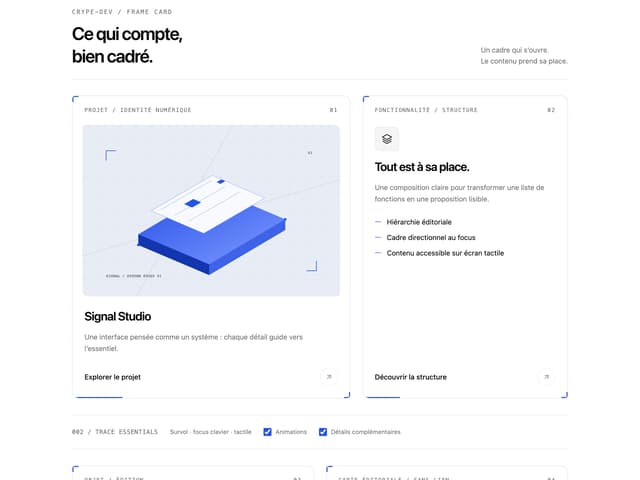

Frame Card
More in Buttons
View all
Button Save
46

Button
20

Eclipse Button
5

Button
32

Button
6

Button
14

Button Group
37
Split Button
32

