
About
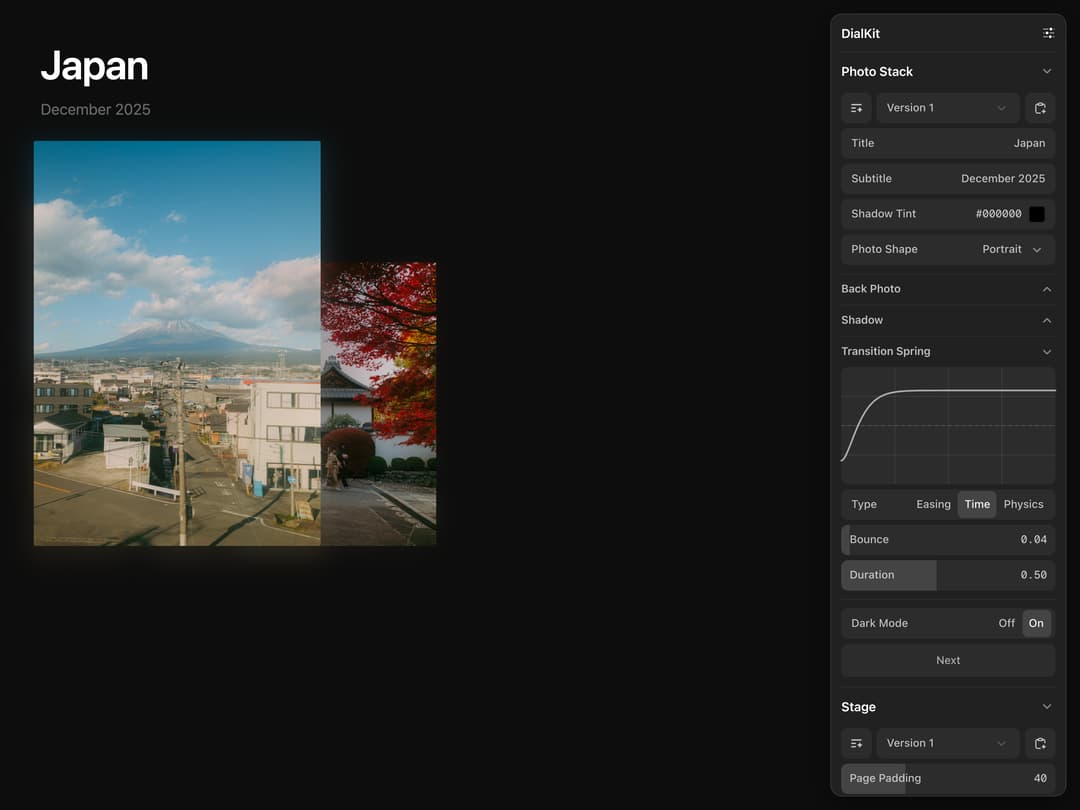
A floating control panel to tune animation and UI parameters in real time. Wire sliders, toggles, color pickers, spring editors and easing curves directly to your values, organize them into nested folders, and export presets as JSON. Auto-detects control types from a plain config object and works with React, Solid, Svelte and Vue.
Built with React and Tailwind. Copy the prompt and paste it into Claude Code, Cursor or Lovable: your agent adds DialKit to your project and fits it to your theme.
Code
How DialKit is used: the demo's code. The component's own source comes with a free account.
Usage.tsx
import { useState, useEffect } from "react"
import { motion, AnimatePresence } from "motion/react"
import { DialRoot, useDialKit } from "@/components/ui/dialkit"

const PHOTO_BASE =
  "https://cdn.jsdelivr.net/gh/joshpuckett/dialkit@ae1af01e40c2898ff9c6258746dc4327ac50ffc0/example/public/photos"

const PHOTOS = [
  { id: 1, src: `${PHOTO_BASE}/one.avif`, color: "#c41e3a" },
  { id: 2, src: `${PHOTO_BASE}/two.avif`, color: "#1a1a2e" },
  { id: 3, src: `${PHOTO_BASE}/three.avif`, color: "#e8d5b7" },
  { id: 4, src: `${PHOTO_BASE}/four.avif`, color: "#2d5a27" },
]

function PhotoStack() {
  const [step, setStep] = useState(0)
  const currentIndex = step % PHOTOS.length

  const next = () => {
    setStep((s) => s + 1)
  }

  const params = useDialKit(
    "Photo Stack",
    {
      title: "Japan",
      subtitle: { type: "text" as const, default: "December 2025", placeholder: "Enter subtitle..." },
      shadowTint: "#000000",
      photoShape: {
        type: "select" as const,
        options: [
          { value: "portrait", label: "Portrait" },
          { value: "square", label: "Square" },
          { value: "landscape", label: "Landscape" },
        ],
        default: "portrait",
      },
      backPhoto: {
        _collapsed: true,
        offsetX: [239, 0, 400],
        offsetY: [0, 0, 150],
        scale: [0.7, 0.5, 0.95],
        overlayOpacity: [0.6, 0, 1],
      },
      shadow: {
        _collapsed: true,
        scale: [1.03, 1, 1.2],
        opacity: [0.25, 0, 1],
        blur: [14, 0, 60],
        yOffset: [8, 0, 60],
      },
      transitionSpring: {
        type: "spring" as const,
        visualDuration: 0.5,
        bounce: 0.04,
      },
      darkMode: true,
      next: { type: "action" as const },
    },
    {
      shortcuts: {
        "backPhoto.offsetX": { key: "x", mode: "coarse" },
        "shadow.opacity": { key: "o", mode: "fine" },
      },
      onAction: (action) => {
        if (action === "next") next()
      },
    }
  )

  const stage = useDialKit("Stage", {
    pagePadding: [40, 16, 96],
    stackGap: [24, 8, 72],
    titleInset: [8, 0, 48],
    lightBackground: { type: "color" as const, default: "#ffffff" },
    darkBackground: { type: "color" as const, default: "#0d0d0d" },
  })

  const visibleCount = 2
  const visiblePhotos = []
  for (let i = 0; i < visibleCount; i++) {
    const photoIndex = (currentIndex + i) % PHOTOS.length
    const lap = Math.floor((step + i) / PHOTOS.length)
    visiblePhotos.push({ ...PHOTOS[photoIndex], stackIndex: i, entranceKey: `${photoIndex}-${lap}` })
  }

  const shapeSizes = {
    portrait: { width: 340, height: 480 },
    square: { width: 400, height: 400 },
    landscape: { width: 480, height: 320 },
  }
  const shape = shapeSizes[params.photoShape as keyof typeof shapeSizes] ?? shapeSizes.portrait

  const bgColor = params.darkMode ? stage.darkBackground : stage.lightBackground
  const textColor = params.darkMode ? "#ffffff" : "#1a1a1a"
  const subtextColor = params.darkMode ? "#666" : "#888"

  useEffect(() => {
    document.documentElement.style.background = bgColor
    document.body.style.background = bgColor
    return () => {
      document.documentElement.style.background = ""
      document.body.style.background = ""
    }
  }, [bgColor])

  return (
    <div
      style={{
        display: "flex",
        flexDirection: "column",
        alignItems: "flex-start",
        gap: stage.stackGap,
        height: "100vh",
        width: "100%",
        padding: stage.pagePadding,
        background: bgColor,
        transition: "background 0.3s ease",
      }}
    >
      <div style={{ paddingLeft: stage.titleInset }}>
        <h1
          style={{
            fontSize: 48,
            fontWeight: 600,
            color: textColor,
            margin: 0,
            letterSpacing: "-0.02em",
            fontFamily: "system-ui, -apple-system, sans-serif",
            transition: "color 0.3s ease",
          }}
        >
          {params.title}
        </h1>
        <p
          style={{
            fontSize: 18,
            color: subtextColor,
            margin: 0,
            marginTop: 4,
            fontFamily: "system-ui, -apple-system, sans-serif",
          }}
        >
          {params.subtitle}
        </p>
      </div>

      <div
        style={{
          position: "relative",
          width: shape.width + 180,
          height: shape.height + 200,
        }}
      >
        <div style={{ position: "absolute", inset: 0, pointerEvents: "none" }}>
          <AnimatePresence initial={false} mode="popLayout">
            {visiblePhotos.map((photo) => {
              const stackIndex = photo.stackIndex
              const isTop = stackIndex === 0
              const targetX = stackIndex * params.backPhoto.offsetX
              const targetY = stackIndex * params.backPhoto.offsetY
              const targetScale = stackIndex === 0 ? 1 : params.backPhoto.scale
              const shadowOpacity = isTop ? params.shadow.opacity : params.shadow.opacity * 0.5

              return (
                <motion.div
                  key={photo.entranceKey}
                  initial={{
                    x: params.backPhoto.offsetX,
                    y: params.backPhoto.offsetY,
                    scale: params.backPhoto.scale * 0.8,
                  }}
                  animate={{
                    x: targetX,
                    y: targetY,
                    scale: targetScale,
                    zIndex: visibleCount - stackIndex,
                  }}
                  exit={{
                    x: -shape.width,
                    y: 0,
                    scale: 1,
                    opacity: 0,
                    zIndex: visibleCount + 1,
                  }}
                  transition={params.transitionSpring}
                  style={{
                    position: "absolute",
                    width: shape.width,
                    height: shape.height,
                    transformOrigin: "bottom left",
                  }}
                >
                  <motion.div
                    initial={false}
                    animate={{ opacity: shadowOpacity }}
                    transition={params.transitionSpring}
                    style={{
                      position: "absolute",
                      inset: 0,
                      transform: `scale(${params.shadow.scale}) translateY(${params.shadow.yOffset}px)`,
                      filter: `blur(${params.shadow.blur}px)`,
                      borderRadius: 2,
                      overflow: "hidden",
                      background: photo.color,
                    }}
                  >
                    <img
                      src={photo.src}
                      alt=""
                      style={{ width: "100%", height: "100%", objectFit: "cover" }}
                    />
                  </motion.div>
                </motion.div>
              )
            })}
          </AnimatePresence>
        </div>

        <div style={{ position: "absolute", inset: 0, clipPath: "inset(-100px -200px 0 0)" }}>
          <AnimatePresence initial={false} mode="popLayout">
            {visiblePhotos.map((photo) => {
              const stackIndex = photo.stackIndex
              const isTop = stackIndex === 0
              const targetX = stackIndex * params.backPhoto.offsetX
              const targetY = stackIndex * params.backPhoto.offsetY
              const targetScale = stackIndex === 0 ? 1 : params.backPhoto.scale
              const overlayOpacity = isTop ? 0 : params.backPhoto.overlayOpacity

              return (
                <motion.div
                  key={photo.entranceKey}
                  initial={{
                    x: params.backPhoto.offsetX,
                    y: params.backPhoto.offsetY,
                    scale: params.backPhoto.scale * 0.8,
                  }}
                  animate={{
                    x: targetX,
                    y: targetY,
                    scale: targetScale,
                    zIndex: visibleCount - stackIndex,
                  }}
                  exit={{
                    x: -shape.width,
                    y: 0,
                    scale: 1,
                    zIndex: visibleCount + 1,
                  }}
                  transition={params.transitionSpring}
                  style={{
                    position: "absolute",
                    width: shape.width,
                    height: shape.height,
                    transformOrigin: "bottom left",
                    cursor: isTop ? "pointer" : "default",
                  }}
                  onClick={isTop ? next : undefined}
                  whileHover={isTop ? { scale: 1.01 } : undefined}
                  whileTap={isTop ? { scale: 0.99 } : undefined}
                >
                  <div
                    style={{
                      position: "absolute",
                      inset: 0,
                      borderRadius: 2,
                      overflow: "hidden",
                      background: photo.color,
                    }}
                  >
                    <img
                      src={photo.src}
                      alt=""
                      style={{ width: "100%", height: "100%", objectFit: "cover" }}
                    />
                    <motion.div
                      initial={false}
                      animate={{ opacity: overlayOpacity }}
                      transition={params.transitionSpring}
                      style={{
                        position: "absolute",
                        inset: 0,
                        background: `linear-gradient(to right, ${params.shadowTint} 0%, transparent 100%)`,
                        pointerEvents: "none",
                      }}
                    />
                  </div>
                </motion.div>
              )
            })}
          </AnimatePresence>
        </div>
      </div>
    </div>
  )
}

export default function DialKitPhotoStackDemo() {
  return (
    <>
      <PhotoStack />
      <DialRoot position="top-right" theme="dark" productionEnabled />
    </>
  )
}