
About
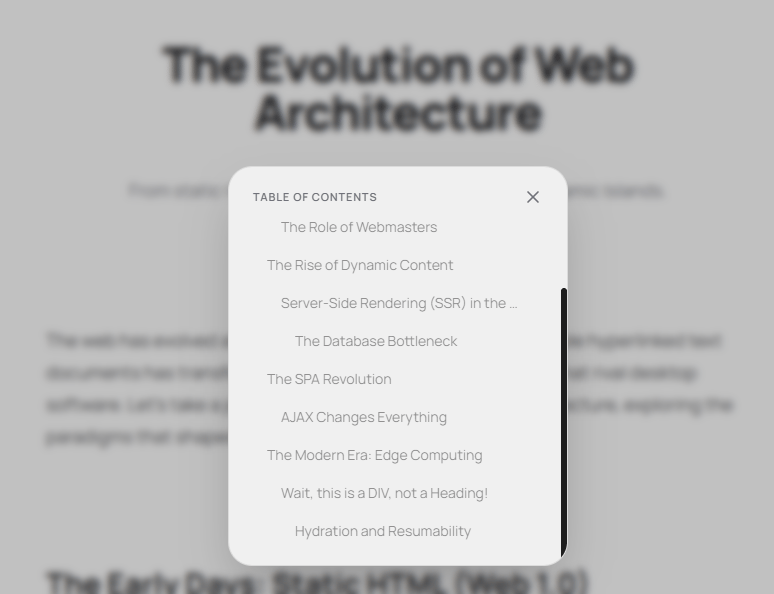
A sleek Dynamic Island-inspired Table of Contents component for React and Next.js with animated expansion, scroll spy tracking, reading progress, smooth scrolling, automatic heading detection, and support for custom TOC elements.
Built with React and Tailwind. Copy the prompt and paste it into Claude Code, Cursor or Lovable: your agent adds Dynamic Island TOC to your project and fits it to your theme.
Code
How Dynamic Island TOC is used: the demo's code. The component's own source comes with a free account.
Usage.tsx
import { DynamicIslandTOC } from "@/components/ui/dynamic-island-toc"; // Adjust path as needed

export default function BlogPostPage() {
  return (
    <div className="relative min-h-screen bg-background text-foreground selection:bg-primary/20">
      {/*
        TOC Component
        Using default selectors: "article h1, article h2, article h3, article h4, .prose h1, .prose h2, .prose h3, .prose h4, [data-toc]"
      */}
      <DynamicIslandTOC />

      <main className="mx-auto max-w-3xl px-6 py-24 sm:py-32 lg:px-8">
        <article className="prose prose-zinc dark:prose-invert lg:prose-lg mx-auto flex flex-col gap-8">

          {/* Header */}
          <div className="mb-10 text-center">
            <h1 className="text-4xl font-extrabold tracking-tight sm:text-5xl mb-4">
              The Evolution of Web Architecture
            </h1>
            <p className="text-lg text-muted-foreground">
              From static HTML pages to Edge Computing and Dynamic Islands.
            </p>
          </div>

          <p>
            The web has evolved at a breakneck pace. What started as simple
            hyperlinked text documents has transformed into rich, immersive
            applications that rival desktop software. Let's take a journey
            through the history of web architecture, exploring the paradigms
            that shaped the modern internet.
          </p>

          {/* STANDARD HEADING TESTS */}
          <h2>The Early Days: Static HTML (Web 1.0)</h2>
          <p>
            In the beginning, the web was read-only. Servers simply hosted flat
            HTML files and served them to browsers upon request. There was no
            interactivity, no user accounts, and no dynamic content.
          </p>
          <div className="h-40 bg-muted/30 rounded-xl border border-border/50 flex items-center justify-center text-muted-foreground">
            [Decorative Image Placeholder]
          </div>
          <p>
            Webmasters manually edited HTML files. If you wanted to change the
            footer on 100 pages, you had to edit 100 files. This era was defined
            by simplicity, but it lacked the flexibility needed for the web to
            grow.
          </p>

          <h3>The Role of Webmasters</h3>
          <p>
            The "Webmaster" was a legendary figure—part designer, part sysadmin,
            part content creator. They uploaded files via FTP and prayed nothing
            broke. If a link rotted, it stayed rotted until manually fixed.
          </p>

          <br className="my-10" />

          <h2>The Rise of Dynamic Content</h2>
          <p>
            As the web grew, the need for dynamic, user-specific content became
            apparent. This birthed Server-Side Rendering (SSR). Languages like
            PHP, Perl, and Java allowed servers to stitch HTML together on the
            fly, pulling data from relational databases.
          </p>

          <h3>Server-Side Rendering (SSR) in the 2000s</h3>
          <p>
            With SSR, every click resulted in a full page reload. The server did
            all the heavy lifting. This era gave us forums, early e-commerce,
            and CMS platforms like WordPress.
          </p>

          <h4>The Database Bottleneck</h4>
          <p>
            As traffic scaled, databases became the primary bottleneck. Querying
            a MySQL database for every page load was incredibly expensive. Caching
            layers like Memcached were introduced to alleviate the pain.
          </p>
          <p>
            Developers spent countless hours optimizing SQL queries and tuning
            Apache servers. It was a time of monolithic codebases, where a single
            repository held the frontend, backend, and database schemas.
          </p>

          <br className="my-10" />

          {/* OVERRIDE TEST: LONG TEXT BUT SHORT TOC TITLE */}
          <h2 data-toc-title="The SPA Revolution">
            The Paradigm Shift to Client-Side Rendering and the Era of Single Page Applications
          </h2>
          <p>
            Notice how long that heading is? Thanks to the `data-toc-title`
            attribute, it shows up cleanly as "The SPA Revolution" in your Table
            of Contents.
          </p>
          <p>
            With the advent of powerful JavaScript engines in browsers (like V8),
            developers realized they could offload UI rendering to the user's
            device. This led to the birth of the Single Page Application (SPA).
          </p>

          <h3>AJAX Changes Everything</h3>
          <p>
            Asynchronous JavaScript and XML (AJAX) allowed web pages to fetch
            data in the background without refreshing the page. This made web
            applications feel fast and native.
          </p>
          <div className="h-64 bg-muted/30 rounded-xl border border-border/50 flex flex-col items-center justify-center text-muted-foreground p-6 text-center">
            <p>Scroll down further to test the TOC scroll spy tracking!</p>
            <p className="mt-4 text-sm">Keep scrolling...</p>
          </div>

          <p>
            Frameworks like AngularJS, Backbone, and eventually React and Vue,
            standardized this approach. Browsers were no longer just document
            viewers; they were full-fledged application runtimes.
          </p>

          <br className="my-10" />

          {/* CUSTOM ELEMENT TEST: DIV BEHAVING AS A TOC HEADING */}
          <div
            data-toc
            data-toc-depth="2"
            data-toc-title="The Modern Era: Edge Computing"
            className="p-8 rounded-2xl bg-foreground/5 border border-foreground/10 my-8"
          >
            <h3 className="text-2xl font-bold mt-0">
              Wait, this is a DIV, not a Heading!
            </h3>
            <p className="mb-0 mt-4 text-muted-foreground">
              This entire highlighted box is registered in the TOC as a Level 2
              heading using the <code>data-toc</code> and <code>data-toc-depth="2"</code> attributes.
              This is incredibly useful when you have complex UI components (like
              interactive widgets or callouts) that you want users to be able to navigate to!
            </p>
          </div>

          <p>
            Today, we are moving compute closer to the user. Edge computing,
            Serverless functions, and distributed databases are the new norm.
            Frameworks like Next.js blur the lines between frontend and backend,
            allowing us to seamlessly mix Server Components and Client Components.
          </p>

          <h4>Hydration and Resumability</h4>
          <p>
            We realized that sending massive Javascript bundles to the client
            was hurting performance. Now, we use techniques like hydration,
            partial hydration (Islands architecture), and resumability to send
            only the JS that is absolutely necessary.
          </p>
          <p>
            It feels like we've come full circle, back to generating HTML on the
            server, but with infinitely more power and interactivity baked in.
          </p>

          <br className="my-20" />

          {/* IGNORE TEST: SHOULD NOT SHOW UP IN TOC */}
          <hr className="my-12 border-border" />

          <h2 data-toc-ignore className="text-center">
            Join My Newsletter
          </h2>
          <p className="text-center text-muted-foreground">
            This section uses <code>data-toc-ignore</code>. Open the Table of Contents,
            and you'll notice "Join My Newsletter" is completely hidden from the list!
          </p>
          <div className="flex gap-4 justify-center mt-6">
            <input
              type="email"
              placeholder="hello@example.com"
              className="px-4 py-2 rounded-lg border border-border bg-background"
            />
            <button className="px-4 py-2 bg-foreground text-background font-medium rounded-lg">
              Subscribe
            </button>
          </div>

        </article>
      </main>
    </div>
  );
}