
About
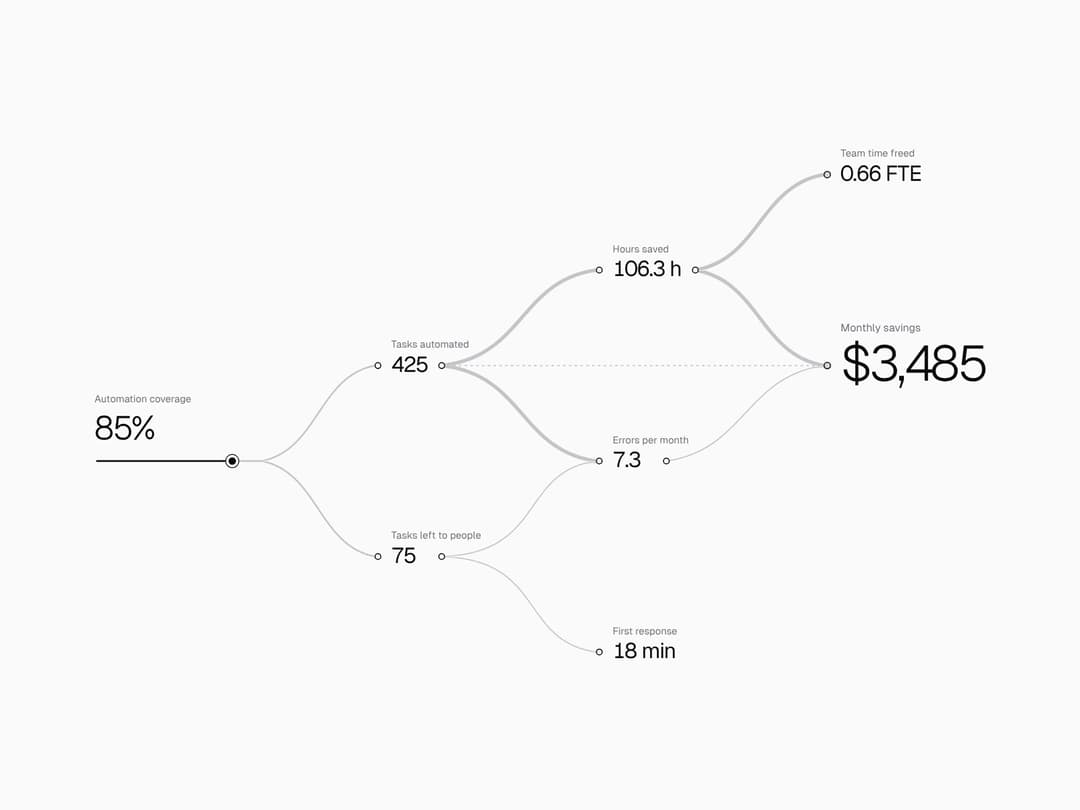
One slider, and the change travels through every metric it touches. Describe metrics as data (a formula and what it depends on); the diagram lays itself out, and a soft light carries the change along the wires, each number updating as the light arrives. Light and dark, no deps.
Built with React and Tailwind. Copy the prompt and paste it into Claude Code, Cursor or Lovable: your agent adds Impact Flow to your project and fits it to your theme.
Code
How Impact Flow is used: the demo's code. The component's own source comes with a free account.
Usage.tsx
"use client";

import * as React from "react";
import { ImpactFlow, type ImpactFlowInput, type ImpactFlowNode } from "@/components/ui/impact-flow";

/* ───────── scenarios: plain data, this is all you write ───────── */

const nf = new Intl.NumberFormat("en-US", { maximumFractionDigits: 0 });
const int = (n: number) => nf.format(Math.round(n));
const one = (n: number) => (Math.round(n * 10) / 10).toFixed(1);
const usd = (n: number) => (n < 0 ? "−$" : "$") + nf.format(Math.abs(Math.round(n)));
const pct = (n: number) => Math.round(n) + "%";
const short = (n: number) => (n >= 1e6 ? (n / 1e6).toFixed(2) + "M" : n >= 1e4 ? Math.round(n / 1e3) + "K" : nf.format(Math.round(n)));
const kusd = (n: number) => "$" + short(n);
const dur = (m: number) => {
  m = Math.round(m);
  if (m <= 0) return "0 min";
  if (m < 60) return m + " min";
  return Math.floor(m / 60) + " h " + String(m % 60).padStart(2, "0") + " min";
};

type Scenario = { name: string; input: ImpactFlowInput; nodes: ImpactFlowNode[] };

const SCENARIOS: Record<"automation" | "mortgage" | "ads", Scenario> = {
  automation: {
    name: "Automation",
    input: { id: "coverage", label: "Automation coverage", min: 0, max: 100, step: 1, defaultValue: 60, format: pct },
    nodes: [
      { id: "automated", label: "Tasks automated", from: ["coverage"], calc: v => (500 * v.coverage) / 100, format: int },
      { id: "manual", label: "Tasks left to people", from: ["coverage"], calc: v => 500 - (500 * v.coverage) / 100, format: int },
      { id: "hours", label: "Hours saved", from: ["automated"], calc: v => (v.automated * 15) / 60, format: n => one(n) + " h" },
      { id: "errors", label: "Errors per month", from: ["automated", "manual"], calc: v => v.manual * 0.04 + v.automated * 0.01, format: one },
      { id: "response", label: "First response", from: ["manual"], calc: v => (v.manual / 500) * 120, format: dur },
      { id: "team", label: "Team time freed", from: ["hours"], calc: v => v.hours / 160, format: n => n.toFixed(2) + " FTE" },
      {
        id: "savings", label: "Monthly savings", primary: true, from: ["hours", "errors", "automated"], minus: ["automated"],
        calc: v => v.hours * 30 + (20 - v.errors) * 40 - v.automated * 0.5, format: usd,
      },
    ],
  },
  mortgage: {
    name: "Mortgage",
    input: { id: "rate", label: "Mortgage rate", min: 3, max: 15, step: 0.25, defaultValue: 8, format: n => n.toFixed(2).replace(/0$/, "") + "%" },
    nodes: [
      { id: "payment", label: "Monthly payment", from: ["rate"], format: usd, calc: v => { const r = v.rate / 1200; return (300000 * r) / (1 - Math.pow(1 + r, -360)); } },
      { id: "interest", label: "Interest over 30 years", from: ["rate"], format: kusd, calc: v => { const r = v.rate / 1200; return ((300000 * r) / (1 - Math.pow(1 + r, -360))) * 360 - 300000; } },
      { id: "income", label: "Income needed per year", from: ["payment"], calc: v => (v.payment / 0.35) * 12, format: kusd },
      { id: "buyers", label: "Buyers who qualify", from: ["payment"], format: int, calc: v => 1000 * Math.min(1, Math.max(0, 1 - ((v.payment / 0.35) * 12 - 40000) / 120000)) },
      { id: "over", label: "Overpayment", from: ["interest"], calc: v => (v.interest / 300000) * 100, format: pct },
      { id: "deals", label: "Deals per month", from: ["buyers"], calc: v => v.buyers * 0.02, format: one },
      { id: "commission", label: "Agency commission", primary: true, from: ["deals"], calc: v => v.deals * 9000, format: usd },
    ],
  },
  ads: {
    name: "Ad budget",
    input: { id: "budget", label: "Monthly ad budget", min: 1000, max: 20000, step: 500, defaultValue: 8000, format: kusd },
    nodes: [
      { id: "clicks", label: "Clicks", from: ["budget"], calc: v => v.budget / 1.6, format: int },
      { id: "views", label: "Impressions", from: ["budget"], calc: v => v.budget * 120, format: short },
      { id: "leads", label: "Leads", from: ["clicks"], calc: v => v.clicks * 0.04, format: int },
      { id: "brand", label: "Brand searches", from: ["views"], calc: v => v.views * 0.0015, format: int },
      { id: "customers", label: "New customers", from: ["leads", "brand"], calc: v => v.leads * 0.25 + v.brand * 0.03, format: int },
      { id: "revenue", label: "Revenue", primary: true, from: ["customers"], calc: v => v.customers * 480, format: usd },
    ],
  },
};
type Key = keyof typeof SCENARIOS;


/* ───────── demo controls (same layout as the other demos) ───────── */

const SEG_BTN =
  "flex items-center gap-1.5 rounded-md px-2.5 py-1 text-xs font-semibold text-muted-foreground transition-colors hover:text-foreground focus-visible:outline-none focus-visible:ring-2 focus-visible:ring-ring aria-pressed:bg-background aria-pressed:text-foreground aria-pressed:shadow-sm";
const BTN =
  "rounded-lg border border-border bg-muted px-2.5 py-1.5 text-xs font-semibold transition-colors hover:text-foreground focus-visible:outline-none focus-visible:ring-2 focus-visible:ring-ring";

function Row({ label, children }: { label: string; children: React.ReactNode }) {
  return (
    <div className="flex flex-wrap items-center gap-2">
      <span className="w-20 shrink-0 text-xs text-muted-foreground">{label}</span>
      {children}
    </div>
  );
}

function Segmented<T extends string>({ label, value, options, onChange }: {
  label: string;
  value: T;
  options: { value: T; label: React.ReactNode }[];
  onChange: (v: T) => void;
}) {
  return (
    <Row label={label}>
      <div role="group" aria-label={label} className="flex gap-0.5 rounded-lg bg-muted p-0.5">
        {options.map(o => (
          <button key={o.value} type="button" aria-pressed={value === o.value} onClick={() => onChange(o.value)} className={SEG_BTN}>
            {o.label}
          </button>
        ))}
      </div>
    </Row>
  );
}

function Slider({ label, value, min, max, step, onChange, format = v => v.toFixed(2) }: {
  label: string;
  value: number;
  min: number;
  max: number;
  step: number;
  onChange: (v: number) => void;
  format?: (v: number) => string;
}) {
  return (
    <label className="flex items-center gap-2 text-xs text-muted-foreground">
      <span className="w-20 shrink-0">{label}</span>
      <input type="range" min={min} max={max} step={step} value={value} onChange={e => onChange(parseFloat(e.target.value))} className="w-32 max-w-[180px] flex-1 accent-primary" />
      <span className="w-9 font-mono tabular-nums">{format(value)}</span>
    </label>
  );
}

function Group({ title, children }: { title: string; children: React.ReactNode }) {
  return (
    <section className="flex min-w-0 flex-col gap-2.5">
      <h3 className="mb-0.5 border-b border-border pb-1.5 font-mono text-[11px] font-semibold uppercase tracking-[.12em] text-muted-foreground">{title}</h3>
      {children}
    </section>
  );
}

export default function ImpactFlowDemo() {
  const [key, setKey] = React.useState<Key>("automation");
  const [theme, setTheme] = React.useState<"auto" | "light" | "dark">("auto");
  const [speed, setSpeed] = React.useState(1);
  const [value, setValue] = React.useState<number>(SCENARIOS.automation.input.defaultValue!);
  const [replay, setReplay] = React.useState(0);
  const [open, setOpen] = React.useState(false);
  const s = SCENARIOS[key];

  const pick = (k: Key) => { setKey(k); setValue(SCENARIOS[k].input.defaultValue!); };

  return (
    <div className="flex h-screen min-h-[600px] w-full flex-col overflow-hidden bg-background text-foreground">
      {/* Stage */}
      <div className="relative min-h-0 flex-1 bg-background">
        {/* absolute fill: the stage gets its height from flex, so a plain height:100% would not resolve */}
        <div className="absolute inset-0">
        <ImpactFlow
          key={key}
          input={s.input}
          nodes={s.nodes}
          value={value}
          onValueChange={setValue}
          theme={theme}
          speed={speed}
          replayKey={replay}
          label={`${s.name}: cause and effect`}
        />
        </div>
      </div>

      {/* Controls */}
      <div className="max-h-[60vh] shrink-0 overflow-y-auto border-t border-border px-4 pb-3 pt-3">
        <div className="mb-2 flex items-center justify-between">
          <div className="text-sm font-bold">
            Impact Flow <span className="ml-2 font-mono text-[11px] font-normal text-muted-foreground">demo controls</span>
          </div>
          <button type="button" aria-expanded={open} onClick={() => setOpen(v => !v)} className={BTN}>
            {open ? "Hide controls" : "Show controls"}
          </button>
        </div>

        {open && (
          <div className="grid grid-cols-1 gap-x-7 gap-y-4 md:grid-cols-3">
            <Group title="Preview">
              <Segmented
                label="Scenario"
                value={key}
                onChange={pick}
                options={(Object.keys(SCENARIOS) as Key[]).map(k => ({ value: k, label: SCENARIOS[k].name }))}
              />
              <Row label="Value">
                <button type="button" onClick={() => setValue(s.input.defaultValue!)} className={BTN}>
                  Reset
                </button>
              </Row>
            </Group>

            <Group title="Appearance">
              <Segmented
                label="Theme"
                value={theme}
                onChange={setTheme}
                options={[
                  { value: "auto", label: "Site" },
                  { value: "light", label: "Light" },
                  { value: "dark", label: "Dark" },
                ]}
              />
            </Group>

            <Group title="Motion">
              <Slider label="Light speed" value={speed} min={0.5} max={2} step={0.1} onChange={setSpeed} format={v => v.toFixed(1) + "×"} />
              <Row label="Light">
                <button type="button" onClick={() => setReplay(r => r + 1)} className={BTN}>
                  Send a wave
                </button>
              </Row>
            </Group>
          </div>
        )}
      </div>
    </div>
  );
}More by Darya
View all

Orbit Timeline
48
Grain Light Card
28
ASCII Voice Orb
11
Voice Orb