
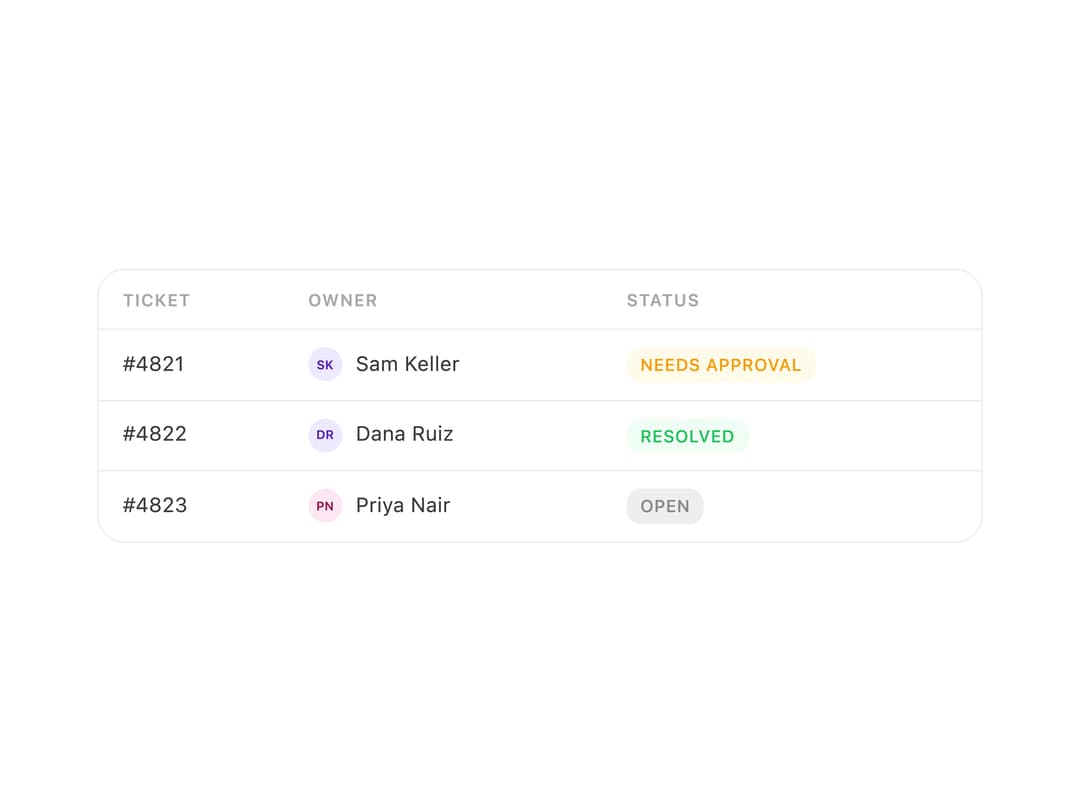
About
A styled data table that renders column headers and rows of cells, with row-hover highlighting and support for rich cell content like badges or avatars.
Built with React and Tailwind. Copy the prompt and paste it into Claude Code, Cursor or Lovable: your agent adds Table to your project and fits it to your theme.
Code
How Table is used: the demo's code. The component's own source comes with a free account.
Usage.tsx
import Table from "@/components/ui/table";
import Avatar from "@/components/ui/table-utils/avatar";
import Badge from "@/components/ui/table-utils/badge";
import Stack from "@/components/ui/table-utils/stack";
import Text from "@/components/ui/table-utils/text";

export default function TableRichCellsDemo() {
  return (
    <div style={{ width: 520 }}>
      <Table
        columns={["Ticket", "Owner", "Status"]}
        rows={[
          [
            "#4821",
            <Stack direction="row" gap={8} align="center">
              <Avatar name="Sam Keller" size={20} />
              <Text size="sm">Sam Keller</Text>
            </Stack>,
            <Badge variant="warning">Needs approval</Badge>,
          ],
          [
            "#4822",
            <Stack direction="row" gap={8} align="center">
              <Avatar name="Dana Ruiz" size={20} />
              <Text size="sm">Dana Ruiz</Text>
            </Stack>,
            <Badge variant="success">Resolved</Badge>,
          ],
          [
            "#4823",
            <Stack direction="row" gap={8} align="center">
              <Avatar name="Priya Nair" size={20} />
              <Text size="sm">Priya Nair</Text>
            </Stack>,
            <Badge>Open</Badge>,
          ],
        ]}
      />
    </div>
  );
}
More by halaska-studio
View all
Dot Grid
24
Orb
15
Segmented Control
8
Choicebox
6
Combobox
5
Dialog
4
Input OTP
4
Switch
1