
About
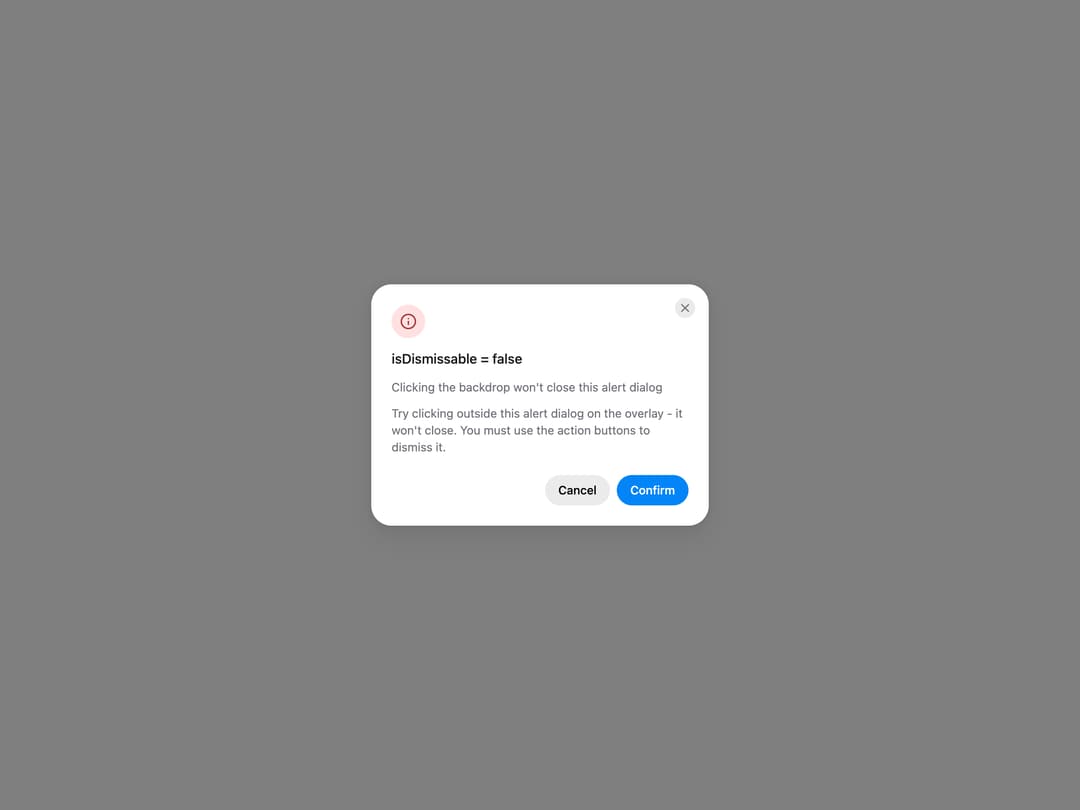
HeroUI AlertDialog for critical confirmations, with status icons, placements, backdrop variants, sizes, custom icons, dismiss behavior, controlled state and custom trigger examples. Uses the real @heroui/react component with bundled @heroui/styles CSS.
Built with React and Tailwind. Copy the prompt and paste it into Claude Code, Cursor or Lovable: your agent adds HeroUI AlertDialog to your project and fits it to your theme.
Code
How HeroUI AlertDialog is used: the demo's code. The component's own source comes with a free account.
Usage.tsx
"use client"

import { AlertDialog } from "@/components/ui/heroui-alert-dialog"
import { Button } from "@heroui/react"
import { Info } from "lucide-react"

export default function DismissBehavior() {
  return (
    <div className="flex max-w-sm flex-col gap-6">
      <div className="flex flex-col gap-2">
        <h3 className="text-lg font-semibold">isDismissable</h3>
        <p className="text-sm text-muted">Controls whether the alert dialog can be dismissed by clicking the overlay backdrop.</p>
        <AlertDialog>
          <Button variant="secondary">Open Alert Dialog</Button>
          <AlertDialog.Backdrop isDismissable={false}>
            <AlertDialog.Container>
              <AlertDialog.Dialog className="sm:max-w-[400px]">
                <AlertDialog.CloseTrigger />
                <AlertDialog.Header>
                  <AlertDialog.Icon status="danger"><Info className="size-5" /></AlertDialog.Icon>
                  <AlertDialog.Heading>isDismissable = false</AlertDialog.Heading>
                  <p className="text-sm leading-5 text-muted">Clicking the backdrop won't close this alert dialog</p>
                </AlertDialog.Header>
                <AlertDialog.Body><p>Try clicking outside this alert dialog on the overlay - it won't close. You must use the action buttons to dismiss it.</p></AlertDialog.Body>
                <AlertDialog.Footer>
                  <Button slot="close" variant="tertiary">Cancel</Button>
                  <Button slot="close">Confirm</Button>
                </AlertDialog.Footer>
              </AlertDialog.Dialog>
            </AlertDialog.Container>
          </AlertDialog.Backdrop>
        </AlertDialog>
      </div>
      <div className="flex flex-col gap-2">
        <h3 className="text-lg font-semibold">isKeyboardDismissDisabled</h3>
        <p className="text-sm text-muted">Controls whether the ESC key can dismiss the alert dialog.</p>
        <AlertDialog>
          <Button variant="secondary">Open Alert Dialog</Button>
          <AlertDialog.Backdrop isKeyboardDismissDisabled>
            <AlertDialog.Container>
              <AlertDialog.Dialog className="sm:max-w-[400px]">
                <AlertDialog.CloseTrigger />
                <AlertDialog.Header>
                  <AlertDialog.Icon status="accent"><Info className="size-5" /></AlertDialog.Icon>
                  <AlertDialog.Heading>isKeyboardDismissDisabled = true</AlertDialog.Heading>
                  <p className="text-sm leading-5 text-muted">ESC key is disabled</p>
                </AlertDialog.Header>
                <AlertDialog.Body><p>Press ESC - nothing happens. You must use the action buttons to dismiss this alert dialog.</p></AlertDialog.Body>
                <AlertDialog.Footer>
                  <Button slot="close" variant="tertiary">Cancel</Button>
                  <Button slot="close">Confirm</Button>
                </AlertDialog.Footer>
              </AlertDialog.Dialog>
            </AlertDialog.Container>
          </AlertDialog.Backdrop>
        </AlertDialog>
      </div>
    </div>
  )
}
Dependencies
More by Hero Ui
View all

DatePicker
465
Chip
440
The Pagination
361
HeroUI Color Picker
105
Skeleton
104
HeroUI Table
100
HeroUI Disclosure Group
94
ComboBox
75