
About
HeroUI v3 Drawer — slide-out panel with placements, backdrop variants, non-dismissable, scrollable content, controlled state, forms and a navigation drawer.
Built with React and Tailwind. Copy the prompt and paste it into Claude Code, Cursor or Lovable: your agent adds HeroUI Drawer to your project and fits it to your theme.
Code
How HeroUI Drawer is used: the demo's code. The component's own source comes with a free account.
Usage.tsx
"use client"

import { Button, useOverlayState } from "@heroui/react"
import React from "react"
import { Drawer } from "@/components/ui/heroui-drawer"

export default function Controlled() {
  const [isOpen, setIsOpen] = React.useState(false)

  const state = useOverlayState()

  return (
    <div className="flex max-w-md flex-col gap-8">
      <div className="flex flex-col gap-3">
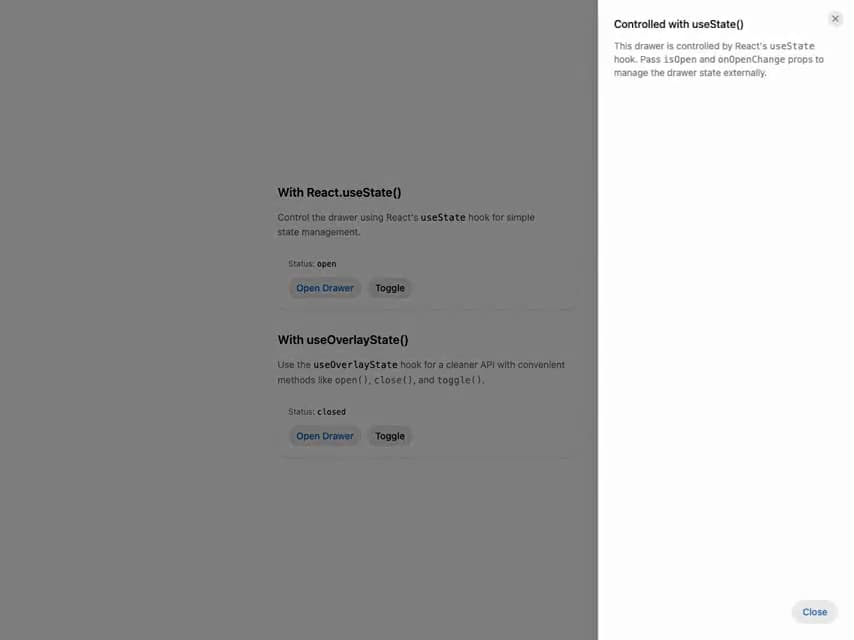
        <h3 className="text-lg font-semibold text-foreground">With React.useState()</h3>
        <p className="text-sm leading-relaxed text-pretty text-muted-foreground">
          Control the drawer using React's <code className="text-foreground">useState</code> hook
          for simple state management.
        </p>
        <div className="flex flex-col items-start gap-3 rounded-2xl bg-surface p-4 shadow-sm">
          <div className="flex w-full items-center justify-between">
            <p className="text-xs text-muted-foreground">
              Status:{" "}
              <span className="font-mono font-medium text-foreground">
                {isOpen ? "open" : "closed"}
              </span>
            </p>
          </div>
          <div className="flex gap-2">
            <Button size="sm" variant="secondary" onPress={() => setIsOpen(true)}>
              Open Drawer
            </Button>
            <Button size="sm" variant="tertiary" onPress={() => setIsOpen(!isOpen)}>
              Toggle
            </Button>
          </div>
        </div>

        <Drawer.Backdrop isOpen={isOpen} onOpenChange={setIsOpen}>
          <Drawer.Content placement="right">
            <Drawer.Dialog>
              <Drawer.CloseTrigger />
              <Drawer.Header>
                <Drawer.Heading>Controlled with useState()</Drawer.Heading>
              </Drawer.Header>
              <Drawer.Body>
                <p>
                  This drawer is controlled by React's <code>useState</code> hook. Pass{" "}
                  <code>isOpen</code> and <code>onOpenChange</code> props to manage the drawer state
                  externally.
                </p>
              </Drawer.Body>
              <Drawer.Footer>
                <Button slot="close" variant="secondary">
                  Close
                </Button>
              </Drawer.Footer>
            </Drawer.Dialog>
          </Drawer.Content>
        </Drawer.Backdrop>
      </div>

      <div className="flex flex-col gap-3">
        <h3 className="text-lg font-semibold text-foreground">With useOverlayState()</h3>
        <p className="text-sm leading-relaxed text-pretty text-muted-foreground">
          Use the <code className="text-foreground">useOverlayState</code> hook for a cleaner API
          with convenient methods like <code>open()</code>, <code>close()</code>, and{" "}
          <code>toggle()</code>.
        </p>
        <div className="flex flex-col items-start gap-3 rounded-2xl bg-surface p-4 shadow-sm">
          <div className="flex w-full items-center justify-between">
            <p className="text-xs text-muted-foreground">
              Status:{" "}
              <span className="font-mono font-medium text-foreground">
                {state.isOpen ? "open" : "closed"}
              </span>
            </p>
          </div>
          <div className="flex gap-2">
            <Button size="sm" variant="secondary" onPress={state.open}>
              Open Drawer
            </Button>
            <Button size="sm" variant="tertiary" onPress={state.toggle}>
              Toggle
            </Button>
          </div>
        </div>

        <Drawer.Backdrop isOpen={state.isOpen} onOpenChange={state.setOpen}>
          <Drawer.Content placement="right">
            <Drawer.Dialog>
              <Drawer.CloseTrigger />
              <Drawer.Header>
                <Drawer.Heading>Controlled with useOverlayState()</Drawer.Heading>
              </Drawer.Header>
              <Drawer.Body>
                <p>
                  The <code>useOverlayState</code> hook provides dedicated methods for common
                  operations. No need to manually create callbacks—just use{" "}
                  <code>state.open()</code>, <code>state.close()</code>, or{" "}
                  <code>state.toggle()</code>.
                </p>
              </Drawer.Body>
              <Drawer.Footer>
                <Button slot="close" variant="secondary">
                  Close
                </Button>
              </Drawer.Footer>
            </Drawer.Dialog>
          </Drawer.Content>
        </Drawer.Backdrop>
      </div>
    </div>
  )
}
Dependencies
More by Hero Ui
View all

DatePicker
465
Chip
440
The Pagination
361
HeroUI Color Picker
105
Skeleton
104
HeroUI Table
100
HeroUI Disclosure Group
94
HeroUI AlertDialog
80