
About
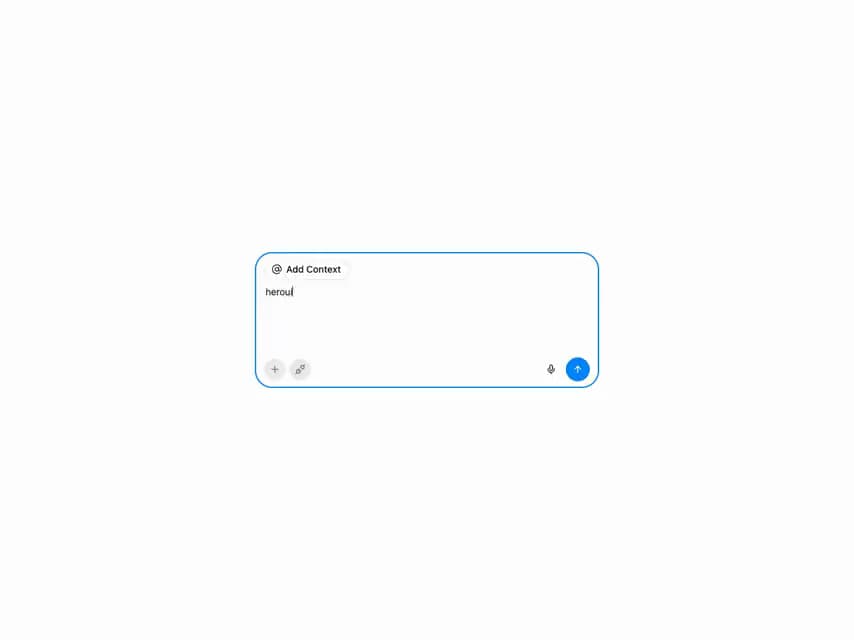
HeroUI v3 InputGroup — inputs with prefix/suffix addons: icons, text, copy button, password toggle, keyboard shortcut, loading state, variants and textarea.
Built with React and Tailwind. Copy the prompt and paste it into Claude Code, Cursor or Lovable: your agent adds HeroUI Input Group to your project and fits it to your theme.
Code
How HeroUI Input Group is used: the demo's code. The component's own source comes with a free account.
Usage.tsx
"use client"

import { ArrowUp, AtSign, Mic, Unplug, Plus } from "lucide-react"
import { Button, Kbd, Spinner, TextField, Tooltip } from "@heroui/react"
import { useState } from "react"
import { InputGroup } from "@/components/ui/heroui-input-group"

export default function WithTextArea() {
  const [value, setValue] = useState("")
  const [isSubmitting, setIsSubmitting] = useState(false)

  const handleSubmit = () => {
    if (!value.trim()) return

    setIsSubmitting(true)

    setTimeout(() => {
      setIsSubmitting(false)
      setValue("")
    }, 1000)
  }

  return (
    <TextField
      fullWidth
      aria-label="Prompt input"
      className="flex w-sm flex-col sm:w-lg"
      name="prompt"
    >
      <InputGroup fullWidth className="flex flex-col gap-2 rounded-3xl py-2">
        <InputGroup.Prefix className="px-3 py-0">
          <Button aria-label="Add context" size="sm" variant="outline">
            <AtSign />
            Add Context
          </Button>
        </InputGroup.Prefix>
        <InputGroup.TextArea
          className="w-full resize-none px-3.5 py-0"
          placeholder="Assign tasks or ask anything..."
          rows={5}
          value={value}
          onChange={(event) => setValue(event.target.value)}
        />
        <InputGroup.Suffix className="flex w-full items-center gap-1.5 px-3 py-0">
          <Tooltip delay={0}>
            <Button isIconOnly aria-label="Attach file" size="sm" variant="tertiary">
              <Plus />
            </Button>
            <Tooltip.Content>
              <p className="text-xs">Add a files and more</p>
            </Tooltip.Content>
          </Tooltip>
          <Tooltip delay={0}>
            <Button isIconOnly aria-label="Connect Apps" size="sm" variant="tertiary">
              <Unplug />
            </Button>
            <Tooltip.Content>
              <p className="text-xs">Connect apps</p>
            </Tooltip.Content>
          </Tooltip>
          <div className="ml-auto flex items-center gap-1.5">
            <Tooltip delay={0}>
              <Button isIconOnly aria-label="Voice input" size="sm" variant="ghost">
                <Mic />
              </Button>
              <Tooltip.Content>
                <p className="text-xs">Voice input</p>
              </Tooltip.Content>
            </Tooltip>
            <Tooltip delay={0}>
              <Button
                isIconOnly
                aria-label="Send prompt"
                isDisabled={!value.trim()}
                isPending={isSubmitting}
                onPress={handleSubmit}
              >
                {({ isPending }) => (isPending ? <Spinner color="current" size="sm" /> : <ArrowUp />)}
              </Button>
              <Tooltip.Content className="flex items-center gap-1">
                <p className="text-xs">Send</p>
                <Kbd className="h-4 rounded-sm px-1">
                  <Kbd.Abbr keyValue="enter" />
                </Kbd>
              </Tooltip.Content>
            </Tooltip>
          </div>
        </InputGroup.Suffix>
      </InputGroup>
    </TextField>
  )
}
Dependencies
More by Hero Ui
View all

DatePicker
465
Chip
440
The Pagination
361
HeroUI Color Picker
105
Skeleton
104
HeroUI Table
100
HeroUI Disclosure Group
94
HeroUI AlertDialog
80
More in Buttons
View all
Button Save
46

Button
20

Eclipse Button
5

Button
32

Button
6

Button
14

Button Group
37
Split Button
32

