
About
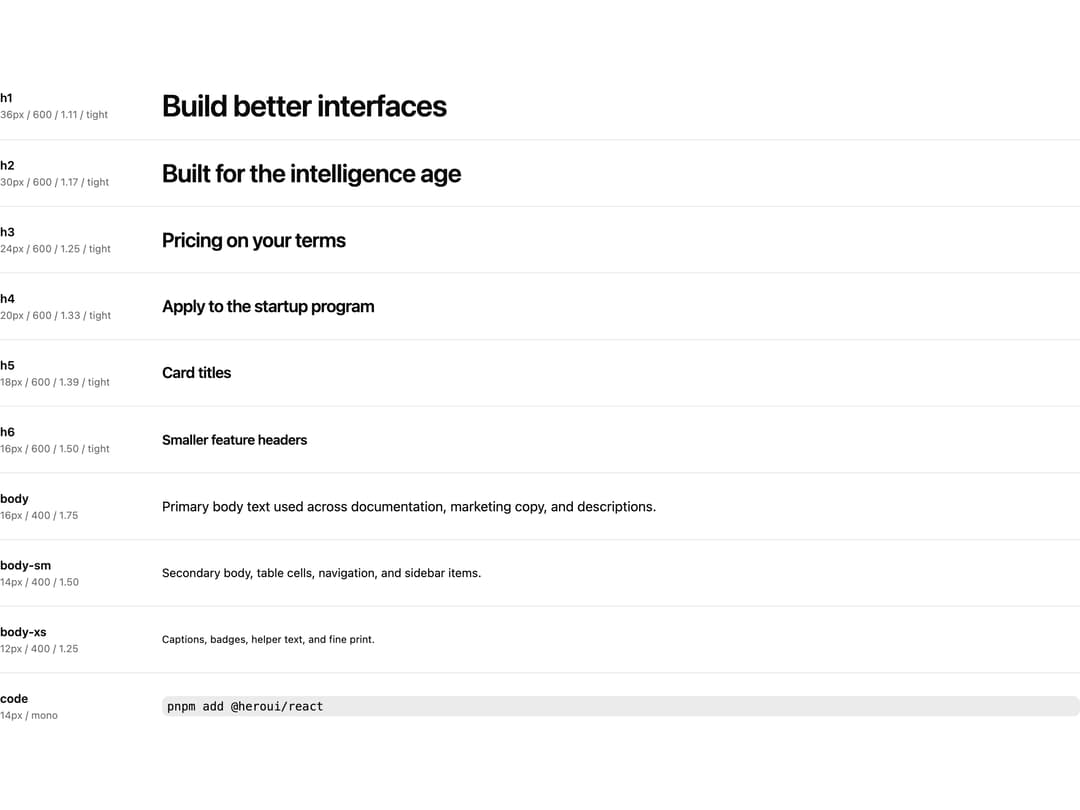
HeroUI v3 Typography — heading and body type scale, primitives (Heading/Paragraph/Code), Prose for rich text, and the render-prop polymorphic API.
Built with React and Tailwind. Copy the prompt and paste it into Claude Code, Cursor or Lovable: your agent adds HeroUI Typography to your project and fits it to your theme.
Code
How HeroUI Typography is used: the demo's code. The component's own source comes with a free account.
Usage.tsx
import { Typography } from "@/components/ui/heroui-typography"

const scale = [
  {
    label: "h1",
    meta: "36px / 600 / 1.11 / tight",
    sample: "Build better interfaces",
    type: "h1" as const,
  },
  {
    label: "h2",
    meta: "30px / 600 / 1.17 / tight",
    sample: "Built for the intelligence age",
    type: "h2" as const,
  },
  {
    label: "h3",
    meta: "24px / 600 / 1.25 / tight",
    sample: "Pricing on your terms",
    type: "h3" as const,
  },
  {
    label: "h4",
    meta: "20px / 600 / 1.33 / tight",
    sample: "Apply to the startup program",
    type: "h4" as const,
  },
  {
    label: "h5",
    meta: "18px / 600 / 1.39 / tight",
    sample: "Card titles",
    type: "h5" as const,
  },
  {
    label: "h6",
    meta: "16px / 600 / 1.50 / tight",
    sample: "Smaller feature headers",
    type: "h6" as const,
  },
  {
    label: "body",
    meta: "16px / 400 / 1.75",
    sample: "Primary body text used across documentation, marketing copy, and descriptions.",
    type: "body" as const,
  },
  {
    label: "body-sm",
    meta: "14px / 400 / 1.50",
    sample: "Secondary body, table cells, navigation, and sidebar items.",
    type: "body-sm" as const,
  },
  {
    label: "body-xs",
    meta: "12px / 400 / 1.25",
    sample: "Captions, badges, helper text, and fine print.",
    type: "body-xs" as const,
  },
  {
    label: "code",
    meta: "14px / mono",
    sample: "pnpm add @heroui/react",
    type: "code" as const,
  },
] as const

export const TypographyScale = () => {
  return (
    <div className="flex w-full flex-col divide-y divide-border">
      {scale.map((row) => (
        <div key={row.label} className="grid grid-cols-[160px_1fr] items-center gap-8 py-5">
          <div className="flex shrink-0 flex-col gap-0.5">
            <span className="text-sm font-semibold text-foreground">{row.label}</span>
            <span className="text-xs whitespace-nowrap text-muted-foreground">{row.meta}</span>
          </div>
          <Typography type={row.type}>{row.sample}</Typography>
        </div>
      ))}
    </div>
  )
}

export default TypographyScale
Dependencies
More by Hero Ui
View all

DatePicker
465
Chip
440
The Pagination
361
HeroUI Color Picker
105
Skeleton
104
HeroUI Table
100
HeroUI Disclosure Group
94
HeroUI AlertDialog
80
More in Text
View all
Motion Blur Text
36

Vertical Cut Reveal Characters
103

NeonRGBTextEffect
144
Text Reveal
27
Random Letter Swap
46

Rainbow Text Effect
47
Text Color
545

Blur Reveal
300