
About
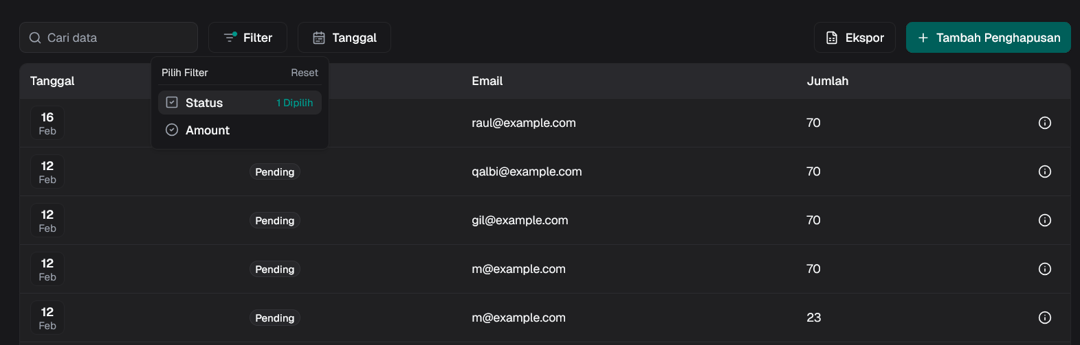
shadcn/ui data-table with grouped/standalone filter
Built with React and Tailwind. Copy the prompt and paste it into Claude Code, Cursor or Lovable: your agent adds Data Table Filter to your project and fits it to your theme.
Code
How Data Table Filter is used: the demo's code. The component's own source comes with a free account.
Usage.tsx
"use client";

import Link from "next/link";

import { ColumnDef, FilterFnOption } from "@tanstack/react-table";

import { DataTable, DataTableControls, DataTableFilter } from "@/components/ui/data-table-filter";
import { Badge } from "@/components/ui/badge";
import { Button } from "@/components/ui/button";
import {
  Tooltip,
  TooltipContent,
  TooltipTrigger,
} from "@/components/ui/tooltip";

import ExportDeletionData from "./export-deletion";

import { InfoIcon, PlusIcon } from "lucide-react";

export type Payment = {
  id: string;
  amount: number;
  status: "pending" | "processing" | "success" | "failed";
  email: string;
  date: Date | string;
};

const columns: ColumnDef<Payment>[] = [
  {
    accessorKey: "date",
    header: "Tanggal",
    cell: ({ row: { original: data } }) => {
      const date = getDate(data.date);
      const month = format(data.date, "LLL");
      const fullDate = format(data.date, "PPPP - kk:mm");

      return (
        <Tooltip>
          <TooltipTrigger asChild>
            <div className="bg-background/40 flex size-10 shrink-0 cursor-default flex-col items-center justify-center rounded-md border text-center">
              <span className="text-sm font-semibold leading-snug">{date}</span>
              <span className="text-muted-foreground text-xs leading-none">
                {month}
              </span>
            </div>
          </TooltipTrigger>
          <TooltipContent className="shadow-md">
            {fullDate}
          </TooltipContent>
        </Tooltip>
      );
    },
    filterFn: "date-range" as FilterFnOption<Payment>,
  },
  {
    accessorKey: "status",
    header: "Status",
    cell: ({ row }) => {
      return (
        <Badge variant="secondary" className="capitalize">
          {row.getValue("status")}
        </Badge>
      );
    },
    filterFn: "checkbox" as FilterFnOption<Payment>,
  },
  {
    accessorKey: "email",
    header: "Email",
  },
  {
    accessorKey: "amount",
    header: "Jumlah",
    filterFn: "radio" as FilterFnOption<Payment>,
  },
  {
    id: "actions",
    cell: ({ row: { original: data } }) => {
      return (
        <Tooltip>
          <TooltipTrigger asChild>
            <Button
              variant="ghost"
              size="icon"
              className="hover:bg-card hover:border"
              asChild
            >
              <Link href="#">
                <InfoIcon />
                <span className="sr-only">Detail</span>
              </Link>
            </Button>
          </TooltipTrigger>
          <TooltipContent>Detail</TooltipContent>
        </Tooltip>
      );
    },
  },
];

const data: Payment[] = [
  {
    id: "728ed52f",
    amount: 100,
    status: "failed",
    email: "habib@example.com",
    date: new Date().toISOString(),
  },
  {
    id: "728ed52f",
    amount: 70,
    status: "pending",
    email: "raul@example.com",
    date: new Date(2025, 1, 16).toISOString(),
  },
  {
    id: "728ed52f",
    amount: 70,
    status: "pending",
    email: "qalbi@example.com",
    date: new Date(2024, 1, 12).toISOString(),
  },
  {
    id: "728ed52f",
    amount: 70,
    status: "processing",
    email: "gil@example.com",
    date: new Date(2023, 1, 12).toISOString(),
  }
]

export function Demo() {
  return (
    <DataTable columns={columns} data={data}>
      {({ table }) => (
        <DataTableControls table={table}>
          <DataTableFilter
            table={table}
            extend={[
              {
                id: "status",
                data: ["pending", "processing", "success", "failed"],
              },
              {
                id: "date",
                detached: true,
              },
            ]}
          />
          <DataTableFilter table={table} filter="date" standalone />
          <ExportDeletionData data={data} className="ms-auto" />
          <Button variant="default" className="@max-2xl:w-10" asChild>
            <Link href="#">
              <PlusIcon />
              <span className="@max-2xl:sr-only">Tambah Penghapusan</span>
            </Link>
          </Button>
        </DataTableControls>
      )}
    </DataTable>
  );
}
Dependencies
More in Dashboards
View all
Dashboard with Collapsible Sidebar
2.4K

Sidebar
235

SaaS Template
2.4K
Stats Bento
1.1K

Financial Bento Grid
71
Stats cards with links
33

Course Design Cards
1.1K

Chat template
598


