
About
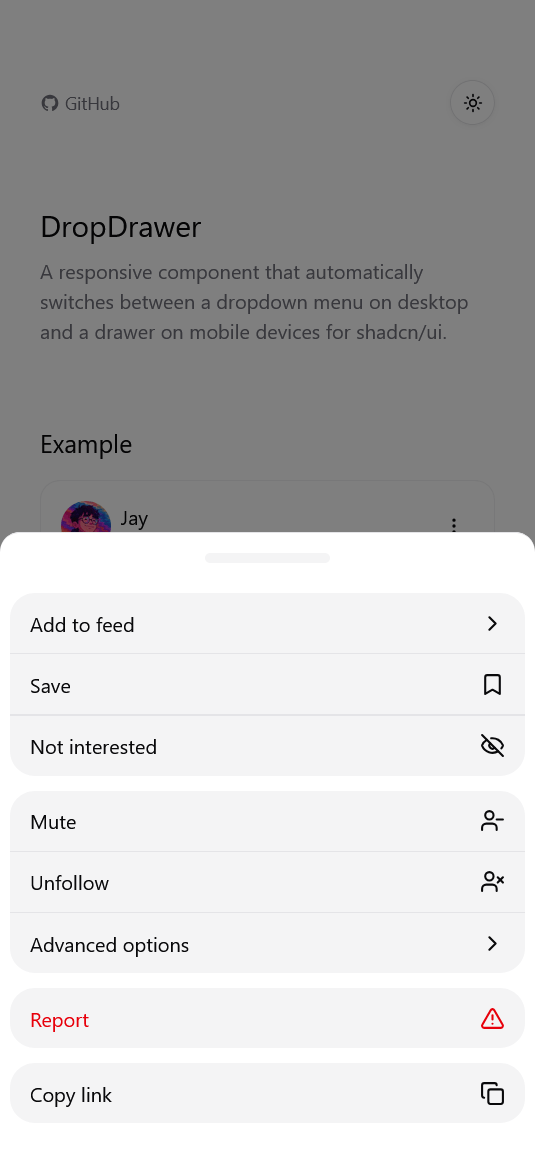
A responsive component that automatically switches between a dropdown menu on desktop and a drawer on mobile devices for shadcn/ui. A drop-in replacement for shadcn/ui's DropdownMenu component.
Built with React and Tailwind. Copy the prompt and paste it into Claude Code, Cursor or Lovable: your agent adds DropDrawer to your project and fits it to your theme.
Code
How DropDrawer is used: the demo's code. The component's own source comes with a free account.
Usage.tsx
"use client";

import {
  AlertTriangle,
  BookmarkIcon,
  Copy,
  EyeOffIcon,
  Home,
  LayoutDashboard,
  LockIcon,
  MoreVertical,
  Settings,
  ShieldIcon,
  UserMinusIcon,
  UserXIcon,
} from "lucide-react";
import { useState } from "react";

import { Button } from "@/components/ui/button";
import {
  DropDrawer,
  DropDrawerContent,
  DropDrawerGroup,
  DropDrawerItem,
  DropDrawerSeparator,
  DropDrawerSub,
  DropDrawerSubContent,
  DropDrawerSubTrigger,
  DropDrawerTrigger,
} from "@/components/ui/dropdrawer";

import Image from "next/image";

export function PostExample() {
  const [open, setOpen] = useState(false);

  return (
    <div className="flex flex-col items-center justify-center">
      <div className="w-full max-w-md rounded-lg border border-border/50 p-4">
        <div className="mb-4 flex items-center justify-between">
          <div className="flex items-center gap-2">
            <Image
              src="/jay.png"
              height="40"
              width="40"
              alt="avatar"
              className="rounded-full"
            />
            <div>
              <p className="font-medium">Jay</p>
              <p className="text-xs text-muted-foreground">just now</p>
            </div>
          </div>
          <DropDrawer open={open} onOpenChange={setOpen}>
            <DropDrawerTrigger asChild>
              <Button
                variant="ghost"
                size="icon"
                className="h-8 w-8 rounded-full"
              >
                <MoreVertical className="h-5 w-5" />
              </Button>
            </DropDrawerTrigger>
            <DropDrawerContent>
              {/* First group: Add to feed, Save, Not interested */}
              <DropDrawerGroup>
                <DropDrawerSub>
                  <DropDrawerSubTrigger
                    icon={<LayoutDashboard className="h-5 w-5" />}
                  >
                    Add to feed
                  </DropDrawerSubTrigger>
                  <DropDrawerSubContent>
                    <DropDrawerItem icon={<Home className="h-5 w-5" />}>
                      Home
                    </DropDrawerItem>
                    <DropDrawerItem
                      icon={<LayoutDashboard className="h-5 w-5" />}
                    >
                      Work
                    </DropDrawerItem>
                    <DropDrawerItem icon={<BookmarkIcon className="h-5 w-5" />}>
                      Personal
                    </DropDrawerItem>
                  </DropDrawerSubContent>
                </DropDrawerSub>
                <DropDrawerItem icon={<BookmarkIcon className="h-5 w-5" />}>
                  Save
                </DropDrawerItem>
                <DropDrawerItem icon={<EyeOffIcon className="h-5 w-5" />}>
                  Not interested
                </DropDrawerItem>
              </DropDrawerGroup>

              <DropDrawerSeparator />

              {/* Second group: Mute, Advanced options, Unfollow */}
              <DropDrawerGroup>
                <DropDrawerItem icon={<UserMinusIcon className="h-5 w-5" />}>
                  Mute
                </DropDrawerItem>
                <DropDrawerItem icon={<UserXIcon className="h-5 w-5" />}>
                  Unfollow
                </DropDrawerItem>
                <DropDrawerSub>
                  <DropDrawerSubTrigger icon={<Settings className="h-5 w-5" />}>
                    Advanced options
                  </DropDrawerSubTrigger>
                  <DropDrawerSubContent>
                    <DropDrawerGroup>
                      <DropDrawerItem icon={<EyeOffIcon className="h-5 w-5" />}>
                        Hide this post
                      </DropDrawerItem>
                      <DropDrawerItem
                        icon={<AlertTriangle className="h-5 w-5" />}
                      >
                        Block content
                      </DropDrawerItem>
                    </DropDrawerGroup>
                    <DropDrawerSeparator />
                    <DropDrawerSub>
                      <DropDrawerSubTrigger
                        icon={<ShieldIcon className="h-5 w-5" />}
                      >
                        Privacy options
                      </DropDrawerSubTrigger>
                      <DropDrawerSubContent>
                        <DropDrawerItem icon={<LockIcon className="h-5 w-5" />}>
                          Restrict sharing
                        </DropDrawerItem>
                        <DropDrawerItem
                          icon={<EyeOffIcon className="h-5 w-5" />}
                        >
                          Manage visibility
                        </DropDrawerItem>
                      </DropDrawerSubContent>
                    </DropDrawerSub>
                  </DropDrawerSubContent>
                </DropDrawerSub>
              </DropDrawerGroup>

              <DropDrawerSeparator />

              {/* Third group: Report (destructive action) */}
              <DropDrawerGroup>
                <DropDrawerItem
                  variant="destructive"
                  icon={<AlertTriangle className="h-5 w-5" />}
                >
                  Report
                </DropDrawerItem>
              </DropDrawerGroup>

              <DropDrawerSeparator />

              {/* Fourth group: Copy link */}
              <DropDrawerGroup>
                <DropDrawerItem icon={<Copy className="h-5 w-5" />}>
                  Copy link
                </DropDrawerItem>
              </DropDrawerGroup>
            </DropDrawerContent>
          </DropDrawer>
        </div>
        <div className="mb-4">
          <p>Click the menu button to see it in action.</p>
          <p className="mt-2 text-sm text-muted-foreground">
            Switch between desktop and mobile view to see the responsive
            behavior.
          </p>
        </div>
        <div className="h-32 w-full rounded-lg bg-muted"></div>
      </div>
    </div>
  );
}