
About
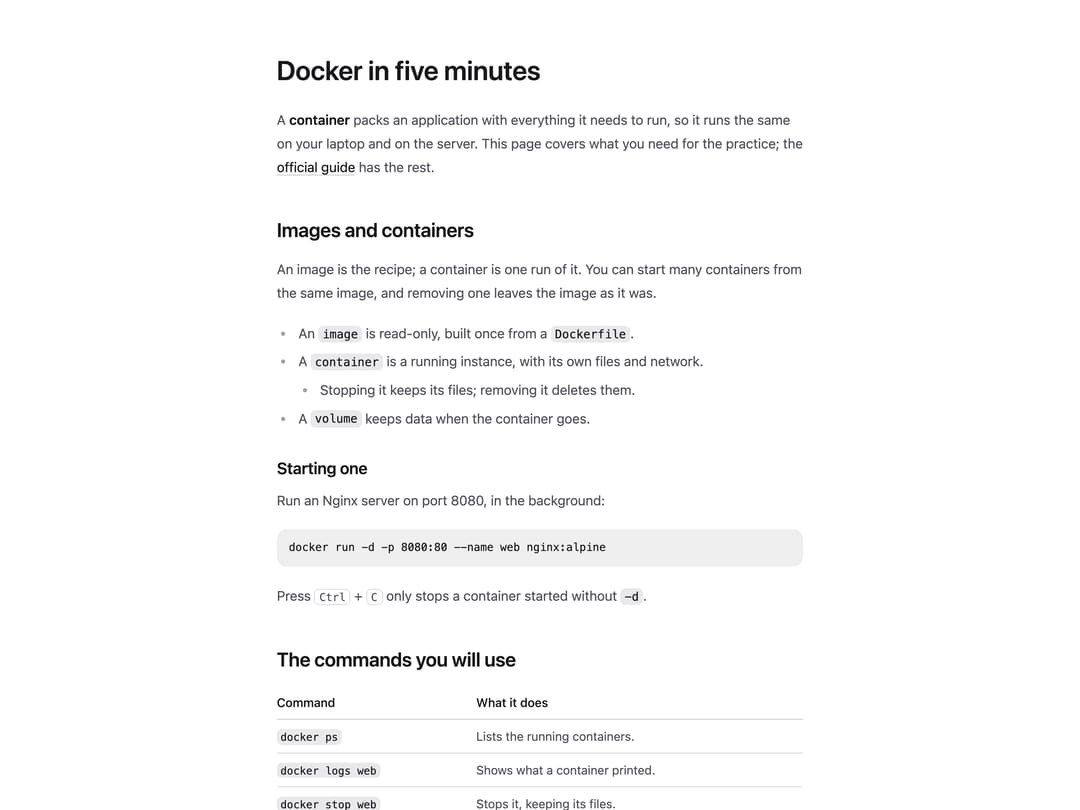
A styled wrapper for rendering an article's content — headings, paragraphs, lists, links, inline code, quotes, tables and images — either from raw HTML (e.g. rendered Markdown) or from nested children, spaced and colored like a document.
Built with React and Tailwind. Copy the prompt and paste it into Claude Code, Cursor or Lovable: your agent adds Prose to your project and fits it to your theme.
Code
How Prose is used: the demo's code. The component's own source comes with a free account.
Usage.tsx
import Prose from "@/components/ui/prose";
export default function ProseDemo() {
return (
<Prose className="mx-auto max-w-2xl px-6 py-16">
<h1>Docker in five minutes</h1>
<p>
A <strong>container</strong> packs an application with everything it
needs to run, so it runs the same on your laptop and on the server. This
page covers what you need for the practice; the{" "}
<a href="#">official guide</a> has the rest.
</p>
<h2>Images and containers</h2>
<p>
An image is the recipe; a container is one run of it. You can start many
containers from the same image, and removing one leaves the image as it
was.
</p>
<ul>
<li>
An <code>image</code> is read-only, built once from a{" "}
<code>Dockerfile</code>.
</li>
<li>
A <code>container</code> is a running instance, with its own files and
network.
<ul>
<li>Stopping it keeps its files; removing it deletes them.</li>
</ul>
</li>
<li>
A <code>volume</code> keeps data when the container goes.
</li>
</ul>
<h3>Starting one</h3>
<p>Run an Nginx server on port 8080, in the background:</p>
<pre>
<code>docker run -d -p 8080:80 --name web nginx:alpine</code>
</pre>
<p>
Press <kbd>Ctrl</kbd> + <kbd>C</kbd> only stops a container started
without <code>-d</code>.
</p>
<h2>The commands you will use</h2>
<table>
<thead>
<tr>
<th>Command</th>
<th>What it does</th>
</tr>
</thead>
<tbody>
<tr>
<td>
<code>docker ps</code>
</td>
<td>Lists the running containers.</td>
</tr>
<tr>
<td>
<code>docker logs web</code>
</td>
<td>Shows what a container printed.</td>
</tr>
<tr>
<td>
<code>docker stop web</code>
</td>
<td>Stops it, keeping its files.</td>
</tr>
<tr>
<td>
<code>docker rm web</code>
</td>
<td>Removes it for good.</td>
</tr>
</tbody>
</table>
<blockquote>
A container is not a virtual machine: it shares the host's kernel,
which is why it starts in a second.
</blockquote>
<ol>
<li>
Write a <code>Dockerfile</code>.
</li>
<li>
Build it with <code>docker build -t app .</code>
</li>
<li>
Run it with <code>docker run app</code>.
</li>
</ol>
<hr />
<p>Next: putting several containers together with Compose.</p>
</Prose>
);
}
More by joseestevez520
View all
Marquee
Chart
Day Strip
File Drop Zone
More in Text
View all
Motion Blur Text
36

Vertical Cut Reveal Characters
103

NeonRGBTextEffect
144
Text Reveal
27
Random Letter Swap
46

Rainbow Text Effect
47
Text Color
545

Blur Reveal
300