
About
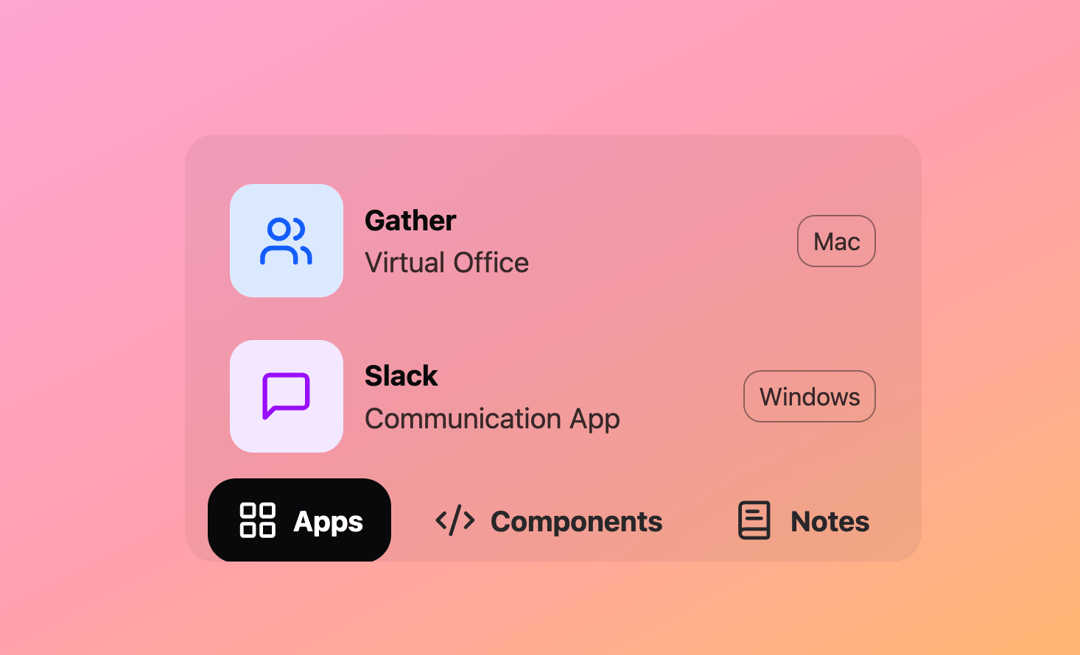
Here is dynamic action bar component
Built with React and Tailwind. Copy the prompt and paste it into Claude Code, Cursor or Lovable: your agent adds Dynamic Action to your project and fits it to your theme.
Code
How Dynamic Action is used: the demo's code. The component's own source comes with a free account.
Usage.tsx
// demo.tsx
import * as React from "react";
import DynamicActionBar, { type ActionItem } from "@/components/ui/dynamic-action";
import {
  LayoutGrid,
  CodeXml,
  BookText,
  MessageSquare,
  Users,
  Link,
} from "lucide-react";

const AppsContent = () => (
  <div className="flex flex-col items-center p-4">
    <div className="flex w-[95%] cursor-pointer items-center gap-3 rounded-2xl py-3 duration-300 hover:bg-black/5 hover:px-3">
      <Users className="h-16 w-16 shrink-0 rounded-xl bg-blue-100 p-4 text-blue-600" />
      <div className="flex w-full flex-col items-start">
        <p className="font-bold">Gather</p>
        <p className="opacity-80">Virtual Office</p>
      </div>
      <span className="block shrink-0 rounded-lg border border-black/50 py-1 px-2 text-sm opacity-80">
        Mac
      </span>
    </div>
    <div className="flex w-[95%] cursor-pointer items-center gap-3 rounded-2xl py-3 duration-300 hover:bg-black/5 hover:px-3">
      <MessageSquare className="h-16 w-16 shrink-0 rounded-xl bg-purple-100 p-4 text-purple-600" />
      <div className="flex w-full flex-col items-start">
        <p className="font-bold">Slack</p>
        <p className="opacity-80">Communication App</p>
      </div>
      <span className="block shrink-0 rounded-lg border border-black/50 py-1 px-2 text-sm opacity-80">
        Windows
      </span>
    </div>
    <div className="mt-4 h-[2px] w-[95%] bg-black/10"></div>
  </div>
);

const ComponentsContent = () => (
  <div className="flex flex-col items-center gap-1 py-4 px-6">
    {[
      { name: "Action Bar", tag: "Dynamic", date: "06 - 12" },
      { name: "Image Expand", tag: "Overlay", date: "05 - 12" },
      { name: "Read Time", tag: "Scroll", date: "04 - 12" },
    ].map((item) => (
      <div key={item.name} className="group w-full">
        <div className="mx-auto flex w-full cursor-pointer items-center justify-between gap-3 rounded-2xl py-2 duration-300 group-hover:w-[95%] group-hover:bg-black/5 group-hover:px-3">
          <div className="flex items-center gap-3">
            <CodeXml className="size-6 shrink-0 opacity-75" />
            <span className="font-bold">{item.name}</span>
          </div>
          <div className="flex items-center gap-3">
            <span className="block shrink-0 rounded-lg border border-black/50 py-1 px-2 text-sm opacity-80">
              {item.tag}
            </span>
            <span>{item.date}</span>
          </div>
        </div>
      </div>
    ))}
    <div className="mt-4 h-[2px] w-full bg-black/10"></div>
  </div>
);

const NotesContent = () => (
  <div className="flex flex-col items-center gap-1 p-4">
    {[
      { name: "Changelog using GitHub", date: "Jun, 24" },
      { name: "Feedback in Slack", date: "May, 24" },
    ].map((item) => (
      <div key={item.name} className="group w-full">
        <div className="mx-auto flex w-full cursor-pointer items-center justify-between gap-3 rounded-2xl py-2 duration-300 group-hover:w-[95%] group-hover:bg-black/5 group-hover:px-3">
          <div className="flex items-center gap-3">
            <Link className="size-6" />
            <span className="font-bold">{item.name}</span>
          </div>
          <span>{item.date}</span>
        </div>
      </div>
    ))}
    <div className="mt-4 h-[2px] w-full bg-black/10"></div>
  </div>
);

const DynamicActionBarDemo = () => {
  const actions: ActionItem[] = [
    {
      id: "apps",
      label: "Apps",
      icon: LayoutGrid,
      content: <AppsContent />,
      dimensions: { width: 500, height: 234 },
    },
    {
      id: "components",
      label: "Components",
      icon: CodeXml,
      content: <ComponentsContent />,
      dimensions: { width: 460, height: 206 },
    },
    {
      id: "notes",
      label: "Notes",
      icon: BookText,
      content: <NotesContent />,
      dimensions: { width: 480, height: 148 },
    },
  ];

  return (
    <div className="flex h-[450px] w-full items-end justify-center rounded-lg bg-gradient-to-br from-pink-300 via-rose-300 to-orange-300 p-4 pb-14">
      <DynamicActionBar actions={actions} />
    </div>
  );
};

export { DynamicActionBarDemo as DemoOne };
Dependencies
More by LN
View all
Pricing Interaction
1.4K
Dorpdown Navigation
1.2K
Visualize Booking
618
Assisted Password Confirmation
585
Tags Selector
531
Mega Menu
386
Feedback Slider
326
FlipButton
288
More in Navigation
View all

Sidebar
234

Tabs
60
Newsletter Signup Footer
16
Progress Bar Stepper
36

Footer 2
201
Navbar with Theme Toggle
43

Navbar
71

Pagination
86
