
About
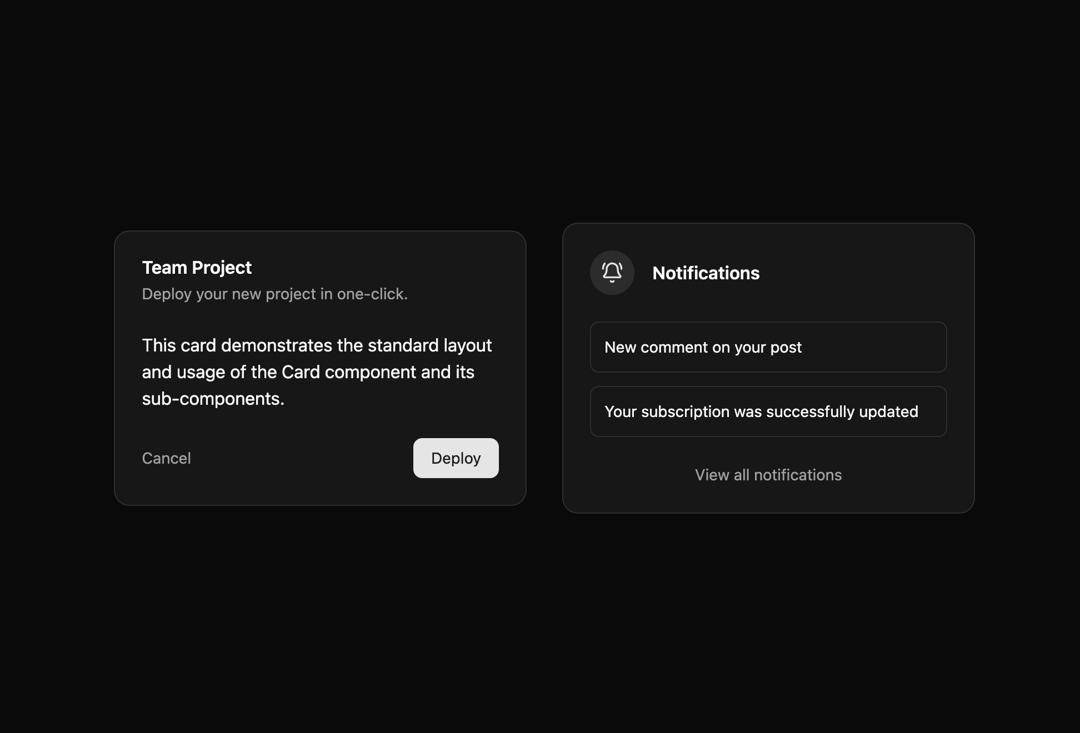
Here is indeveui card base component
Built with React and Tailwind. Copy the prompt and paste it into Claude Code, Cursor or Lovable: your agent adds Card to your project and fits it to your theme.
Code
How Card is used: the demo's code. The component's own source comes with a free account.
Usage.tsx
// demo.tsx
import { BellRing } from 'lucide-react';

import Card, {
   CardContent,
   CardDescription,
   CardFooter,
   CardHeader,
   CardTitle,
} from '@/components/ui/indevui-card';

function CardDemo() {
   return (
      <div className="flex flex-col items-center justify-center gap-8 md:flex-row">
         <Card className="w-full max-w-sm">
            <CardHeader>
               <CardTitle>Team Project</CardTitle>
               <CardDescription>Deploy your new project in one-click.</CardDescription>
            </CardHeader>
            <CardContent>
               <p>
                  This card demonstrates the standard layout and usage of the Card component and its
                  sub-components.
               </p>
            </CardContent>
            <CardFooter className="flex justify-between">
               <span className="cursor-pointer text-sm text-muted-foreground hover:text-foreground">
                  Cancel
               </span>
               <span className="cursor-pointer rounded-md bg-primary px-4 py-2 text-sm text-primary-foreground hover:bg-primary/90">
                  Deploy
               </span>
            </CardFooter>
         </Card>
         <Card className="w-full max-w-sm">
            <CardHeader>
               <div className="flex items-center gap-4">
                  <div className="grid h-10 w-10 place-items-center rounded-full bg-primary/10 text-primary">
                     <BellRing className="h-5 w-5" />
                  </div>
                  <CardTitle>Notifications</CardTitle>
               </div>
            </CardHeader>
            <CardContent className="flex flex-col gap-3">
               <div className="rounded-md border p-3 text-sm">New comment on your post</div>
               <div className="rounded-md border p-3 text-sm">
                  Your subscription was successfully updated
               </div>
            </CardContent>
            <CardFooter>
               <p className="w-full text-center text-sm text-muted-foreground">
                  View all notifications
               </p>
            </CardFooter>
         </Card>
      </div>
   );
}

export { CardDemo as DemoOne };More by LN
View all
Pricing Interaction
1.4K
Dorpdown Navigation
1.2K
Visualize Booking
618
Assisted Password Confirmation
585
Tags Selector
531
Mega Menu
386
Feedback Slider
326
FlipButton
288
More in Buttons
View all
Button Save
46

Button
20

Eclipse Button
5

Button
32

Button
6

Button
14

Button Group
37
Split Button
32

