
About
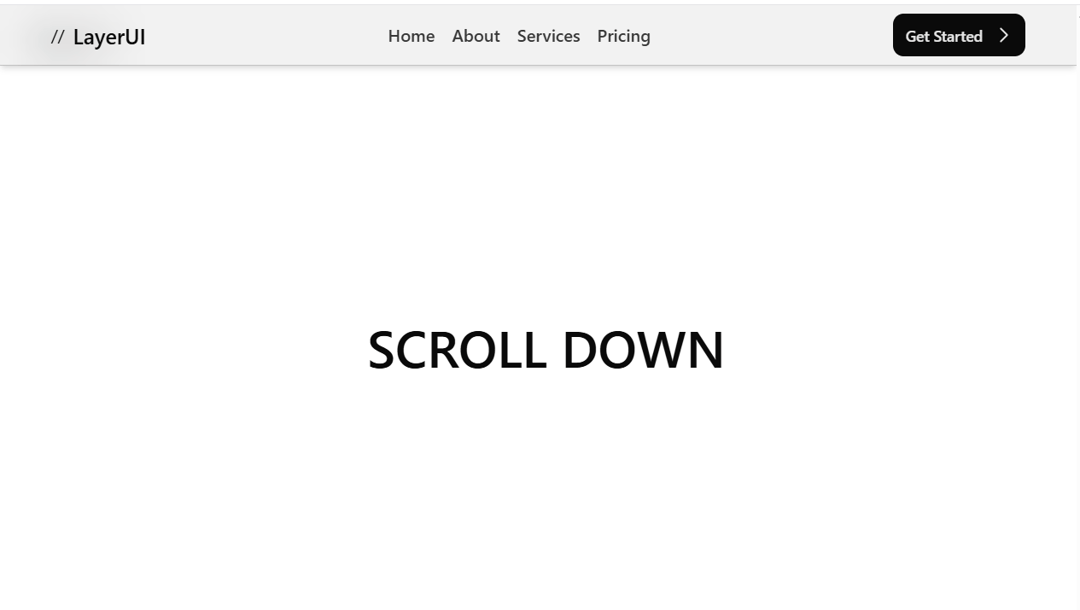
scrollhidenavbar
Built with React and Tailwind. Copy the prompt and paste it into Claude Code, Cursor or Lovable: your agent adds scrollhidenavbar to your project and fits it to your theme.
Code
How scrollhidenavbar is used: the demo's code. The component's own source comes with a free account.
Usage.tsx
import { cn } from "@/lib/utils";
import { motion, useMotionValueEvent, useScroll } from "framer-motion";
import { useState } from "react";

// Define the structure for navigation items
interface NavigationItem {
    name: string;
    href: string;
}

// List of navigation items
const navigationItems: NavigationItem[] = [
    { name: "Home", href: "#" },
    { name: "About", href: "#" },
    { name: "Services", href: "#" },
    { name: "Pricing", href: "#" }
];

// Variants for the navigation bar animation
const navVariants = {
    visible: { opacity: 1, y: 0 },
    hidden: { opacity: 0, y: "-4rem" },
    open: {
        height: "100%",
        transition: { duration: 0.5, ease: 'easeInOut', type: 'just', stiffness: 50 }
    },
    close: {
        height: "auto",
        transition: { duration: 0.5, ease: 'easeInOut', type: 'just', stiffness: 50 }
    }
};

// NavigationBar component
export default function NavigationBar() {
    const { scrollY } = useScroll();
    const [hidden, setHidden] = useState(false);
    const [prevScroll, setPrevScroll] = useState(0);
    const [isMenuOpen, setMenuOpen] = useState(false);

    // Update hidden state based on scroll position
    function update(latest: number, prev: number): void {
        if (latest < prev) {
            setHidden(false);
        } else if (latest > 200 && latest > prev) {
            setHidden(true);
        }
    }

    useMotionValueEvent(scrollY, "change", (latest: number) => {
        update(latest, prevScroll);
        setPrevScroll(latest);
    });

    return (
        <>
            <motion.nav
                className="bg-black/5 dark:bg-white/20 z-50 w-full sm:px-12 py-2 top-0 min-w-full mx-auto p-4 dark:border-white/30 fixed start-0 border-b shadow-md border-black/20 backdrop-blur-lg"
                variants={navVariants}
                animate={[hidden ? "hidden" : "visible", isMenuOpen ? "open" : "close"]}
                transition={{
                    ease: [0.1, 0.25, 0.3, 1],
                    duration: 0.6,
                    staggerChildren: 0.05
                }}
            >
                <div className="flex justify-between w-full">
                    <div className="flex items-center gap-2">
                        //
                        <p className="text-xl font-semibold">LayerUI</p>
                    </div>
                    <div className="hidden md:flex items-center gap-4 text-base font-medium">
                        {navigationItems.map((item, index) => (
                            <a className=" opacity-80 hover:opacity-100 hover:-translate-y-0.5 ease-in-out duration-150" key={index} href={item.href}>
                                {item.name}
                            </a>
                        ))}
                    </div>
                    <div className='flex justify-between items-center gap-2 sm:gap-5'>
                        <a href="#" className="group/button relative inline-flex h-10 items-center justify-center overflow-hidden rounded-lg gap-2 bg-neutral-950 pl-3 pr-2 font-medium text-neutral-200">
                            <span className="text-sm">Get Started</span>
                            <svg xmlns="http://www.w3.org/2000/svg" width="24" height="24" viewBox="0 0 24 24" fill="none" stroke="currentColor" strokeWidth="1.5" strokeLinecap="round" strokeLinejoin="round" className="lucide lucide-chevron-right group-hover/button:translate-x-1 transition-all duration-200 ease-in-out">
                                <path d="m9 18 6-6-6-6" />
                            </svg>
                        </a>
                        <MenuToggle isMenuOpen={isMenuOpen} setMenuOpen={setMenuOpen} />
                    </div>
                </div>
                {isMenuOpen && (
                    <div className="flex my-16 sm:mx-16 bg-black/10 dark:bg-white/10 rounded-xl mx-4 flex-col px-5 py-7 gap-5 text-lg font-medium">
                        {navigationItems.map((item, index) => (
                            <motion.a
                                key={index}
                                initial={{ opacity: 0, y: 20 }}
                                animate={{ opacity: 1, y: 0 }}
                                transition={{ ease: 'easeInOut', duration: 0.3, delay: index * 0.2, stiffness: 50, type: 'spring' }}
                                className='py-2 rounded-xl border border-black/20 px-4 flex items-center dark:border-white/15 hover:-translate-y-2 ease-in-out duration-150 hover:bg-black hover:text-white shadow dark:hover:bg-white dark:hover:text-black bg-white dark:bg-black'
                                href={item.href}
                            >
                                {item.name}
                            </motion.a>
                        ))}
                    </div>
                )}
            </motion.nav>
            <div>
                <div className='h-screen text-5xl font-semibold flex justify-center items-center'>
                    SCROLL DOWN
                </div>
                <div className='h-screen text-5xl font-semibold flex justify-center items-center'>
                    SCROLL DOWN
                </div>
            </div>
        </>
    );
}


// MenuToggle component for the hamburger menu
interface MenuToggleProps {
    isMenuOpen: boolean;
    setMenuOpen: React.Dispatch<React.SetStateAction<boolean>>;
}

function MenuToggle({ isMenuOpen, setMenuOpen }: MenuToggleProps) {
    return (
        <button
            className={cn("md:hidden group inline-flex w-12 h-12 text-center items-center justify-center transition rounded-lg text-black dark:text-white")}
            onClick={() => setMenuOpen(!isMenuOpen)}
        >
            <svg className="w-6 h-6 fill-current pointer-events-none" viewBox="0 0 16 16" xmlns="http://www.w3.org/2000/svg">
                <rect className={cn("origin-center transition-all duration-300 ease-[cubic-bezier(.5,.85,.25,1.1)]", isMenuOpen ? "rotate-[315deg] [x:0] [y:7]" : "")} y="2" x="7" width="9" height="1.5" rx="1"></rect>
                <rect className={cn("origin-center transition-all duration-300 ease-[cubic-bezier(.5,.85,.25,1.8)]", isMenuOpen ? "rotate-45" : "")} y="7" width="16" height="1.5" rx="1"></rect>
                <rect className={cn("origin-center transition-all duration-300 ease-[cubic-bezier(.5,.85,.25,1.1)]", isMenuOpen ? "[y:7] [x:0] -rotate-[225deg]" : "")} y="12" width="9" height="1.5" rx="1"></rect>
            </svg>
        </button>
    );
}
More by Maheshwarreddy
View all
chatfaq

threedpricing

Pricing Section