
About
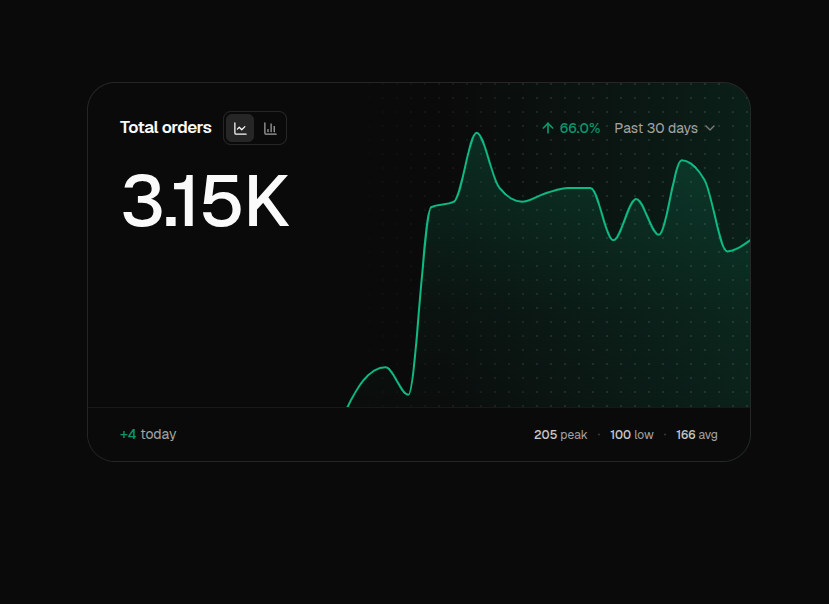
A KPI stat card pairing a large headline figure with a data-driven chart, rendered with Recharts and switchable between a smooth progression curve and bars.
Built with React and Tailwind. Copy the prompt and paste it into Claude Code, Cursor or Lovable: your agent adds Progress Metric Card to your project and fits it to your theme.
Code
How Progress Metric Card is used: the demo's code. The component's own source comes with a free account.
Usage.tsx
import ProgressMetricCard, { type SeriesPoint } from '@/components/ui/progress-metric-card';

const ordersSeries: SeriesPoint[] = [
  { value: 100, date: '18 Mar, 2025' },
  { value: 115, date: '21 Mar, 2025' },
  { value: 120, date: '24 Mar, 2025' },
  { value: 110, date: '27 Mar, 2025' },
  { value: 178, date: '30 Mar, 2025' },
  { value: 180, date: '02 Apr, 2025' },
  { value: 205, date: '05 Apr, 2025' },
  { value: 185, date: '08 Apr, 2025' },
  { value: 180, date: '11 Apr, 2025' },
  { value: 183, date: '14 Apr, 2025' },
  { value: 185, date: '17 Apr, 2025' },
  { value: 185, date: '20 Apr, 2025' },
  { value: 166, date: '23 Apr, 2025' },
  { value: 181, date: '26 Apr, 2025' },
  { value: 168, date: '29 Apr, 2025' },
  { value: 195, date: '02 May, 2025' },
  { value: 188, date: '05 May, 2025' },
  { value: 162, date: '08 May, 2025' },
  { value: 166, date: '11 May, 2025' },
];

export default function ProgressMetricCardDemo() {
  return (
    <div className="flex w-full max-w-[760px] flex-col gap-4 p-12">
      <ProgressMetricCard title="Total orders" unit="orders" data={ordersSeries} defaultIndex={6} />
    </div>
  );
}
Dependencies
More by Mak VieSAinte
View all

Team Showcase
2.4K
Builders Community Hero
507
Hover Brand Logo
408
Contributors Section
215
Country Accordion
199
More in Buttons
View all
Button Save
46

Button
20

Eclipse Button
5

Button
32

Button
6

Button
14

Button Group
37
Split Button
32

