
About
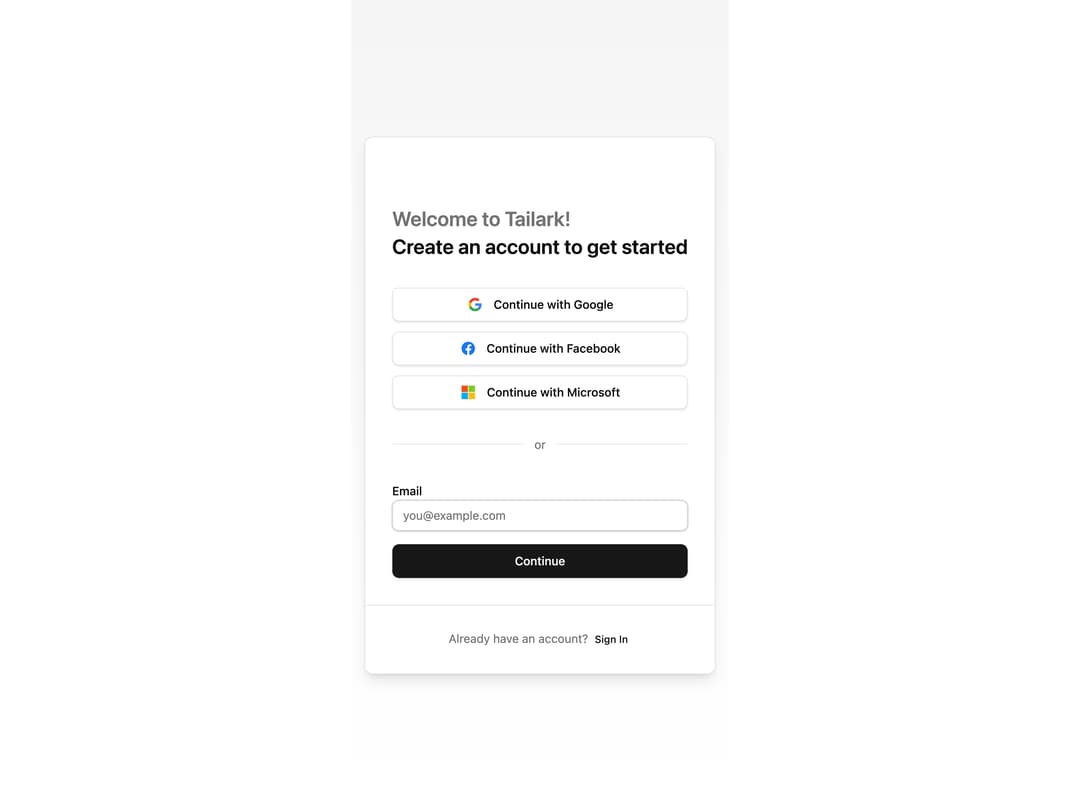
Here is Login component
Built with React and Tailwind. Copy the prompt and paste it into Claude Code, Cursor or Lovable: your agent adds Login to your project and fits it to your theme.
Code
How Login is used: the demo's code. The component's own source comes with a free account.
Usage.tsx
import { Button } from '@/components/ui/button'
import { Input } from '@/components/ui/input'
import { Label } from '@/components/ui/label'
import Link from 'next/link'

export default function LoginPage() {
    return (
        <section className="bg-gradient-to-b from-muted to-background flex min-h-screen items-center justify-center px-4 py-12 md:py-20">
            <form
                action=""
                className="w-full max-w-md rounded-lg border border-border bg-card shadow-lg"
            >
                <div className="p-8">
                    {/* Logo / Home Link */}
                    <div>
                        <Link
                            href="/mist"
                            aria-label="Go home"
                            className="inline-block"
                        >
                            {/* You can put a logo here */}
                        </Link>
                        <h1 className="mt-6 text-pretty text-2xl font-semibold leading-snug">
                            <span className="block text-muted-foreground">Welcome to Tailark!</span>
                            Create an account to get started
                        </h1>
                    </div>

                    {/* Social Buttons */}
                    <div className="mt-8 space-y-3">
                        {/* Google */}
                        <Button
                            type="button"
                            variant="outline"
                            size="lg"
                            className="w-full flex items-center justify-center gap-3"
                        >
                            <span className="flex items-center justify-center size-5">
                                <svg xmlns="http://www.w3.org/2000/svg" viewBox="0 0 256 262" className="w-full h-full">
                                    <path fill="#4285f4" d="M255.878 133.451c0-10.734-.871-18.567-2.756-26.69H130.55v48.448h71.947c-1.45 12.04-9.283 30.172-26.69 42.356l-.244 1.622l38.755 30.023l2.685.268c24.659-22.774 38.875-56.282 38.875-96.027"></path>
                                    <path fill="#34a853" d="M130.55 261.1c35.248 0 64.839-11.605 86.453-31.622l-41.196-31.913c-11.024 7.688-25.82 13.055-45.257 13.055c-34.523 0-63.824-22.773-74.269-54.25l-1.531.13l-40.298 31.187l-.527 1.465C35.393 231.798 79.49 261.1 130.55 261.1"></path>
                                    <path fill="#fbbc05" d="M56.281 156.37c-2.756-8.123-4.351-16.827-4.351-25.82c0-8.994 1.595-17.697 4.206-25.82l-.073-1.73L15.26 71.312l-1.335.635C5.077 89.644 0 109.517 0 130.55s5.077 40.905 13.925 58.602z"></path>
                                    <path fill="#eb4335" d="M130.55 50.479c24.514 0 41.05 10.589 50.479 19.438l36.844-35.974C195.245 12.91 165.798 0 130.55 0C79.49 0 35.393 29.301 13.925 71.947l42.211 32.783c10.59-31.477 39.891-54.251 74.414-54.251"></path>
                                </svg>
                            </span>
                            <span>Continue with Google</span>
                        </Button>

                        {/* Facebook */}
                        <Button
                            type="button"
                            variant="outline"
                            size="lg"
                            className="w-full flex items-center justify-center gap-3"
                        >
                            <span className="flex items-center justify-center size-5">
                                <svg xmlns="http://www.w3.org/2000/svg" viewBox="0 0 256 256" className="w-full h-full">
                                    <path fill="#1877f2" d="M256 128C256 57.308 198.692 0 128 0S0 57.308 0 128c0 63.888 46.808 116.843 108 126.445V165H75.5v-37H108V99.8c0-32.08 19.11-49.8 48.348-49.8C170.352 50 185 52.5 185 52.5V84h-16.14C152.959 84 148 93.867 148 103.99V128h35.5l-5.675 37H148v89.445c61.192-9.602 108-62.556 108-126.445"></path>
                                    <path fill="#fff" d="m177.825 165l5.675-37H148v-24.01C148 93.866 152.959 84 168.86 84H185V52.5S170.352 50 156.347 50C127.11 50 108 67.72 108 99.8V128H75.5v37H108v89.445A129 129 0 0 0 128 256a129 129 0 0 0 20-1.555V165z"></path>
                                </svg>
                            </span>
                            <span>Continue with Facebook</span>
                        </Button>

                        {/* Microsoft */}
                        <Button
                            type="button"
                            variant="outline"
                            size="lg"
                            className="w-full flex items-center justify-center gap-3"
                        >
                            <span className="flex items-center justify-center size-5">
                                <svg xmlns="http://www.w3.org/2000/svg" viewBox="0 0 256 256" className="w-full h-full">
                                    <path fill="#f1511b" d="M121.666 121.666H0V0h121.666z"></path>
                                    <path fill="#80cc28" d="M256 121.666H134.335V0H256z"></path>
                                    <path fill="#00adef" d="M121.663 256.002H0V134.336h121.663z"></path>
                                    <path fill="#fbbc09" d="M256 256.002H134.335V134.336H256z"></path>
                                </svg>
                            </span>
                            <span>Continue with Microsoft</span>
                        </Button>
                    </div>

                    {/* Divider */}
                    <div className="my-8 flex items-center">
                        <div className="h-px flex-1 bg-border" />
                        <span className="px-3 text-sm text-muted-foreground">or</span>
                        <div className="h-px flex-1 bg-border" />
                    </div>

                    {/* Email Field */}
                    <div className="space-y-4">
                        <div className="space-y-2">
                            <Label htmlFor="email" className="text-sm font-medium">
                                Email
                            </Label>
                            <Input
                                type="email"
                                required
                                name="email"
                                id="email"
                                placeholder="you@example.com"
                                className="ring-foreground/15 border-input ring-1"
                            />
                        </div>

                        <Button className="w-full" size="lg">
                            Continue
                        </Button>
                    </div>
                </div>

                {/* Footer */}
                <div className="px-8 py-6 border-t border-border text-center">
                    <p className="text-sm text-muted-foreground">
                        Already have an account?{' '}
                        <Button asChild variant="link" size="sm" className="px-1">
                            <Link href="#">Sign In</Link>
                        </Button>
                    </p>
                </div>
            </form>
        </section>
    )
}
Dependencies
More by Méschac Irung
View all

Features 8
3.1K
Hero Section 1
3K
Hero Section 5
2.6K
Hero Section 6
881
Hero Section 2
876
Hero Section 4
626
Features 9
595
Hero Section 3
580
More in Buttons
View all

Button
14
Texture Button
92
Button
34
Button Save
46

Button
64

Button Group
3

Notification Button
103

Button

