
About
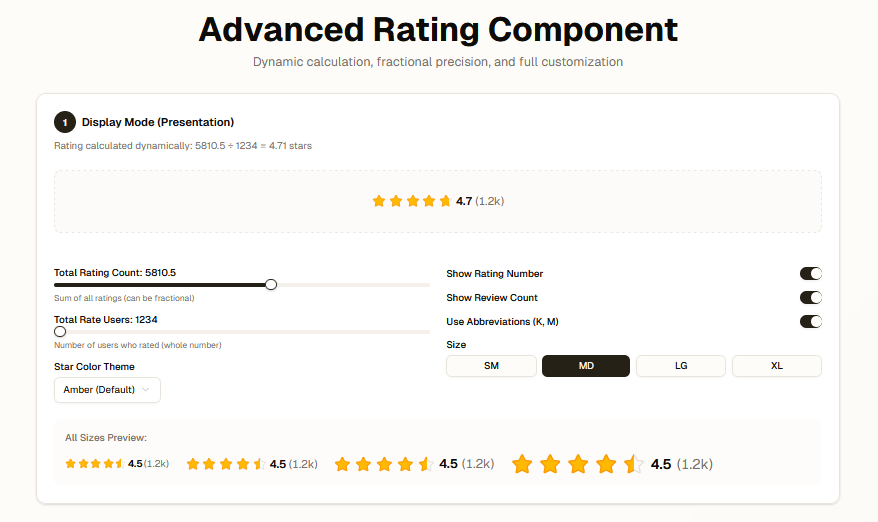
Versatile rating component supporting both display and input modes Features: - Display mode: Shows calculated averages with user counts - Input mode: Interactive star selection with hover effects - Internationalization support with locale-specific formatting - Customizable precision (full, half, or fractional stars) - Responsive sizing and theming options
Built with React and Tailwind. Copy the prompt and paste it into Claude Code, Cursor or Lovable: your agent adds Rating to your project and fits it to your theme.
Code
How Rating is used: the demo's code. The component's own source comes with a free account.
Usage.tsx
"use client"
import * as React from "react"
import { Rating } from "@/components/ui/rating"
import { Card, CardContent, CardDescription, CardHeader, CardTitle } from "@/components/ui/card"
import { Label } from "@/components/ui/label"
import { Switch } from "@/components/ui/switch"
import { Slider } from "@/components/ui/slider"
import { Button } from "@/components/ui/button"
import { Separator } from "@/components/ui/separator"
import { Select, SelectContent, SelectItem, SelectTrigger, SelectValue } from "@/components/ui/select"
export default function DemoOne() {
const [displayTotalRatingCount, setDisplayTotalRatingCount] = React.useState(5810.5)
const [displayTotalRateUser, setDisplayTotalRateUser] = React.useState(1234)
const [displayShowNumber, setDisplayShowNumber] = React.useState(true)
const [displayShowReviews, setDisplayShowReviews] = React.useState(true)
const [displayUseAbbreviation, setDisplayUseAbbreviation] = React.useState(true)
const [displaySize, setDisplaySize] = React.useState<"sm" | "md" | "lg" | "xl">("md")
const [displayStarFillColor, setDisplayStarFillColor] = React.useState("fill-amber-400 text-amber-400")
const [displayStarStrokeColor, setDisplayStarStrokeColor] = React.useState("stroke-amber-500")
const [inputRating, setInputRating] = React.useState(0)
const [inputPrecision, setInputPrecision] = React.useState<"full" | "half" | "fractional">("half")
const [inputShowNumber, setInputShowNumber] = React.useState(true)
const [inputShowManualInput, setInputShowManualInput] = React.useState(true)
const [inputSize, setInputSize] = React.useState<"sm" | "md" | "lg" | "xl">("lg")
// Calculate average ratings for display
const displayAvgRating = displayTotalRateUser > 0 ? displayTotalRatingCount / displayTotalRateUser : 0
return (
<div className="min-h-screen bg-gradient-to-br from-background via-background to-muted/20 p-4 md:p-8">
<div className="mx-auto max-w-6xl space-y-8">
{/* Header */}
<div className="text-center space-y-2">
<h1 className="text-4xl md:text-5xl font-bold text-balance">Advanced Rating Component</h1>
<p className="text-lg text-muted-foreground text-balance">
Dynamic calculation, fractional precision, and full customization
</p>
</div>
{/* Display Mode Demo */}
<Card className="border-2">
<CardHeader>
<CardTitle className="flex items-center gap-2">
<span className="inline-flex items-center justify-center w-8 h-8 rounded-full bg-primary text-primary-foreground text-sm font-bold">
1
</span>
Display Mode (Presentation)
</CardTitle>
<CardDescription>
Rating calculated dynamically: {displayTotalRatingCount.toFixed(1)} ÷ {displayTotalRateUser} ={" "}
{displayAvgRating.toFixed(2)} stars
</CardDescription>
</CardHeader>
<CardContent className="space-y-6">
{/* Preview */}
<div className="flex items-center justify-center p-8 bg-muted/30 rounded-lg border-2 border-dashed">
<Rating
totalRatingCount={displayTotalRatingCount}
totalRateUser={displayTotalRateUser}
showRatingNumber={displayShowNumber}
showReviewCount={displayShowReviews}
useAbbreviation={displayUseAbbreviation}
size={displaySize}
mode="display"
starFillColor={displayStarFillColor}
starStrokeColor={displayStarStrokeColor}
/>
</div>
<Separator />
{/* Controls */}
<div className="grid gap-6 md:grid-cols-2">
<div className="space-y-4">
<div className="space-y-2">
<Label>Total Rating Count: {displayTotalRatingCount.toFixed(1)}</Label>
<Slider
value={[displayTotalRatingCount]}
onValueChange={([value]) => setDisplayTotalRatingCount(value)}
min={0}
max={10000}
step={0.5}
className="w-full"
/>
<p className="text-xs text-muted-foreground">Sum of all ratings (can be fractional)</p>
</div>
<div className="space-y-2">
<Label>Total Rate Users: {displayTotalRateUser}</Label>
<Slider
value={[displayTotalRateUser]}
onValueChange={([value]) => setDisplayTotalRateUser(Math.round(value))}
min={1}
max={10000000}
step={1000}
className="w-full"
/>
<p className="text-xs text-muted-foreground">Number of users who rated (whole number)</p>
</div>
<div className="space-y-2">
<Label>Star Color Theme</Label>
<Select
value={displayStarFillColor}
onValueChange={(value) => {
setDisplayStarFillColor(value)
// Update stroke color to match
const strokeMap: Record<string, string> = {
"fill-amber-400 text-amber-400": "stroke-amber-500",
"fill-blue-400 text-blue-400": "stroke-blue-500",
"fill-green-400 text-green-400": "stroke-green-500",
"fill-red-400 text-red-400": "stroke-red-500",
"fill-purple-400 text-purple-400": "stroke-purple-500",
"fill-pink-400 text-pink-400": "stroke-pink-500",
}
setDisplayStarStrokeColor(strokeMap[value] || "stroke-amber-500")
}}
>
<SelectTrigger>
<SelectValue />
</SelectTrigger>
<SelectContent>
<SelectItem value="fill-amber-400 text-amber-400">Amber (Default)</SelectItem>
<SelectItem value="fill-blue-400 text-blue-400">Blue</SelectItem>
<SelectItem value="fill-green-400 text-green-400">Green</SelectItem>
<SelectItem value="fill-red-400 text-red-400">Red</SelectItem>
<SelectItem value="fill-purple-400 text-purple-400">Purple</SelectItem>
<SelectItem value="fill-pink-400 text-pink-400">Pink</SelectItem>
</SelectContent>
</Select>
</div>
</div>
<div className="space-y-4">
<div className="flex items-center justify-between">
<Label htmlFor="display-show-number">Show Rating Number</Label>
<Switch id="display-show-number" checked={displayShowNumber} onCheckedChange={setDisplayShowNumber} />
</div>
<div className="flex items-center justify-between">
<Label htmlFor="display-show-reviews">Show Review Count</Label>
<Switch
id="display-show-reviews"
checked={displayShowReviews}
onCheckedChange={setDisplayShowReviews}
/>
</div>
<div className="flex items-center justify-between">
<Label htmlFor="display-abbreviation">Use Abbreviations (K, M)</Label>
<Switch
id="display-abbreviation"
checked={displayUseAbbreviation}
onCheckedChange={setDisplayUseAbbreviation}
/>
</div>
<div className="space-y-2">
<Label>Size</Label>
<div className="flex gap-2">
{(["sm", "md", "lg", "xl"] as const).map((size) => (
<Button
key={size}
variant={displaySize === size ? "default" : "outline"}
size="sm"
onClick={() => setDisplaySize(size)}
className="flex-1"
>
{size.toUpperCase()}
</Button>
))}
</div>
</div>
</div>
</div>
{/* Size Examples */}
<div className="space-y-3 p-4 bg-muted/20 rounded-lg">
<p className="text-sm font-medium text-muted-foreground">All Sizes Preview:</p>
<div className="flex flex-wrap items-center gap-6">
<Rating totalRatingCount={5565} totalRateUser={1234} size="sm" />
<Rating totalRatingCount={5565} totalRateUser={1234} size="md" />
<Rating totalRatingCount={5565} totalRateUser={1234} size="lg" />
<Rating totalRatingCount={5565} totalRateUser={1234} size="xl" />
</div>
</div>
</CardContent>
</Card>
{/* Input Mode Demo */}
<Card className="border-2">
<CardHeader>
<CardTitle className="flex items-center gap-2">
<span className="inline-flex items-center justify-center w-8 h-8 rounded-full bg-primary text-primary-foreground text-sm font-bold">
2
</span>
Input Mode (Interactive)
</CardTitle>
<CardDescription>
Select a rating by clicking stars or entering a value. Current selection: {inputRating.toFixed(1)} stars
</CardDescription>
</CardHeader>
<CardContent className="space-y-6">
{/* Preview */}
<div className="flex flex-col items-center justify-center gap-4 p-8 bg-muted/30 rounded-lg border-2 border-dashed">
<p className="text-sm text-muted-foreground">
{inputPrecision === "full" && "Click stars to rate (full stars only)"}
{inputPrecision === "half" && "Click left/right side of stars for half-star ratings"}
{inputPrecision === "fractional" && "Click anywhere on stars for precise fractional ratings (0.1)"}
</p>
<Rating
showRatingNumber={inputShowNumber}
showManualInput={inputShowManualInput}
size={inputSize}
mode="input"
precision={inputPrecision}
onRatingChange={(newRating) => {
setInputRating(newRating)
}}
/>
{inputRating > 0 && (
<p className="text-sm font-medium text-primary">You selected: {inputRating.toFixed(1)} stars</p>
)}
</div>
<Separator />
{/* Controls */}
<div className="grid gap-6 md:grid-cols-2">
<div className="space-y-4">
<div className="space-y-2">
<Label>Star Precision</Label>
<Select value={inputPrecision} onValueChange={(value: any) => setInputPrecision(value)}>
<SelectTrigger>
<SelectValue />
</SelectTrigger>
<SelectContent>
<SelectItem value="full">Full Stars (1.0)</SelectItem>
<SelectItem value="half">Half Stars (0.5)</SelectItem>
<SelectItem value="fractional">Fractional (0.1)</SelectItem>
</SelectContent>
</Select>
</div>
<div className="flex items-center justify-between">
<Label htmlFor="input-show-number">Show Rating Number</Label>
<Switch id="input-show-number" checked={inputShowNumber} onCheckedChange={setInputShowNumber} />
</div>
<div className="flex items-center justify-between">
<Label htmlFor="input-show-manual">Show Manual Input</Label>
<Switch
id="input-show-manual"
checked={inputShowManualInput}
onCheckedChange={setInputShowManualInput}
/>
</div>
</div>
<div className="space-y-4">
<div className="space-y-2">
<Label>Size</Label>
<div className="flex gap-2">
{(["sm", "md", "lg", "xl"] as const).map((size) => (
<Button
key={size}
variant={inputSize === size ? "default" : "outline"}
size="sm"
onClick={() => setInputSize(size)}
className="flex-1"
>
{size.toUpperCase()}
</Button>
))}
</div>
</div>
<Button
variant="outline"
onClick={() => {
setInputRating(0)
}}
className="w-full"
>
Reset Rating
</Button>
</div>
</div>
</CardContent>
</Card>
{/* Real-world Examples */}
<Card className="border-2">
<CardHeader>
<CardTitle className="flex items-center gap-2">
<span className="inline-flex items-center justify-center w-8 h-8 rounded-full bg-primary text-primary-foreground text-sm font-bold">
3
</span>
Real-World Examples
</CardTitle>
<CardDescription>See how the component looks in different contexts</CardDescription>
</CardHeader>
<CardContent className="space-y-6">
{/* Product Card Example */}
<div className="p-6 bg-card border rounded-lg space-y-3">
<h3 className="text-lg font-semibold">Premium Wireless Headphones</h3>
<Rating totalRatingCount={13665.6} totalRateUser={2847} size="md" />
<p className="text-sm text-muted-foreground">High-quality audio with active noise cancellation</p>
<p className="text-2xl font-bold">$299.99</p>
</div>
{/* Review Example */}
<div className="p-6 bg-card border rounded-lg space-y-3">
<div className="flex items-start justify-between">
<div>
<h4 className="font-semibold">Amazing product!</h4>
<p className="text-sm text-muted-foreground">by John Doe • 2 days ago</p>
</div>
<Rating totalRatingCount={5} totalRateUser={1} showReviewCount={false} size="sm" />
</div>
<p className="text-sm">
Absolutely love these headphones. The sound quality is incredible and the battery life exceeds
expectations.
</p>
</div>
{/* Compact List Example */}
<div className="space-y-2">
<p className="text-sm font-medium text-muted-foreground mb-3">Top Rated Products:</p>
{[
{ name: "Product A", totalRating: 6049950.3, users: 1234567 },
{ name: "Product B", totalRating: 419399.8, users: 89234 },
{ name: "Product C", totalRating: 205551, users: 45678 },
].map((product, i) => (
<div key={i} className="flex items-center justify-between p-3 bg-muted/20 rounded-lg">
<span className="text-sm font-medium">{product.name}</span>
<Rating totalRatingCount={product.totalRating} totalRateUser={product.users} size="sm" />
</div>
))}
</div>
<div className="space-y-3 p-4 bg-muted/20 rounded-lg">
<p className="text-sm font-medium text-muted-foreground">Color Variations:</p>
<div className="space-y-2">
<Rating
totalRatingCount={2225}
totalRateUser={500}
size="md"
starFillColor="fill-blue-400 text-blue-400"
starStrokeColor="stroke-blue-500"
/>
<Rating
totalRatingCount={2225}
totalRateUser={500}
size="md"
starFillColor="fill-green-400 text-green-400"
starStrokeColor="stroke-green-500"
/>
<Rating
totalRatingCount={2225}
totalRateUser={500}
size="md"
starFillColor="fill-red-400 text-red-400"
starStrokeColor="stroke-red-500"
/>
</div>
</div>
</CardContent>
</Card>
</div>
</div>
)
}
Dependencies
More in Forms
View all

Premium Auth
500

Login 1
52
Authentication Card
47

Book A Demo 3
83
Book A Demo 1
69

Contact Card
1K

Login Card
32

Login 2
7
