
About
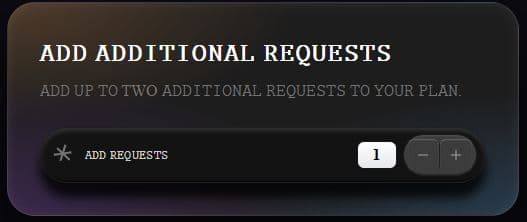
A simple request feature
Built with React and Tailwind. Copy the prompt and paste it into Claude Code, Cursor or Lovable: your agent adds Add Requests to your project and fits it to your theme.
Code
How Add Requests is used: the demo's code. The component's own source comes with a free account.
Usage.tsx
import { useState } from 'react';
import { Minus, Plus } from 'lucide-react';

function App() {
  const [count, setCount] = useState(1);
  const increment = () => setCount(prev => Math.min(2, prev + 1));
  const decrement = () => setCount(prev => Math.max(0, prev - 1));

  return (
    <div className="w-screen min-h-screen flex justify-center items-center bg-[#0a0a0f] p-4 font-['Inter']">
      {/* Card container */}
      <div className="relative w-full max-w-lg">

        {/* Main card with corrected atmospheric lighting and raised edge */}
        <div
          className="relative rounded-[28px] p-8 border border-white/10 bg-[#1D1D1D]
            [background-image:radial-gradient(at_bottom_left,rgba(61,40,81,0.9)_0%,transparent_45%),radial-gradient(at_top_left,rgba(101,72,48,0.7)_0%,transparent_40%),radial-gradient(at_bottom_right,rgba(40,61,81,0.9)_0%,transparent_40%)]
            shadow-[0_40px_60px_rgba(0,0,0,0.6),inset_0_1px_10px_rgba(255,255,255,0.08)]" /* Soft, raised edge is this inset shadow */
        >
          {/* Header section */}
          <div className="mb-6 relative z-22">
            <h2 className="text-[24px] font-semibold text-white mb-2 tracking-wider">
              𝙰𝙳𝙳 𝙰𝙳𝙳𝙸𝚃𝙸𝙾𝙽𝙰𝙻 𝚁𝙴𝚀𝚄𝙴𝚂𝚃𝚂
            </h2>
            <p className="text-[10px] text-neutral-100" className="text-neutral-500">
              𝙰𝙳𝙳 𝚄𝙿 𝚃𝙾 TWO 𝙰𝙳𝙳𝙸𝚃𝙸𝙾𝙽𝙰𝙻 𝚁𝙴𝚀𝚄𝙴𝚂𝚃𝚂 𝚃𝙾 𝚈𝙾𝚄𝚁 𝙿𝙻𝙰𝙽.
            </p>
          </div>

          {/* Counter Bar Container: Now with exact dimensions, colors, and shadows */}
          <div className="relative flex items-center justify-between rounded-full py-1.5 px-2 bg-[#131313] border border-white/5
            shadow-[0_15px_10px_rgba(0,0,0,0.8),inset_0_3px_4px_rgba(78,78,76,0.5),inset_0_-1px_2px_rgba(0,0,0,0.8)]"
          >
            {/* Left side: Custom 3-line star icon and label */}
            <div className="flex items-center gap-3 pl-1 pr-2">
              <span className="w-5 h-5 flex items-center justify-center -mt-0.5">
                <svg width="20" height="20" viewBox="0 0 24 24" fill="none" stroke="currentColor" strokeWidth="2.5" className="text-neutral-500">
                  <line x1="15" y1="1" x2="9" y2="20"></line>
                  <line x1="1" y1="13" x2="22" y2="10"></line>
                  <line x1="5" y1="5" x2="20" y2="19"></line>
                </svg>
              </span>
              <span className="text-white/80 font-medium text-[12px] uppercase tracking-wide">
                𝙰𝙳𝙳 𝚁𝙴𝚀𝚄𝙴𝚂𝚃𝚂
              </span>
            </div>

            {/* Right side: Counter controls - fully separated and correctly styled */}
            <div className="flex items-center">
              {/* 1. White count display - STANDALONE ELEMENT with top highlight */}
              <div className="bg-gradient-to-b from-white to-gray-200 rounded-[7px] w-10 h-7 flex items-center justify-center
                border border-neutral-900 shadow-[0_1px_8px_rgba(0,0,0,0.2),inset_0_1px_1px_rgba(225,225,225,0.3)]"
              >
                <span className="text-[16px] font-bold text-black">{count}</span>
              </div>

              {/* 2. Small visual gap */}
              <div className="w-1.5 h-full"></div>

              {/* 3. Button pill - SEPARATE CONTAINER with embossed line */}
              <div className="flex items-center rounded-full bg-[#3C3C3C] p-1 border border-black/50 shadow-[inset_0_1px_2px_rgba(255,255,255,0.1),inset_0_-1px_1px_rgba(0,0,0,0.3)]">
                {/* Minus button with a right border (embossed line) and top highlight */}
                <button
                  onClick={decrement}
                  disabled={count === 0}
                  className="w-8 h-8 rounded-[6px] flex items-center justify-center
                    bg-[#3C3C3C] border-r border-black/50 text-neutral-400
                    hover:bg-neutral-700 disabled:opacity-50 transition-colors
                    shadow-[inset_0_1px_1px_rgba(255,255,255,0.2)]" /* Top highlight */
                  aria-label="Decrease"
                >
                  <Minus className="w-[16px] h-[16px]" strokeWidth={1.5} />
                </button>
                {/* Plus button with top highlight */}
                <button
                  onClick={increment}
                  disabled={count === 2}
                  className="w-8 h-8 rounded-[6px] flex items-center justify-center
                    bg-[#3C3C3C] text-neutral-400
                    hover:bg-neutral-400 disabled:opacity-30 transition-colors
                    shadow-[inset_0_1px_1px_rgba(255,255,255,0.2)]" /* Top highlight */
                  aria-label="Increase"
                >
                  <Plus className="w-[16px] h-[16px]" strokeWidth={1.5} />
                </button>
              </div>
            </div>
          </div>
        </div>
      </div>
    </div>
  );
}

export default App;
More by Patrick Dunn
View all
Wilderness
891
sneak
449
Robot Flyby
247
Desert Drift
175
Tidal Cursor
147
Bloodline
120
Glass Spiral
2
Inverted-Fluid
1
More in Pricing
View all
Pricing Section
582

Pricing Cards
31

Pricing Card
535

Pricing Section
173
pricing section
158
Single Pricing Card
795

Pricing
125
Glowing Pricing Tiers
45


