About
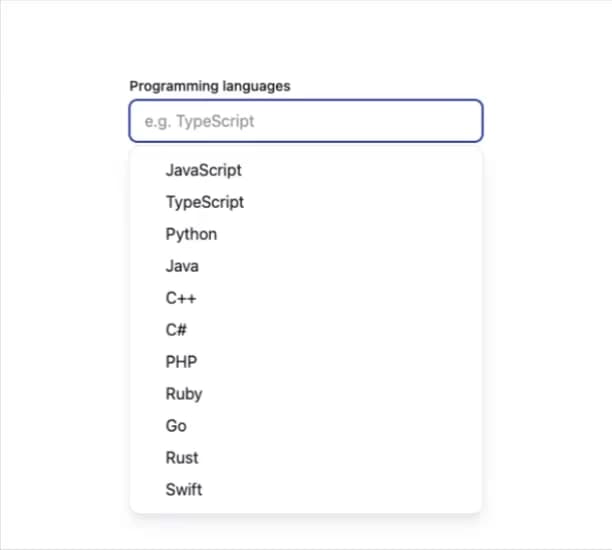
Here is Combobox component
Built with React and Tailwind. Copy the prompt and paste it into Claude Code, Cursor or Lovable: your agent adds Combobox to your project and fits it to your theme.
Code
How Combobox is used: the demo's code. The component's own source comes with a free account.
Usage.tsx
import * as React from 'react';
import { Combobox } from '@base-ui-components/react/combobox';

export default function ExampleMultipleCombobox() {
  const containerRef = React.useRef<HTMLDivElement | null>(null);
  const id = React.useId();

  return (
    <Combobox.Root items={langs} multiple>
      <div className="max-w-[28rem] flex flex-col gap-1">
        <label className="text-sm leading-5 font-medium text-gray-900" htmlFor={id}>
          Programming languages
        </label>
        <Combobox.Chips
          className="flex flex-wrap items-center gap-0.5 rounded-md border border-gray-200 px-1.5 py-1 w-64 focus-within:outline focus-within:outline-2 focus-within:-outline-offset-1 focus-within:outline-blue-800 min-[500px]:w-[22rem]"
          ref={containerRef}
        >
          <Combobox.Value>
            {(value: ProgrammingLanguage[]) => (
              <React.Fragment>
                {value.map((language) => (
                  <Combobox.Chip
                    key={language.id}
                    className="flex items-center gap-1 rounded-md bg-gray-100 px-1.5 py-[0.2rem] text-sm text-gray-900 outline-none cursor-default [@media(hover:hover)]:[&[data-highlighted]]:bg-blue-800 [@media(hover:hover)]:[&[data-highlighted]]:text-gray-50 focus-within:bg-blue-800 focus-within:text-gray-50"
                    aria-label={language.value}
                  >
                    {language.value}
                    <Combobox.ChipRemove
                      className="rounded-md p-1 text-inherit hover:bg-gray-200"
                      aria-label="Remove"
                    >
                      <XIcon />
                    </Combobox.ChipRemove>
                  </Combobox.Chip>
                ))}
                <Combobox.Input
                  id={id}
                  placeholder={value.length > 0 ? '' : 'e.g. TypeScript'}
                  className="min-w-12 flex-1 h-8 rounded-md border-0 bg-transparent pl-2 text-base text-gray-900 outline-none"
                />
              </React.Fragment>
            )}
          </Combobox.Value>
        </Combobox.Chips>
      </div>

      <Combobox.Portal>
        <Combobox.Positioner className="z-50 outline-none" sideOffset={4} anchor={containerRef}>
          <Combobox.Popup className="w-[var(--anchor-width)] max-h-[min(var(--available-height),24rem)] max-w-[var(--available-width)] overflow-y-auto scroll-pt-2 scroll-pb-2 overscroll-contain rounded-lg bg-[canvas] py-2 text-gray-900 shadow-lg shadow-gray-200 outline-1 outline-gray-200 dark:shadow-none dark:-outline-offset-1 dark:outline-gray-300">
            <Combobox.Empty className="px-4 py-2 text-[0.925rem] leading-4 text-gray-600 empty:m-0 empty:p-0">
              No languages found.
            </Combobox.Empty>
            <Combobox.List>
              {(language: ProgrammingLanguage) => (
                <Combobox.Item
                  key={language.id}
                  className="grid cursor-default grid-cols-[0.75rem_1fr] items-center gap-2 py-2 pr-8 pl-4 text-base leading-4 outline-none select-none [@media(hover:hover)]:[&[data-highlighted]]:relative [@media(hover:hover)]:[&[data-highlighted]]:z-0 [@media(hover:hover)]:[&[data-highlighted]]:text-gray-50 [@media(hover:hover)]:[&[data-highlighted]]:before:absolute [@media(hover:hover)]:[&[data-highlighted]]:before:inset-x-2 [@media(hover:hover)]:[&[data-highlighted]]:before:inset-y-0 [@media(hover:hover)]:[&[data-highlighted]]:before:z-[-1] [@media(hover:hover)]:[&[data-highlighted]]:before:rounded-sm [@media(hover:hover)]:[&[data-highlighted]]:before:bg-gray-900"
                  value={language}
                >
                  <Combobox.ItemIndicator className="col-start-1">
                    <CheckIcon className="size-3" />
                  </Combobox.ItemIndicator>
                  <div className="col-start-2">{language.value}</div>
                </Combobox.Item>
              )}
            </Combobox.List>
          </Combobox.Popup>
        </Combobox.Positioner>
      </Combobox.Portal>
    </Combobox.Root>
  );
}

function CheckIcon(props: React.ComponentProps<'svg'>) {
  return (
    <svg fill="currentcolor" width="10" height="10" viewBox="0 0 10 10" {...props}>
      <path d="M9.1603 1.12218C9.50684 1.34873 9.60427 1.81354 9.37792 2.16038L5.13603 8.66012C5.01614 8.8438 4.82192 8.96576 4.60451 8.99384C4.3871 9.02194 4.1683 8.95335 4.00574 8.80615L1.24664 6.30769C0.939709 6.02975 0.916013 5.55541 1.19372 5.24822C1.47142 4.94102 1.94536 4.91731 2.2523 5.19524L4.36085 7.10461L8.12299 1.33999C8.34934 0.993152 8.81376 0.895638 9.1603 1.12218Z" />
    </svg>
  );
}

function XIcon(props: React.ComponentProps<'svg'>) {
  return (
    <svg
      xmlns="http://www.w3.org/2000/svg"
      width={16}
      height={16}
      viewBox="0 0 24 24"
      fill="none"
      stroke="currentColor"
      strokeWidth="2"
      strokeLinecap="round"
      strokeLinejoin="round"
      aria-hidden
      {...props}
    >
      <path d="M18 6 6 18" />
      <path d="m6 6 12 12" />
    </svg>
  );
}

interface ProgrammingLanguage {
  id: string;
  value: string;
}

const langs: ProgrammingLanguage[] = [
  { id: 'js', value: 'JavaScript' },
  { id: 'ts', value: 'TypeScript' },
  { id: 'py', value: 'Python' },
  { id: 'java', value: 'Java' },
  { id: 'cpp', value: 'C++' },
  { id: 'cs', value: 'C#' },
  { id: 'php', value: 'PHP' },
  { id: 'ruby', value: 'Ruby' },
  { id: 'go', value: 'Go' },
  { id: 'rust', value: 'Rust' },
  { id: 'swift', value: 'Swift' },
];
Dependencies
More by prebuiltui
View all

Image Gallery
1.3K
Hero Section
412
Feature Sections
344
Testimonial
303
Cards
231
FAQ Sections
177
Form
136
Login Form
125