About
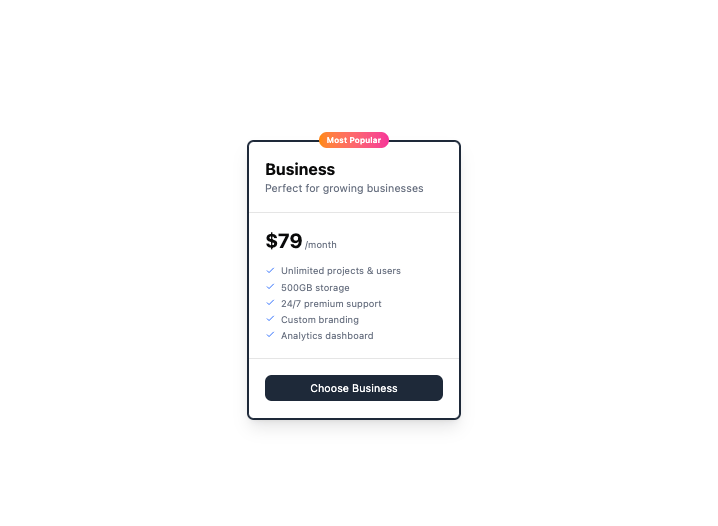
Here is Pricing Cards components
Built with React and Tailwind. Copy the prompt and paste it into Claude Code, Cursor or Lovable: your agent adds Pricing Cards to your project and fits it to your theme.
Code
How Pricing Cards is used: the demo's code. The component's own source comes with a free account.
Usage.tsx
export default function Example() {
    return (
        <div className="relative max-w-80 w-full">
            <div className="absolute inset-x-0 top-1 flex justify-center">
                <span className="rounded-full bg-gradient-to-r from-orange-400 to-pink-500 px-3 py-1 text-xs font-semibold text-white">
                    Most Popular
                </span>
            </div>

            <div className="mt-4 rounded-lg border-2 border-gray-800 bg-white shadow-lg">
                <div className="border-b p-6">
                    <h3 className="text-2xl font-bold">Business</h3>
                    <p className="text-gray-500">Perfect for growing businesses</p>
                </div>

                <div className="p-6">
                    <div className="mb-4 flex items-baseline">
                        <span className="text-3xl font-bold">$79</span>
                        <span className="ml-1 text-sm text-gray-500">/month</span>
                    </div>

                    <ul className="space-y-1 text-gray-500">
                        <li className="flex items-center gap-2">
                            <svg className="h-4 w-4 text-blue-600" xmlns="http://www.w3.org/2000/svg" fill="none"
                                viewBox="0 0 24 24" stroke="currentColor">
                                <path strokeLinecap="round" strokeLinejoin="round" strokeWidth="2" d="M5 13l4 4L19 7" />
                            </svg>
                            <span className="text-sm">Unlimited projects & users</span>
                        </li>
                        <li className="flex items-center gap-2">
                            <svg className="h-4 w-4 text-blue-600" xmlns="http://www.w3.org/2000/svg" fill="none"
                                viewBox="0 0 24 24" stroke="currentColor">
                                <path strokeLinecap="round" strokeLinejoin="round" strokeWidth="2" d="M5 13l4 4L19 7" />
                            </svg>
                            <span className="text-sm">500GB storage</span>
                        </li>
                        <li className="flex items-center gap-2">
                            <svg className="h-4 w-4 text-blue-600" xmlns="http://www.w3.org/2000/svg" fill="none"
                                viewBox="0 0 24 24" stroke="currentColor">
                                <path strokeLinecap="round" strokeLinejoin="round" strokeWidth="2" d="M5 13l4 4L19 7" />
                            </svg>
                            <span className="text-sm">24/7 premium support</span>
                        </li>
                        <li className="flex items-center gap-2">
                            <svg className="h-4 w-4 text-blue-600" xmlns="http://www.w3.org/2000/svg" fill="none"
                                viewBox="0 0 24 24" stroke="currentColor">
                                <path strokeLinecap="round" strokeLinejoin="round" strokeWidth="2" d="M5 13l4 4L19 7" />
                            </svg>
                            <span className="text-sm">Custom branding</span>
                        </li>
                        <li className="flex items-center gap-2">
                            <svg className="h-4 w-4 text-blue-600" xmlns="http://www.w3.org/2000/svg" fill="none"
                                viewBox="0 0 24 24" stroke="currentColor">
                                <path strokeLinecap="round" strokeLinejoin="round" strokeWidth="2" d="M5 13l4 4L19 7" />
                            </svg>
                            <span className="text-sm">Analytics dashboard</span>
                        </li>
                    </ul>
                </div>

                <div className="border-t p-6">
                    <button className="w-full rounded-lg bg-gray-800 px-4 py-2 text-white transition-opacity hover:opacity-90">
                        Choose Business
                    </button>
                </div>
            </div>
        </div>
    );
};More by prebuiltui
View all

Image Gallery
1.3K
Hero Section
412
Feature Sections
343
Testimonial
297
Cards
231
FAQ Sections
177
Form
136
Login Form
125
More in Pricing
View all
Pricing Section
571

Pricing Section
172

Pricing Card
532
Colorful-Pricing
84
pricing section
157
Single Pricing Card
792
Login Card
5

Boxly Pricing-1
86


