
About
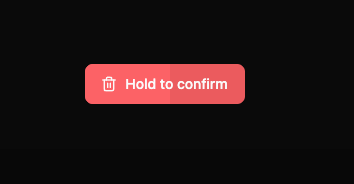
A simple hold to delete button
Built with React and Tailwind. Copy the prompt and paste it into Claude Code, Cursor or Lovable: your agent adds Hold to delete Button to your project and fits it to your theme.
Code
How Hold to delete Button is used: the demo's code. The component's own source comes with a free account.
Usage.tsx
import { DeleteButton } from "@/components/ui/hold-to-delete-button"

export default function Page() {
  const handleDelete = () => {
    console.log("Item deleted!")
  }

  const handleCancel = () => {
    console.log("Delete canceled")
  }

  return (
    <div className="flex min-h-screen items-center justify-center">
      <DeleteButton
        onDelete={handleDelete}
        onCancel={handleCancel}
        holdDuration={2000}
      />
    </div>
  )
}
Dependencies
More by Rafael Porto
View all
AI Assistant Interface
462
To-do card
239
Command Palette
215
Publish Button
127
Sign In
97
AI Assistant Panel
Sign In Card
More in Buttons
View all
Button Save
46

Button
20

Eclipse Button
5

Button
32

Button
6

Button
14

Button Group
37
Split Button
32

