
About
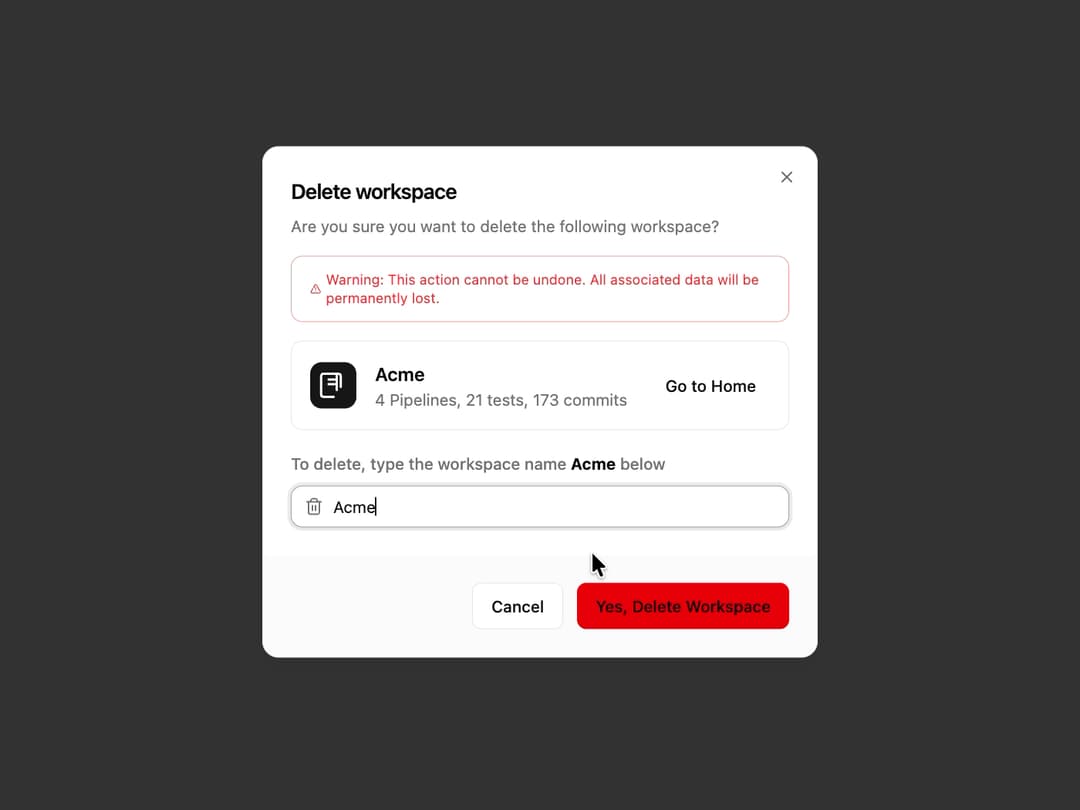
Destructive Action Dialog A modal dialog that prompts the user for confirmation before performing a destructive action. It includes a mandatory text input match to prevent accidental confirmation.
Built with React and Tailwind. Copy the prompt and paste it into Claude Code, Cursor or Lovable: your agent adds Destructive Action Dialog to your project and fits it to your theme.
Code
How Destructive Action Dialog is used: the demo's code. The component's own source comes with a free account.
Usage.tsx
import React, { useState } from "react";
import { Button } from "@/components/ui/button";
import { DestructiveActionDialog } from "@/components/ui/destructive-action-dialog"; // Adjust path as needed

// A simple Icon for the demo
const WorkspaceIcon = () => (
  <div className="h-10 w-10 flex-shrink-0 flex items-center justify-center rounded-lg bg-primary text-primary-foreground">
    <svg xmlns="http://www.w3.org/2000/svg" width="24" height="24" viewBox="0 0 24 24" fill="none" stroke="currentColor" strokeWidth="2" strokeLinecap="round" strokeLinejoin="round">
      <path d="M12.5 22h-9a2 2 0 0 1-2-2V4a2 2 0 0 1 2-2h13a2 2 0 0 1 2 2v9.5" />
      <path d="M15 2v14" />
      <path d="M8 7h5" />
      <path d="M8 11h5" />
    </svg>
  </div>
);

export default function DestructiveActionDialogDemo() {
  const [isDialogOpen, setIsDialogOpen] = useState(false);
  const [isDeleting, setIsDeleting] = useState(false);

  // Simulate an async delete operation
  const handleConfirmDelete = () => {
    setIsDeleting(true);
    console.log("Deletion started...");
    setTimeout(() => {
      setIsDeleting(false);
      setIsDialogOpen(false);
      console.log("Workspace 'Acme' deleted successfully.");
      // Here you would typically show a success toast
    }, 2000);
  };

  return (
    <div className="flex h-screen w-full items-center justify-center bg-background">
      <Button variant="destructive" onClick={() => setIsDialogOpen(true)}>
        Delete Workspace
      </Button>

      <DestructiveActionDialog
        isOpen={isDialogOpen}
        onOpenChange={setIsDialogOpen}
        title="Delete workspace"
        description="Are you sure you want to delete the following workspace?"
        warningText="Warning: This action cannot be undone. All associated data will be permanently lost."
        itemToConfirm="Acme"
        onConfirm={handleConfirmDelete}
        isLoading={isDeleting}
      >
        {/* This content is passed as children to display the item being deleted */}
        <div className="flex items-center justify-between">
          <div className="flex items-center gap-4">
            <WorkspaceIcon />
            <div>
              <p className="font-semibold text-foreground">Acme</p>
              <p className="text-sm text-muted-foreground">4 Pipelines, 21 tests, 173 commits</p>
            </div>
          </div>
          <Button variant="ghost" size="sm">Go to Home</Button>
        </div>
      </DestructiveActionDialog>
    </div>
  );
}
Dependencies
More by Ravi Katiyar
View all

Animated Shader Hero
3.7K
Hero
3.1K
Circular Gallery
2.7K
Minimalist Hero
2.5K
Floating Icons Hero Section
1.9K
Glass Calendar
1.8K
Feature Carousel
1.7K
AI Image Generator Hero
1.4K
More in Forms
View all

Premium Auth
500

Login 1
52
Authentication Card
47

Book A Demo 3
83
Book A Demo 1
69

Contact Card
1K

Login Card
32

Login 2
7
