
About
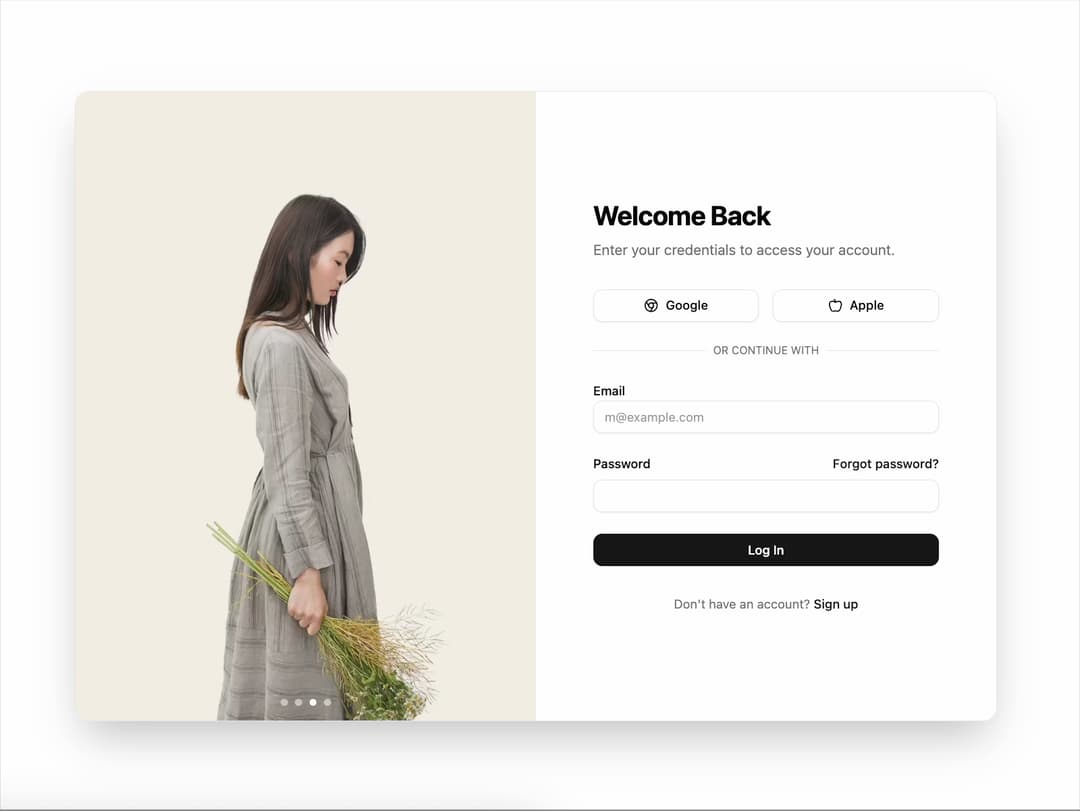
Image slider for login/signup screens. Rotates lifestyle or product photos alongside the authentication form. Enhances visual appeal and storytelling during user login.
Built with React and Tailwind. Copy the prompt and paste it into Claude Code, Cursor or Lovable: your agent adds Image Slider to your project and fits it to your theme.
Code
How Image Slider is used: the demo's code. The component's own source comes with a free account.
Usage.tsx
// demos/image-slider-login-demo.tsx

import * as React from "react";
import { motion } from "framer-motion";
import { ImageSlider } from "@/components/ui/image-slider"; // Adjust path as needed
import { Button } from "@/components/ui/button";
import { Input } from "@/components/ui/input";
import { Label } from "@/components/ui/label";
import { Chrome, Apple } from "lucide-react";

export default function ImageSliderLoginDemo() {
  const images = [
    "https://cdn.21st.dev/assets/mirror/03/03ae1dfe758f85ffc2e1b35168819781697dff334890b7e5be6bae9eee06df8b.jpg",
    "https://cdn.21st.dev/assets/mirror/a9/a9cdb54540a036802f97fc22377663c5db2530223ffb28e6c1a7b69eaa9c629f.jpg",
    "https://cdn.21st.dev/assets/mirror/3d/3db702a1ed76683584d89bd83ad183704d215a5070d642be28a28a224acc3f5c.jpg",
    "https://cdn.21st.dev/assets/mirror/85/85bf1034f06246a8c575a62521dd7a99964defb403955e6739eb86fe2a14408f.jpg",
  ];

  const containerVariants = {
    hidden: { opacity: 0 },
    visible: {
      opacity: 1,
      transition: {
        staggerChildren: 0.15,
        delayChildren: 0.2,
      },
    },
  };

  const itemVariants = {
    hidden: { y: 20, opacity: 0 },
    visible: {
      y: 0,
      opacity: 1,
      transition: {
        type: "spring",
        stiffness: 100,
        damping: 12,
      },
    },
  };

  return (
    <div className="w-full h-screen min-h-[700px] flex items-center justify-center bg-background p-4">
      <motion.div
        className="w-full max-w-5xl h-[700px] grid grid-cols-1 lg:grid-cols-2 rounded-2xl overflow-hidden shadow-2xl border"
        initial={{ opacity: 0, scale: 0.95 }}
        animate={{ opacity: 1, scale: 1 }}
        transition={{ duration: 0.5, ease: "easeOut" }}
      >
        {/* Left side: Image Slider */}
        <div className="hidden lg:block">
          <ImageSlider images={images} interval={4000} />
        </div>

        {/* Right side: Login Form */}
        <div className="w-full h-full bg-card text-card-foreground flex flex-col items-center justify-center p-8 md:p-12">
          <motion.div
            className="w-full max-w-sm"
            variants={containerVariants}
            initial="hidden"
            animate="visible"
          >
            <motion.h1 variants={itemVariants} className="text-3xl font-bold tracking-tight mb-2">
              Welcome Back
            </motion.h1>
            <motion.p variants={itemVariants} className="text-muted-foreground mb-8">
              Enter your credentials to access your account.
            </motion.p>

            <motion.div variants={itemVariants} className="grid grid-cols-1 md:grid-cols-2 gap-4 mb-6">
              <Button variant="outline">
                <Chrome className="mr-2 h-4 w-4" />
                Google
              </Button>
              <Button variant="outline">
                <Apple className="mr-2 h-4 w-4" />
                Apple
              </Button>
            </motion.div>

            <motion.div variants={itemVariants} className="relative mb-6">
              <div className="absolute inset-0 flex items-center">
                <span className="w-full border-t" />
              </div>
              <div className="relative flex justify-center text-xs uppercase">
                <span className="bg-card px-2 text-muted-foreground">
                  Or continue with
                </span>
              </div>
            </motion.div>

            <motion.form variants={itemVariants} className="space-y-6">
              <div className="space-y-2">
                <Label htmlFor="email">Email</Label>
                <Input id="email" type="email" placeholder="m@example.com" required />
              </div>
              <div className="space-y-2">
                 <div className="flex items-center justify-between">
                    <Label htmlFor="password">Password</Label>
                    <a href="#" className="text-sm font-medium text-primary hover:underline">
                        Forgot password?
                    </a>
                 </div>
                <Input id="password" type="password" required />
              </div>
              <Button type="submit" className="w-full">
                Log In
              </Button>
            </motion.form>

            <motion.p variants={itemVariants} className="text-center text-sm text-muted-foreground mt-8">
              Don't have an account?{" "}
              <a href="#" className="font-medium text-primary hover:underline">
                Sign up
              </a>
            </motion.p>
          </motion.div>
        </div>
      </motion.div>
    </div>
  );
}
Dependencies
More by Ravi Katiyar
View all

Animated Shader Hero
3.7K
Hero
3.1K
Circular Gallery
2.7K
Minimalist Hero
2.5K
Floating Icons Hero Section
1.9K
Glass Calendar
1.8K
Feature Carousel
1.7K
AI Image Generator Hero
1.4K
More in Sign-in
View all

Modern & Stunning sign in
1.6K
SignInPage
631

Sign In Form
201
Clean & Minimal sign in
617
Sign In
97

Split Sign In Form
16
Authentication Card
47
Modern Animated Sign In
1.1K


