
About
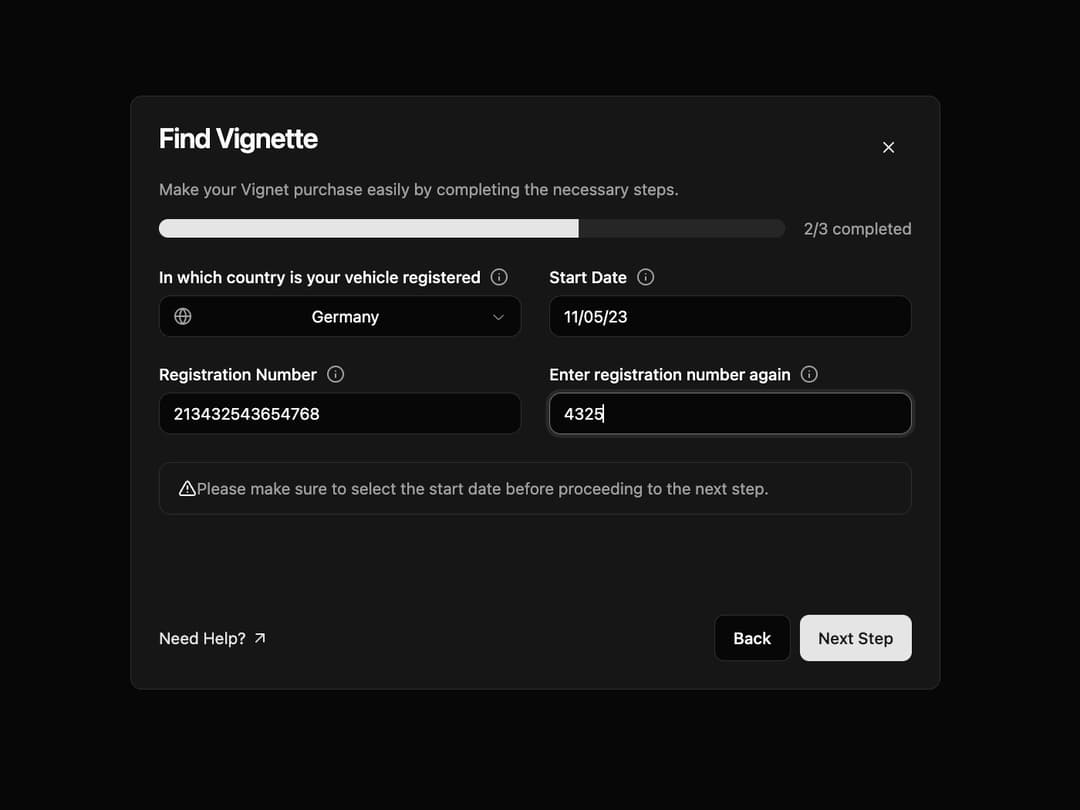
Multi-Step Form A responsive and animated container for multi-step forms, providing progress tracking, navigation, and a clean layout. It uses framer-motion for smooth step transitions.
Built with React and Tailwind. Copy the prompt and paste it into Claude Code, Cursor or Lovable: your agent adds Multi-Step Form to your project and fits it to your theme.
Code
How Multi-Step Form is used: the demo's code. The component's own source comes with a free account.
Usage.tsx
// demo.tsx
"use client";

import * as React from "react";
import {
  AlertCircle,
  AlertTriangle,
  ArrowUpRight,
  Globe,
  Info,
} from "lucide-react";

import { MultiStepForm } from "@/components/ui/multi-step-form";
import { Alert, AlertDescription, AlertTitle } from "@/components/ui/alert";
import { Button } from "@/components/ui/button";
import { Input } from "@/components/ui/input";
import { Label } from "@/components/ui/label";
import {
  Select,
  SelectContent,
  SelectItem,
  SelectTrigger,
  SelectValue,
} from "@/components/ui/select";
import {
  Tooltip,
  TooltipContent,
  TooltipProvider,
  TooltipTrigger,
} from "@/components/ui/tooltip";

const TooltipIcon = ({ text }: { text: string }) => (
  <TooltipProvider>
    <Tooltip>
      <TooltipTrigger asChild>
        <Info className="h-4 w-4 text-muted-foreground cursor-pointer" />
      </TooltipTrigger>
      <TooltipContent>
        <p>{text}</p>
      </TooltipContent>
    </Tooltip>
  </TooltipProvider>
);

const VignettePurchaseFormDemo = () => {
  // Demo state for a 3-step form, currently on step 2
  const [currentStep, setCurrentStep] = React.useState(2);
  const totalSteps = 3;

  const handleNext = () => {
    if (currentStep < totalSteps) {
      setCurrentStep(currentStep + 1);
    }
  };

  const handleBack = () => {
    if (currentStep > 1) {
      setCurrentStep(currentStep - 1);
    }
  };

  return (
    <div className="flex h-full w-full items-center justify-center bg-background p-4">
      <MultiStepForm
        currentStep={currentStep}
        totalSteps={totalSteps}
        title="Find Vignette"
        description="Make your Vignet purchase easily by completing the necessary steps."
        onBack={handleBack}
        onNext={handleNext}
        onClose={() => alert("Close button clicked!")}
        footerContent={
          <a href="#" className="flex items-center gap-1 text-sm text-primary hover:underline">
            Need Help? <ArrowUpRight className="h-4 w-4" />
          </a>
        }
      >
        {/* Render content based on the current step */}
        {currentStep === 2 && (
          <div className="space-y-6">
            <div className="grid grid-cols-1 gap-6 md:grid-cols-2">
              {/* Country Selection */}
              <div className="space-y-2">
                <div className="flex items-center gap-2">
                  <Label htmlFor="country">In which country is your vehicle registered</Label>
                  <TooltipIcon text="Select the country where your vehicle is officially registered." />
                </div>
                <Select>
                  <SelectTrigger id="country">
                    <Globe className="h-4 w-4 mr-2 text-muted-foreground" />
                    <SelectValue placeholder="Select a country..." />
                  </SelectTrigger>
                  <SelectContent>
                    <SelectItem value="us">United States</SelectItem>
                    <SelectItem value="de">Germany</SelectItem>
                    <SelectItem value="fr">France</SelectItem>
                    <SelectItem value="gb">United Kingdom</SelectItem>
                  </SelectContent>
                </Select>
              </div>

              {/* Start Date */}
              <div className="space-y-2">
                <div className="flex items-center gap-2">
                  <Label htmlFor="start-date">Start Date</Label>
                  <TooltipIcon text="The date your vignette should become valid." />
                </div>
                <Input id="start-date" placeholder="DD / MM / YYYY" />
              </div>

              {/* Registration Number */}
              <div className="space-y-2">
                <div className="flex items-center gap-2">
                  <Label htmlFor="reg-number">Registration Number</Label>
                   <TooltipIcon text="Enter your vehicle's registration number exactly as it appears on your documents." />
                </div>
                <Input id="reg-number" placeholder="Enter Registration Number" />
              </div>

              {/* Confirm Registration Number */}
              <div className="space-y-2">
                <div className="flex items-center gap-2">
                  <Label htmlFor="confirm-reg-number">Enter registration number again</Label>
                   <TooltipIcon text="Please re-enter the registration number to avoid any mistakes." />
                </div>
                <Input id="confirm-reg-number" placeholder="Confirm number" />
              </div>
            </div>

            {/* Alert Message */}
            <Alert variant="destructive">
              <AlertTriangle className="h-4 w-4" />
              <AlertDescription>
                Please make sure to select the start date before proceeding to the next step.
              </AlertDescription>
            </Alert>
          </div>
        )}
      </MultiStepForm>
    </div>
  );
};

export default VignettePurchaseFormDemo;
Dependencies
More by Ravi Katiyar
View all

Animated Shader Hero
3.7K
Hero
3.1K
Circular Gallery
2.7K
Minimalist Hero
2.5K
Floating Icons Hero Section
1.8K
Glass Calendar
1.8K
Feature Carousel
1.7K
AI Image Generator Hero
1.4K
More in Forms
View all

Premium Auth
496
Authentication Card
45

Login 1
52

Login 2
7

Form
32

Card Studio
41

Login Card
32

Form
136
