
About
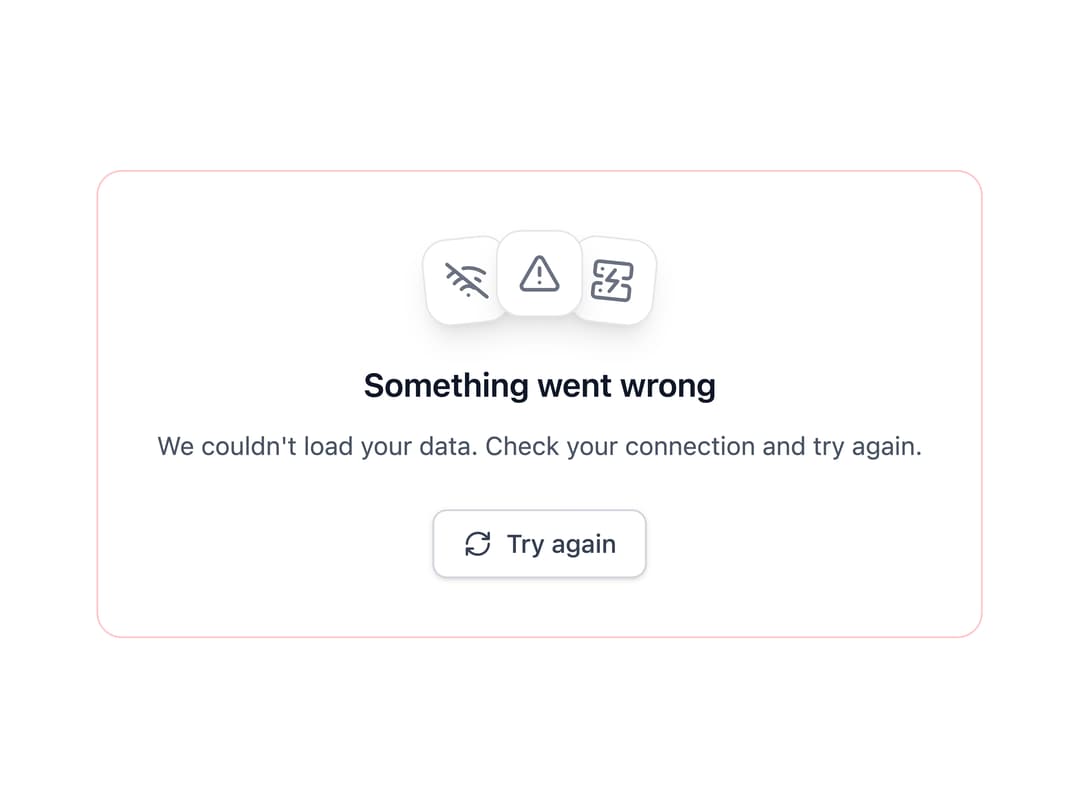
Beautiful and modular empty state components based of https://21st.dev/serafimcloud/empty-state/default
Built with React and Tailwind. Copy the prompt and paste it into Claude Code, Cursor or Lovable: your agent adds Interactive Empty State to your project and fits it to your theme.
Code
How Interactive Empty State is used: the demo's code. The component's own source comes with a free account.
Usage.tsx
import { EmptyState } from "@/components/ui/interactive-empty-state";
import { AlertTriangle, WifiOff, ServerCrash, RefreshCw } from "lucide-react";

export default function Demo() {
  return (
    <div className="flex min-h-[400px] w-full items-center justify-center p-6">
      <EmptyState
        variant="error"
        title="Something went wrong"
        description="We couldn't load your data. Check your connection and try again."
        icons={[
          <WifiOff key="1" />,
          <AlertTriangle key="2" />,
          <ServerCrash key="3" />,
        ]}
        action={{
          label: "Try again",
          icon: <RefreshCw className="h-4 w-4" />,
          onClick: () => {},
        }}
      />
    </div>
  );
}
Dependencies
More by Remco
View all
heartbeat loader
Cube loader
More in Buttons
View all
Button Save
46

Button
20

Eclipse Button
5

Button
6

Button
14

Button Group
37

Button
32
Split Button
32

