
About
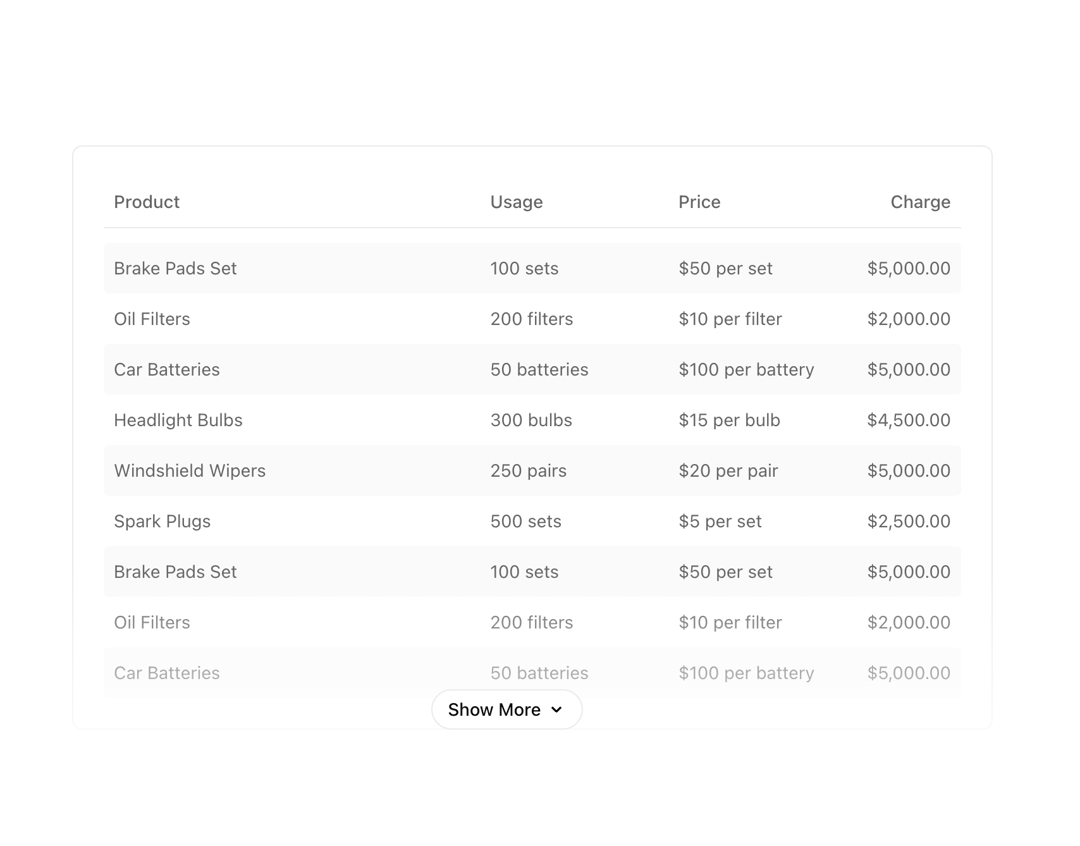
A semantic HTML table component
Built with React and Tailwind. Copy the prompt and paste it into Claude Code, Cursor or Lovable: your agent adds Table to your project and fits it to your theme.
Code
How Table is used: the demo's code. The component's own source comes with a free account.
Usage.tsx
import React, { memo, useState } from "react";
import { Table } from "@/components/ui/table";
import { ShowMore } from "@/components/ui/show-more";

const formatter = new Intl.NumberFormat("en-US", {
  style: "currency",
  maximumFractionDigits: 2,
  currency: "usd",
});

const formatCurrency = (amount: number): string => {
  return formatter.format(amount);
};

const items = [
  {
    product: "Brake Pads Set",
    usage: "100 sets",
    price: "$50 per set",
    charge: 5000,
  },
  {
    product: "Oil Filters",
    usage: "200 filters",
    price: "$10 per filter",
    charge: 2000,
  },
  {
    product: "Car Batteries",
    usage: "50 batteries",
    price: "$100 per battery",
    charge: 5000,
  },
  {
    product: "Headlight Bulbs",
    usage: "300 bulbs",
    price: "$15 per bulb",
    charge: 4500,
  },
  {
    product: "Windshield Wipers",
    usage: "250 pairs",
    price: "$20 per pair",
    charge: 5000,
  },
  {
    product: "Spark Plugs",
    usage: "500 sets",
    price: "$5 per set",
    charge: 2500,
  },
];

const Row = memo(function Row({ item }: { item: (typeof items)[number] }) {
  return (
    <Table.Row>
      <Table.Cell>{item.product}</Table.Cell>
      <Table.Cell>{item.usage}</Table.Cell>
      <Table.Cell>{item.price}</Table.Cell>
      <Table.Cell>{formatCurrency(item.charge)}</Table.Cell>
    </Table.Row>
  );
});

export const BasicTable = () => (
  <div className="w-full flex flex-col justify-center">
    <div className="font-bold text-xl dark:text-white">Basic table</div>
    <div className="w-full mt-[8px]">
      <Table>
        <Table.Header>
          <Table.Row>
            <Table.Head>Col 1</Table.Head>
            <Table.Head>Col 2</Table.Head>
            <Table.Head>Col 3</Table.Head>
          </Table.Row>
        </Table.Header>
        <Table.Body>
          <Table.Row>
            <Table.Cell>Value 1.1</Table.Cell>
            <Table.Cell>Value 1.2</Table.Cell>
            <Table.Cell>Value 1.3</Table.Cell>
          </Table.Row>
          <Table.Row>
            <Table.Cell>Value 2.1</Table.Cell>
            <Table.Cell>Value 2.2</Table.Cell>
            <Table.Cell>Value 2.3</Table.Cell>
          </Table.Row>
          <Table.Row>
            <Table.Cell>Value 3.1</Table.Cell>
            <Table.Cell>Value 3.2</Table.Cell>
            <Table.Cell>Value 3.3</Table.Cell>
          </Table.Row>
        </Table.Body>
      </Table>
    </div>
  </div>
);

export const StripedTable = () => (
  <div className="w-full flex flex-col justify-center">
    <div className="font-bold text-xl dark:text-white">Striped table</div>
    <div className="w-full mt-[8px]">
      <Table>
        <Table.Header>
          <Table.Row>
            <Table.Head>Col 1</Table.Head>
            <Table.Head>Col 2</Table.Head>
            <Table.Head>Col 3</Table.Head>
          </Table.Row>
        </Table.Header>
        <Table.Body striped>
          <Table.Row>
            <Table.Cell>Value 1.1</Table.Cell>
            <Table.Cell>Value 1.2</Table.Cell>
            <Table.Cell>Value 1.3</Table.Cell>
          </Table.Row>
          <Table.Row>
            <Table.Cell>Value 2.1</Table.Cell>
            <Table.Cell>Value 2.2</Table.Cell>
            <Table.Cell>Value 2.3</Table.Cell>
          </Table.Row>
          <Table.Row>
            <Table.Cell>Value 3.1</Table.Cell>
            <Table.Cell>Value 3.2</Table.Cell>
            <Table.Cell>Value 3.3</Table.Cell>
          </Table.Row>
        </Table.Body>
      </Table>
    </div>
  </div>
);

export const InteractiveTable = () => (
  <div className="w-full flex flex-col justify-center">
    <div className="font-bold text-xl dark:text-white">Interactive table</div>
    <div className="w-full mt-[8px]">
      <Table>
        <Table.Header>
          <Table.Row>
            <Table.Head>Col 1</Table.Head>
            <Table.Head>Col 2</Table.Head>
            <Table.Head>Col 3</Table.Head>
          </Table.Row>
        </Table.Header>
        <Table.Body interactive>
          <Table.Row>
            <Table.Cell>Value 1.1</Table.Cell>
            <Table.Cell>Value 1.2</Table.Cell>
            <Table.Cell>Value 1.3</Table.Cell>
          </Table.Row>
          <Table.Row>
            <Table.Cell>Value 2.1</Table.Cell>
            <Table.Cell>Value 2.2</Table.Cell>
            <Table.Cell>Value 2.3</Table.Cell>
          </Table.Row>
          <Table.Row>
            <Table.Cell>Value 3.1</Table.Cell>
            <Table.Cell>Value 3.2</Table.Cell>
            <Table.Cell>Value 3.3</Table.Cell>
          </Table.Row>
        </Table.Body>
      </Table>
    </div>
  </div>
);

export const FullFeaturedTable = () => (
  <div className="w-full flex flex-col justify-center">
    <div className="font-bold text-xl dark:text-white">Full featured table</div>
    <div className="w-full mt-[8px]">
      <Table>
        <Table.Colgroup>
          <Table.Col className="w-[44%]" />
          <Table.Col className="w-[22%]" />
          <Table.Col className="w-[22%]" />
          <Table.Col className="w-[11%]" />
        </Table.Colgroup>
        <Table.Header>
          <Table.Row>
            <Table.Head>Product</Table.Head>
            <Table.Head>Usage</Table.Head>
            <Table.Head>Price</Table.Head>
            <Table.Head>Charge</Table.Head>
          </Table.Row>
        </Table.Header>
        <Table.Body interactive striped>
          {items.map((item) => (
            <Table.Row key={item.product}>
              <Table.Cell>{item.product}</Table.Cell>
              <Table.Cell>{item.usage}</Table.Cell>
              <Table.Cell>{item.price}</Table.Cell>
              <Table.Cell>{formatCurrency(item.charge)}</Table.Cell>
            </Table.Row>
          ))}
        </Table.Body>
        <Table.Footer>
          <Table.Row>
            <Table.Cell
              className="text-[#171717] dark:text-[#ededed] font-medium"
              colSpan={3}
            >
              Subtotal
            </Table.Cell>
            <Table.Cell className="text-[#171717] dark:text-[#ededed] font-medium">
              {formatCurrency(items.reduce((sum, val) => sum + val.charge, 0))}
            </Table.Cell>
          </Table.Row>
        </Table.Footer>
      </Table>
    </div>
  </div>
);

export const VirtualizedTable = () => {
  const [expanded, setExpanded] = useState(false);

  return (
    <div className="w-full flex flex-col justify-center">
      <div className="font-bold text-xl dark:text-white">Virtualized table</div>
      <div className="w-full mt-[8px] relative">
        <Table>
          <Table.Colgroup>
            <Table.Col className="w-[44%]" />
            <Table.Col className="w-[22%]" />
            <Table.Col className="w-[22%]" />
            <Table.Col className="w-[11%]" />
          </Table.Colgroup>
          <Table.Header>
            <Table.Row>
              <Table.Head>Product</Table.Head>
              <Table.Head>Usage</Table.Head>
              <Table.Head>Price</Table.Head>
              <Table.Head>Charge</Table.Head>
            </Table.Row>
          </Table.Header>
          <Table.Body interactive striped virtualize>
            {new Array(5_000).fill(null).map((_, index) => {
              if (!expanded && index >= 9) return null;
              const item = items[index % items.length];
              if (!item) return null;
              return <Row item={item} key={`${item.product}${index}`} />;
            })}
          </Table.Body>
        </Table>
        {expanded ? null : (
          <div className="pointer-events-none absolute bottom-0 left-0 h-[30%] w-full rounded bg-gradient-to-t from-white dark:from-[#0a0a0a] to-transparent opacity-80" />
        )}
        <div className={expanded ? "h-16" : "h-4"} />
        <div className="pointer-events-none absolute bottom-0 left-0 flex h-[calc(100%-160px)] w-full flex-col justify-end">
          <ShowMore
            className="pointer-events-auto sticky bottom-4 mb-4"
            expanded={expanded}
            noBorder
            onClick={() => setExpanded((x) => !x)}
          />
        </div>
      </div>
    </div>
  );
};
More by tigran tumasov
View all
Product Hunt Badge
1.8K
Book
161
Calendar
151
Theme Switcher
135
Snippet
124
Feedback
88
Toggle
88
Toast
84