
About
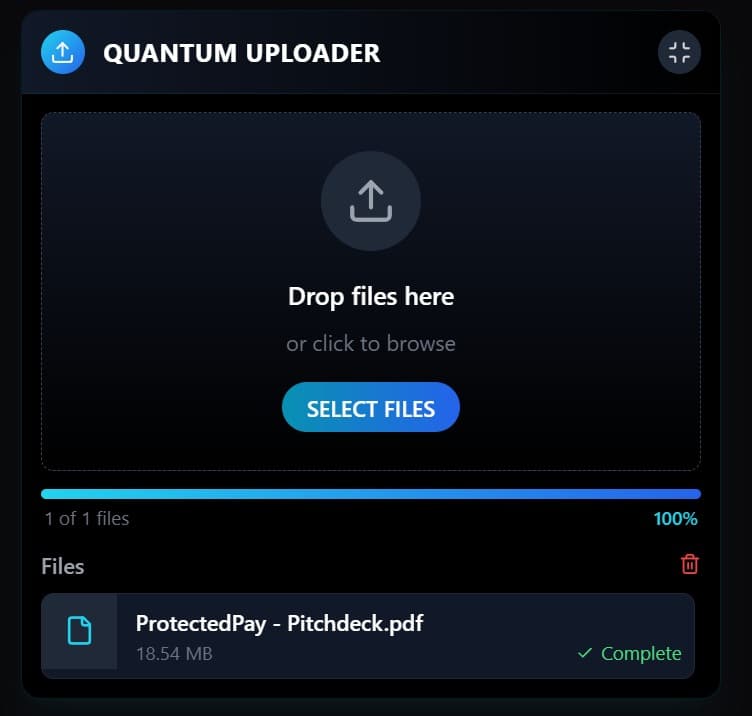
This component has a distinctly futuristic, high-tech vibe with its dark theme, glowing accents, and sleek interface. It's practical and functional while also being visually impressive with a sci-fi aesthetic that would make it stand out in a competition.
Built with React and Tailwind. Copy the prompt and paste it into Claude Code, Cursor or Lovable: your agent adds Futuristic File Uploader to your project and fits it to your theme.
Code
How Futuristic File Uploader is used: the demo's code. The component's own source comes with a free account.
Usage.tsx
import { useState, useRef } from "react";
import { cn } from "@/lib/utils";
import {
  Upload,
  X,
  File,
  Image,
  FileText,
  Check,
  AlertCircle,
  Film,
  Music,
  Code,
  Archive,
  Maximize,
  Minimize,
  Trash2
} from "lucide-react";

type FileItem = {
  id: string;
  file: File;
  preview: string;
  progress: number;
  error?: string;
  uploaded: boolean;
};

export const Component = () => {
  const [files, setFiles] = useState<FileItem[]>([]);
  const [isDragging, setIsDragging] = useState(false);
  const [expanded, setExpanded] = useState(true);
  const fileInputRef = useRef<HTMLInputElement>(null);
  const uploadAreaRef = useRef<HTMLDivElement>(null);

  // Handle file selection
  const handleFileSelect = (selectedFiles: FileList | null) => {
    if (!selectedFiles) return;

    // Add pulse animation
    if (uploadAreaRef.current) {
      uploadAreaRef.current.classList.add('pulse-animation');
      setTimeout(() => {
        if (uploadAreaRef.current) {
          uploadAreaRef.current.classList.remove('pulse-animation');
        }
      }, 800);
    }

    const newFiles = Array.from(selectedFiles).map(file => {
      // Generate preview for images
      const preview = file.type.startsWith('image/')
        ? URL.createObjectURL(file)
        : '';

      return {
        id: Math.random().toString(36).substring(2, 9),
        file,
        preview,
        progress: 0,
        uploaded: false
      };
    });

    setFiles(prev => [...prev, ...newFiles]);

    // Simulate upload progress
    newFiles.forEach(fileItem => {
      simulateUpload(fileItem.id);
    });
  };

  // Simulate file upload with progress
  const simulateUpload = (fileId: string) => {
    let progress = 0;
    const interval = setInterval(() => {
      progress += Math.floor(Math.random() * 15) + 5;

      if (progress >= 100) {
        clearInterval(interval);
        progress = 100;

        setFiles(prev =>
          prev.map(f =>
            f.id === fileId ? { ...f, progress, uploaded: true } : f
          )
        );
      } else {
        setFiles(prev =>
          prev.map(f =>
            f.id === fileId ? { ...f, progress } : f
          )
        );
      }
    }, 300);
  };

  // Remove file
  const removeFile = (fileId: string, event?: React.MouseEvent) => {
    if (event) {
      event.stopPropagation();
    }

    setFiles(prev => {
      const updatedFiles = prev.filter(f => f.id !== fileId);

      // Revoke object URLs to avoid memory leaks
      const fileToRemove = prev.find(f => f.id === fileId);
      if (fileToRemove?.preview) {
        URL.revokeObjectURL(fileToRemove.preview);
      }

      return updatedFiles;
    });
  };

  // Handle drag events
  const handleDragEnter = (e: React.DragEvent<HTMLDivElement>) => {
    e.preventDefault();
    e.stopPropagation();
    setIsDragging(true);
  };

  const handleDragLeave = (e: React.DragEvent<HTMLDivElement>) => {
    e.preventDefault();
    e.stopPropagation();
    setIsDragging(false);
  };

  const handleDragOver = (e: React.DragEvent<HTMLDivElement>) => {
    e.preventDefault();
    e.stopPropagation();
  };

  const handleDrop = (e: React.DragEvent<HTMLDivElement>) => {
    e.preventDefault();
    e.stopPropagation();
    setIsDragging(false);

    const droppedFiles = e.dataTransfer.files;
    handleFileSelect(droppedFiles);
  };

  // Get file icon based on type
  const getFileIcon = (type: string) => {
    if (type.startsWith('image/')) return <Image size={20} />;
    if (type.startsWith('video/')) return <Film size={20} />;
    if (type.startsWith('audio/')) return <Music size={20} />;
    if (type.startsWith('text/')) return <FileText size={20} />;
    if (type.includes('compressed') || type.includes('zip') || type.includes('rar')) return <Archive size={20} />;
    if (type.includes('json') || type.includes('javascript') || type.includes('html') || type.includes('css')) return <Code size={20} />;
    return <File size={20} />;
  };

  // Format file size
  const formatFileSize = (bytes: number) => {
    if (bytes === 0) return '0 Bytes';

    const k = 1024;
    const sizes = ['Bytes', 'KB', 'MB', 'GB'];
    const i = Math.floor(Math.log(bytes) / Math.log(k));

    return parseFloat((bytes / Math.pow(k, i)).toFixed(2)) + ' ' + sizes[i];
  };

  // Calculate stats
  const stats = {
    total: files.length,
    uploaded: files.filter(f => f.uploaded).length,
    pending: files.filter(f => !f.uploaded && !f.error).length,
    totalSize: files.reduce((acc, file) => acc + file.file.size, 0)
  };

  // Calculate overall upload progress
  const overallProgress = files.length
    ? Math.round(files.reduce((sum, file) => sum + file.progress, 0) / files.length)
    : 0;

  return (
    <div className="w-full max-w-md mx-auto bg-black border border-cyan-800/30 rounded-xl overflow-hidden shadow-xl shadow-cyan-900/10">
      {/* Header */}
      <div className="bg-gradient-to-r from-gray-900 to-black border-b border-cyan-900/30 p-3 flex justify-between items-center">
        <div className="flex items-center">
          <div className="h-7 w-7 rounded-full bg-gradient-to-br from-cyan-400 to-blue-600 flex items-center justify-center mr-3">
            <Upload className="h-4 w-4 text-white" />
          </div>
          <h2 className="text-white font-bold tracking-wide">QUANTUM UPLOADER</h2>
        </div>

        <div className="flex gap-2">
          <button
            className="h-7 w-7 rounded-full bg-gray-800 hover:bg-gray-700 flex items-center justify-center transition-colors"
            onClick={() => setExpanded(!expanded)}
          >
            {expanded ? (
              <Minimize className="h-4 w-4 text-gray-300" />
            ) : (
              <Maximize className="h-4 w-4 text-gray-300" />
            )}
          </button>
        </div>
      </div>

      {expanded && (
        <>
          {/* Upload area */}
          <div
            ref={uploadAreaRef}
            className={cn(
              "transition-all duration-300 overflow-hidden",
              isDragging ? "scale-[0.98]" : "scale-100"
            )}
            onDragEnter={handleDragEnter}
            onDragLeave={handleDragLeave}
            onDragOver={handleDragOver}
            onDrop={handleDrop}
            onClick={() => fileInputRef.current?.click()}
          >
            <input
              type="file"
              ref={fileInputRef}
              className="hidden"
              onChange={(e) => handleFileSelect(e.target.files)}
              multiple
            />

            <div className={cn(
              "p-6 m-3 border border-dashed rounded-lg transition-colors cursor-pointer bg-gradient-to-b from-gray-900 to-black",
              isDragging
                ? "border-cyan-400 shadow-[0_0_15px_rgba(6,182,212,0.15)]"
                : "border-gray-700 hover:border-gray-500"
            )}>
              <div className="flex flex-col items-center justify-center text-center">
                <div className={cn(
                  "h-16 w-16 rounded-full bg-gray-800 flex items-center justify-center mb-4",
                  isDragging ? "bg-cyan-900/50" : "bg-gray-800"
                )}>
                  <Upload
                    className={cn(
                      "h-8 w-8 transition-all",
                      isDragging ? "text-cyan-400" : "text-gray-400"
                    )}
                  />
                </div>

                <h3 className={cn(
                  "font-medium mb-2 transition-colors",
                  isDragging ? "text-cyan-400" : "text-white"
                )}>
                  {isDragging ? "Release to Upload" : "Drop files here"}
                </h3>

                <p className="text-sm text-gray-500 mb-4">
                  or click to browse
                </p>

                <div className="px-4 py-1.5 rounded-full bg-gradient-to-r from-cyan-600 to-blue-600 text-white text-sm font-medium">
                  SELECT FILES
                </div>
              </div>
            </div>
          </div>

          {/* Progress bar (only show if files exist) */}
          {files.length > 0 && (
            <div className="px-3">
              <div className="h-1.5 w-full bg-gray-800 rounded-full overflow-hidden">
                <div
                  className="h-full bg-gradient-to-r from-cyan-400 to-blue-600 transition-all duration-300"
                  style={{ width: `${overallProgress}%` }}
                ></div>
              </div>

              <div className="flex justify-between items-center mt-1 px-0.5 text-xs">
                <div className="text-gray-500">{stats.uploaded} of {stats.total} files</div>
                <div className="text-cyan-400 font-medium">{overallProgress}%</div>
              </div>
            </div>
          )}

          {/* File list */}
          {files.length > 0 && (
            <div className="mt-3 px-3 pb-3">
              <div className="flex justify-between items-center mb-2">
                <h3 className="text-gray-400 text-sm font-medium">Files</h3>

                <button
                  className="text-xs text-red-500 hover:text-red-400 transition-colors"
                  onClick={() => {
                    files.forEach(f => {
                      if (f.preview) URL.revokeObjectURL(f.preview);
                    });
                    setFiles([]);
                  }}
                >
                  <Trash2 size={14} />
                </button>
              </div>

              <div className="space-y-2 max-h-64 overflow-y-auto pr-1 scrollbar-thin">
                {files.map((file) => (
                  <div
                    key={file.id}
                    className="relative group flex bg-gray-900 rounded-lg overflow-hidden border border-gray-800 hover:border-gray-700 transition-colors"
                  >
                    {/* File preview/icon */}
                    <div className="h-12 w-12 flex-shrink-0 bg-gray-800 flex items-center justify-center">
                      {file.preview ? (
                        <img
                          src={file.preview}
                          alt={file.file.name}
                          className="h-full w-full object-cover"
                        />
                      ) : (
                        <div className="text-cyan-400">
                          {getFileIcon(file.file.type)}
                        </div>
                      )}
                    </div>

                    {/* File details */}
                    <div className="flex-1 min-w-0 p-2 pl-3">
                      <div className="truncate text-sm text-white font-medium">
                        {file.file.name}
                      </div>
                      <div className="flex items-center justify-between mt-0.5">
                        <div className="text-xs text-gray-500">
                          {formatFileSize(file.file.size)}
                        </div>

                        {/* Status indicator */}
                        <div className="text-xs flex items-center">
                          {file.uploaded ? (
                            <span className="text-green-400 flex items-center gap-1">
                              <Check size={12} />
                              <span>Complete</span>
                            </span>
                          ) : file.error ? (
                            <span className="text-red-400 flex items-center gap-1">
                              <AlertCircle size={12} />
                              <span>Error</span>
                            </span>
                          ) : (
                            <span className="text-cyan-400">
                              {file.progress}%
                            </span>
                          )}
                        </div>
                      </div>

                      {/* Progress indicator */}
                      {!file.uploaded && (
                        <div className="mt-1 h-1 w-full bg-gray-800 rounded-full overflow-hidden">
                          <div
                            className={cn(
                              "h-full transition-all duration-200",
                              file.error
                                ? "bg-red-500"
                                : "bg-gradient-to-r from-cyan-400 to-blue-600"
                            )}
                            style={{ width: `${file.progress}%` }}
                          ></div>
                        </div>
                      )}
                    </div>

                    {/* Remove button */}
                    <button
                      className="absolute right-2 top-2 opacity-0 group-hover:opacity-100 transition-opacity text-gray-500 hover:text-white"
                      onClick={(e) => removeFile(file.id, e)}
                    >
                      <X size={16} />
                    </button>
                  </div>
                ))}
              </div>
            </div>
          )}
        </>
      )}

      {/* CSS for advanced effects */}
      <style jsx>{`
        .scrollbar-thin::-webkit-scrollbar {
          width: 4px;
        }

        .scrollbar-thin::-webkit-scrollbar-track {
          background: rgba(0, 0, 0, 0.1);
          border-radius: 4px;
        }

        .scrollbar-thin::-webkit-scrollbar-thumb {
          background: rgba(6, 182, 212, 0.3);
          border-radius: 4px;
        }

        .scrollbar-thin::-webkit-scrollbar-thumb:hover {
          background: rgba(6, 182, 212, 0.5);
        }

        .pulse-animation {
          animation: pulse 0.8s ease-out;
        }

        @keyframes pulse {
          0% {
            box-shadow: 0 0 0 0 rgba(6, 182, 212, 0.5);
          }
          70% {
            box-shadow: 0 0 0 20px rgba(6, 182, 212, 0);
          }
          100% {
            box-shadow: 0 0 0 0 rgba(6, 182, 212, 0);
          }
        }
      `}</style>
    </div>
  );
};
Dependencies
More by LAKSHAY SINGLA
View all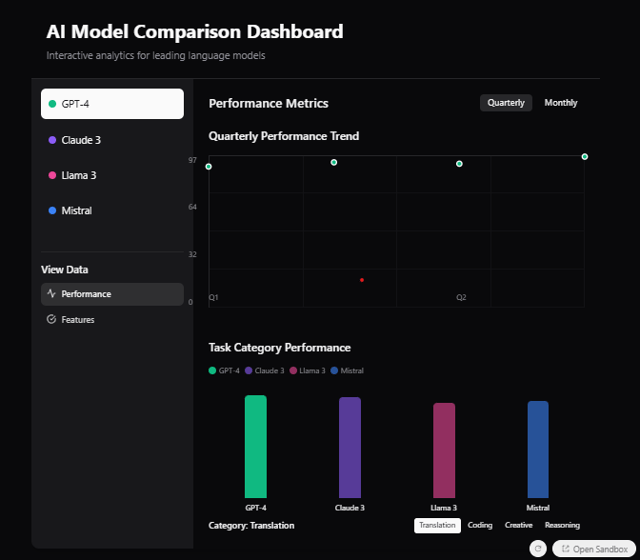
Interactive AI Model Comparison Dashboard