
About
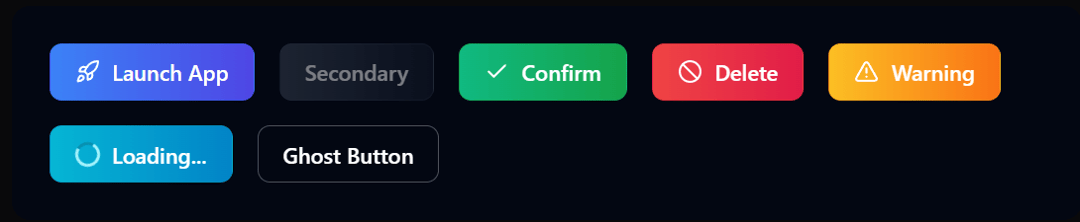
This advanced button component offers a variety of futuristic visual effects and interactions. Features include gradient backgrounds, dynamic ripple effects, glitch animations, magnetic hover behavior, and pulsing glow effects. The component is fully customizable with multiple variants, sizes, and states. Perfect for modern web applications, gaming interfaces, or any UI requiring high visual impact and user engagement.
Built with React and Tailwind. Copy the prompt and paste it into Claude Code, Cursor or Lovable: your agent adds Pulse Button to your project and fits it to your theme.
Code
How Pulse Button is used: the demo's code. The component's own source comes with a free account.
Usage.tsx
"use client"

import * as React from "react"
import { useState, useEffect } from "react"

// Define types for component props
export interface PulseButtonProps extends React.ButtonHTMLAttributes<HTMLButtonElement> {
  children?: React.ReactNode
  variant?: "primary" | "secondary" | "success" | "danger" | "warning" | "info" | "ghost"
  size?: "sm" | "md" | "lg"
  glowEffect?: "none" | "subtle" | "intense"
  loading?: boolean
  disabled?: boolean
  fullWidth?: boolean
  icon?: React.ReactNode
  iconPosition?: "left" | "right"
  animationType?: "ripple" | "pulse" | "glitch" | "magnetic" | "none"
  className?: string
}

export const PulseButton = ({
  children,
  variant = "primary",
  size = "md",
  glowEffect = "subtle",
  loading = false,
  disabled = false,
  fullWidth = false,
  icon = null,
  iconPosition = "left",
  animationType = "ripple",
  className = "",
  ...props
}: PulseButtonProps) => {
  const [isHovered, setIsHovered] = useState(false)
  const [isPressed, setIsPressed] = useState(false)
  const [rippleEffect, setRippleEffect] = useState<Array<{
    x: number,
    y: number,
    size: number,
    id: number
  }>>([])
  const [rippleCount, setRippleCount] = useState(0)
  const [buttonPosition, setButtonPosition] = useState({ x: 0, y: 0 })
  const buttonRef = React.useRef<HTMLButtonElement>(null)

  // Magnetic effect handling
  const handleMouseMove = (e: React.MouseEvent<HTMLButtonElement>) => {
    if (animationType !== 'magnetic' || disabled || loading) return

    const rect = buttonRef.current?.getBoundingClientRect()
    if (!rect) return

    const x = e.clientX - rect.left
    const y = e.clientY - rect.top

    const centerX = rect.width / 2
    const centerY = rect.height / 2

    const distanceX = x - centerX
    const distanceY = y - centerY

    setButtonPosition({
      x: distanceX / 10,
      y: distanceY / 10
    })
  }

  const resetMagneticEffect = () => {
    if (animationType !== 'magnetic') return
    setButtonPosition({ x: 0, y: 0 })
  }

  // Ripple effect handling
  const createRipple = (e: React.MouseEvent<HTMLButtonElement>) => {
    if (animationType !== 'ripple' || disabled || loading) return

    const button = e.currentTarget
    const rect = button.getBoundingClientRect()

    const x = e.clientX - rect.left
    const y = e.clientY - rect.top
    const size = Math.max(rect.width, rect.height) * 2

    const newRipple = {
      x,
      y,
      size,
      id: rippleCount
    }

    setRippleEffect(prev => [...prev, newRipple])
    setRippleCount(prev => prev + 1)

    // Remove ripple after animation completes
    setTimeout(() => {
      setRippleEffect(prev => prev.filter(ripple => ripple.id !== newRipple.id))
    }, 1000)
  }

  // Variant styles
  const variantStyles = {
    primary: {
      background: "bg-gradient-to-r from-blue-500 to-indigo-600",
      hover: "hover:from-blue-600 hover:to-indigo-700",
      text: "text-white",
      border: "border-blue-600",
      glow: "rgba(79, 70, 229, 0.6)",
      ripple: "bg-blue-200 bg-opacity-30",
      loading: "border-blue-200 border-t-blue-600"
    },
    secondary: {
      background: "bg-gradient-to-r from-gray-700 to-gray-900",
      hover: "hover:from-gray-800 hover:to-gray-950",
      text: "text-gray-100",
      border: "border-gray-600",
      glow: "rgba(107, 114, 128, 0.6)",
      ripple: "bg-gray-200 bg-opacity-30",
      loading: "border-gray-400 border-t-gray-200"
    },
    success: {
      background: "bg-gradient-to-r from-emerald-500 to-green-600",
      hover: "hover:from-emerald-600 hover:to-green-700",
      text: "text-white",
      border: "border-green-600",
      glow: "rgba(16, 185, 129, 0.6)",
      ripple: "bg-green-200 bg-opacity-30",
      loading: "border-green-200 border-t-green-600"
    },
    danger: {
      background: "bg-gradient-to-r from-red-500 to-rose-600",
      hover: "hover:from-red-600 hover:to-rose-700",
      text: "text-white",
      border: "border-red-600",
      glow: "rgba(225, 29, 72, 0.6)",
      ripple: "bg-red-200 bg-opacity-30",
      loading: "border-red-200 border-t-red-600"
    },
    warning: {
      background: "bg-gradient-to-r from-amber-400 to-orange-500",
      hover: "hover:from-amber-500 hover:to-orange-600",
      text: "text-white",
      border: "border-amber-500",
      glow: "rgba(251, 191, 36, 0.6)",
      ripple: "bg-amber-200 bg-opacity-30",
      loading: "border-amber-200 border-t-amber-500"
    },
    info: {
      background: "bg-gradient-to-r from-cyan-500 to-sky-600",
      hover: "hover:from-cyan-600 hover:to-sky-700",
      text: "text-white",
      border: "border-cyan-600",
      glow: "rgba(6, 182, 212, 0.6)",
      ripple: "bg-cyan-200 bg-opacity-30",
      loading: "border-cyan-200 border-t-cyan-600"
    },
    ghost: {
      background: "bg-transparent backdrop-blur-sm",
      hover: "hover:bg-white hover:bg-opacity-10",
      text: "text-white",
      border: "border-white border-opacity-30",
      glow: "rgba(255, 255, 255, 0.3)",
      ripple: "bg-white bg-opacity-20",
      loading: "border-white border-opacity-20 border-t-white"
    }
  }

  // Size styles
  const sizeStyles = {
    sm: "text-xs px-3 py-1.5 rounded-md",
    md: "text-sm px-4 py-2 rounded-lg",
    lg: "text-base px-6 py-3 rounded-xl"
  }

  // Glow effect styles
  const glowEffectStyles = {
    none: "",
    subtle: "shadow-md transition-shadow duration-300",
    intense: "shadow-lg transition-shadow duration-300"
  }

  // Animation type styles
  const animationTypeStyles = {
    ripple: "overflow-hidden transition-transform duration-200 active:scale-95",
    pulse: "animate-pulse transition-transform duration-200 active:scale-95",
    glitch: "transition-all duration-300 active:scale-95 glitch-effect",
    magnetic: "transition-all duration-300",
    none: "transition-colors duration-200 active:scale-95"
  }

  // Combine styles
  const variantStyle = variantStyles[variant]
  const sizeStyle = sizeStyles[size]
  const glowStyle = glowEffectStyles[glowEffect]
  const animationStyle = animationTypeStyles[animationType]

  // Magnetic effect tracking
  useEffect(() => {
    if (animationType !== 'magnetic') return

    const handleMouseLeave = () => {
      resetMagneticEffect()
    }

    const button = buttonRef.current
    if (button) {
      button.addEventListener('mouseleave', handleMouseLeave)
      return () => {
        button.removeEventListener('mouseleave', handleMouseLeave)
      }
    }
  }, [animationType])

  return (
    <button
      ref={buttonRef}
      className={`
        relative group font-medium border border-opacity-30 select-none
        inline-flex items-center justify-center transition-all
        ${variantStyle.background} ${variantStyle.hover} ${variantStyle.text} ${variantStyle.border}
        ${sizeStyle} ${glowStyle} ${animationStyle} ${fullWidth ? 'w-full' : ''}
        ${className} ${disabled ? 'opacity-50 cursor-not-allowed' : ''}
      `}
      disabled={disabled || loading}
      onMouseEnter={() => setIsHovered(true)}
      onMouseLeave={() => {
        setIsHovered(false)
        resetMagneticEffect()
      }}
      onMouseDown={() => setIsPressed(true)}
      onMouseUp={() => setIsPressed(false)}
      onMouseMove={handleMouseMove}
      onClick={createRipple}
      style={
        animationType === 'magnetic'
          ? {
              transform: `translate(${buttonPosition.x}px, ${buttonPosition.y}px)`,
              boxShadow: isHovered && glowEffect !== 'none'
                ? `0 0 ${glowEffect === 'intense' ? '25px' : '15px'} ${variantStyle.glow}`
                : 'none'
            }
          : {
              boxShadow: isHovered && glowEffect !== 'none'
                ? `0 0 ${glowEffect === 'intense' ? '25px' : '15px'} ${variantStyle.glow}`
                : 'none'
            }
      }
      {...props}
    >
      {/* Ripple effects */}
      {animationType === 'ripple' && rippleEffect.map(ripple => (
        <span
          key={ripple.id}
          className={`absolute rounded-full ${variantStyle.ripple} animate-ripple`}
          style={{
            left: ripple.x - ripple.size / 2,
            top: ripple.y - ripple.size / 2,
            width: ripple.size,
            height: ripple.size
          }}
        />
      ))}

      {/* Glitch effect overlay */}
      {animationType === 'glitch' && isHovered && (
        <>
          <span className="absolute inset-0 block translate-x-0.5 -translate-y-0.5 bg-inherit opacity-30" />
          <span className="absolute inset-0 block -translate-x-0.5 translate-y-0.5 bg-inherit opacity-30" />
        </>
      )}

      {/* Leading icon */}
      {icon && iconPosition === 'left' && (
        <span className={`inline-flex ${children ? 'mr-2' : ''}`}>
          {icon}
        </span>
      )}

      {/* Loading spinner */}
      {loading ? (
        <div className="flex items-center justify-center">
          <div className={`animate-spin rounded-full h-4 w-4 border-2 ${variantStyle.loading} mr-2`}></div>
          {children && <span>{children}</span>}
        </div>
      ) : (
        children
      )}

      {/* Trailing icon */}
      {icon && iconPosition === 'right' && (
        <span className={`inline-flex ${children ? 'ml-2' : ''}`}>
          {icon}
        </span>
      )}

      {/* Pulse animation border */}
      {animationType === 'pulse' && !disabled && (
        <span className={`absolute inset-0 rounded-xl ${variantStyle.border} opacity-0 group-hover:opacity-100 animate-ping`}></span>
      )}
    </button>
  )
}

// Demo components for showcasing the PulseButton
import { Rocket, Zap, AlertTriangle, ArrowRight, Upload, Check, Ban } from "lucide-react"

// Basic demo with default variants
export const PulseButtonDemo = () => {
  return (
    <div className="flex flex-wrap gap-4 p-6 bg-gray-950 rounded-xl">
      <PulseButton variant="primary" icon={<Rocket size={16} />}>
        Launch App
      </PulseButton>

      <PulseButton variant="secondary" animationType="pulse">
        Secondary
      </PulseButton>

      <PulseButton variant="success" icon={<Check size={16} />} glowEffect="intense">
        Confirm
      </PulseButton>

      <PulseButton variant="danger" icon={<Ban size={16} />}>
        Delete
      </PulseButton>

      <PulseButton variant="warning" icon={<AlertTriangle size={16} />}>
        Warning
      </PulseButton>

      <PulseButton variant="info" loading>
        Loading...
      </PulseButton>

      <PulseButton variant="ghost" animationType="glitch">
        Ghost Button
      </PulseButton>
    </div>
  )
}

// Demo showcasing different animation types
export const PulseButtonAnimations = () => {
  return (
    <div className="grid grid-cols-1 sm:grid-cols-2 lg:grid-cols-4 gap-4 p-6 bg-gray-950 rounded-xl">
      <div className="flex flex-col items-center gap-2">
        <span className="text-sm text-gray-400">Ripple Effect</span>
        <PulseButton
          variant="primary"
          animationType="ripple"
          icon={<Zap size={16} />}
        >
          Click Me
        </PulseButton>
      </div>

      <div className="flex flex-col items-center gap-2">
        <span className="text-sm text-gray-400">Pulse Animation</span>
        <PulseButton
          variant="info"
          animationType="pulse"
          icon={<ArrowRight size={16} />}
          iconPosition="right"
        >
          Next Step
        </PulseButton>
      </div>

      <div className="flex flex-col items-center gap-2">
        <span className="text-sm text-gray-400">Glitch Effect</span>
        <PulseButton
          variant="danger"
          animationType="glitch"
          glowEffect="intense"
        >
          Glitch
        </PulseButton>
      </div>

      <div className="flex flex-col items-center gap-2">
        <span className="text-sm text-gray-400">Magnetic Effect</span>
        <PulseButton
          variant="ghost"
          animationType="magnetic"
          icon={<Upload size={16} />}
        >
          Upload
        </PulseButton>
      </div>
    </div>
  )
}

// Demo showcasing different sizes
export const PulseButtonSizes = () => {
  return (
    <div className="flex items-center gap-4 p-6 bg-gray-950 rounded-xl">
      <PulseButton variant="primary" size="sm">
        Small
      </PulseButton>

      <PulseButton variant="primary" size="md">
        Medium
      </PulseButton>

      <PulseButton variant="primary" size="lg">
        Large
      </PulseButton>
    </div>
  )
}
Dependencies
More by Tanishq
View all
Stacked Activity Cards
313
AI Swarm Visualization
95
Cyberpunk Neon Folder
48
Neomorphic Card
1
Animated Scroll Indicator
Pixel Animation Cards
Shiny CTA Button
Course Progress Tracking Cards
More in Buttons
View all
Button Save
46

Button
20

Eclipse Button
5

Button
6

Button
14

Button Group
37

Button
32
Split Button
32

