
About
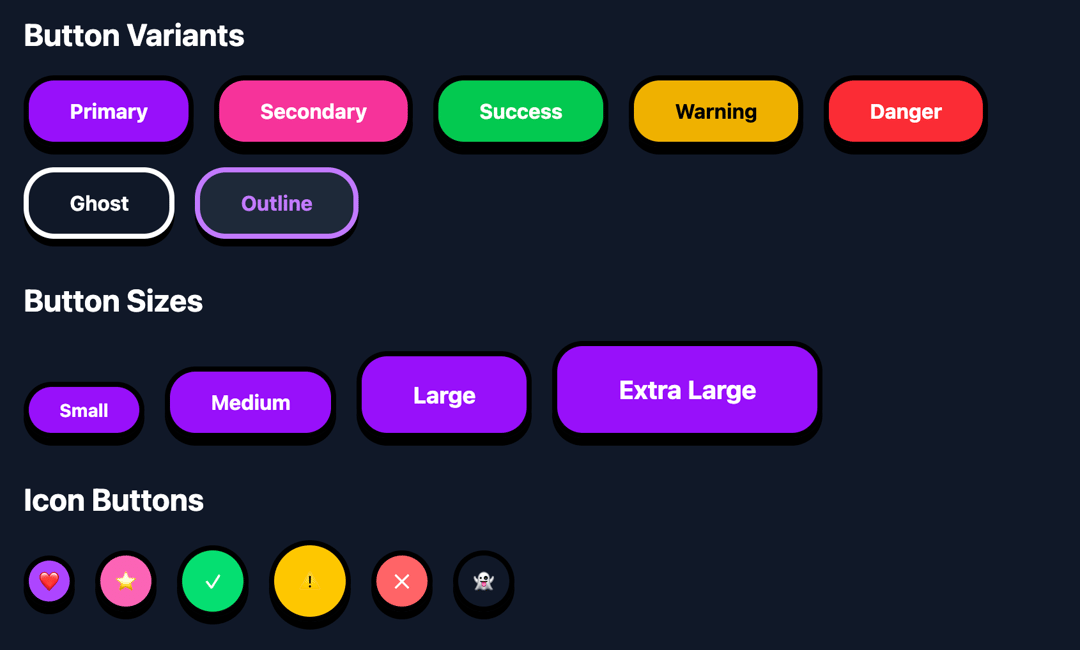
Add some 🥰 cuteness to your site with cute ui. You're gonna love it.
Built with React and Tailwind. Copy the prompt and paste it into Claude Code, Cursor or Lovable: your agent adds Cute UI Buttons to your project and fits it to your theme.
Code
How Cute UI Buttons is used: the demo's code. The component's own source comes with a free account.
Usage.tsx
import React from 'react';
import { useState } from 'react';

// Button variants following the cute UI design style
const Button = ({
  children,
  variant = 'primary',
  size = 'md',
  disabled = false,
  onClick,
  className = '',
  ...props
}) => {
  const [isPressed, setIsPressed] = useState(false);

  const baseClasses = `
    relative inline-flex items-center justify-center
    font-bold rounded-3xl border-4 border-black
    transition-all duration-150 ease-in-out
    cursor-pointer select-none
    focus:outline-none focus:ring-4 focus:ring-opacity-50
    ${isPressed ? 'transform translate-y-1' : 'transform translate-y-0 shadow-[0_6px_0_0_#000]'}
    ${disabled ? 'opacity-50 cursor-not-allowed' : 'active:translate-y-1 active:shadow-[0_2px_0_0_#000]'}
  `;

  const sizeClasses = {
    sm: 'px-6 py-2 text-sm min-h-[40px]',
    md: 'px-8 py-3 text-base min-h-[48px]',
    lg: 'px-10 py-4 text-lg min-h-[56px]',
    xl: 'px-12 py-5 text-xl min-h-[64px]'
  };

  const variantClasses = {
    primary: 'bg-purple-500 text-white hover:bg-purple-600 focus:ring-purple-300 dark:bg-purple-600 dark:hover:bg-purple-700',
    secondary: 'bg-pink-400 text-white hover:bg-pink-500 focus:ring-pink-300 dark:bg-pink-500 dark:hover:bg-pink-600',
    success: 'bg-green-400 text-white hover:bg-green-500 focus:ring-green-300 dark:bg-green-500 dark:hover:bg-green-600',
    warning: 'bg-yellow-400 text-black hover:bg-yellow-500 focus:ring-yellow-300 dark:bg-yellow-500 dark:hover:bg-yellow-600',
    danger: 'bg-red-400 text-white hover:bg-red-500 focus:ring-red-300 dark:bg-red-500 dark:hover:bg-red-600',
    ghost: 'bg-transparent text-black border-black hover:bg-gray-100 focus:ring-gray-300 dark:text-white dark:border-white dark:hover:bg-gray-800',
    outline: 'bg-white text-purple-600 border-purple-600 hover:bg-purple-50 focus:ring-purple-300 dark:bg-gray-800 dark:text-purple-400 dark:border-purple-400 dark:hover:bg-gray-700'
  };

  const handleMouseDown = () => setIsPressed(true);
  const handleMouseUp = () => setIsPressed(false);
  const handleMouseLeave = () => setIsPressed(false);

  return (
    <button
      className={`${baseClasses} ${sizeClasses[size]} ${variantClasses[variant]} ${className}`}
      disabled={disabled}
      onClick={onClick}
      onMouseDown={handleMouseDown}
      onMouseUp={handleMouseUp}
      onMouseLeave={handleMouseLeave}
      {...props}
    >
      {children}
    </button>
  );
};

// Icon Button component
const IconButton = ({
  children,
  variant = 'primary',
  size = 'md',
  disabled = false,
  onClick,
  className = '',
  ...props
}) => {
  const [isPressed, setIsPressed] = useState(false);

  const baseClasses = `
    relative inline-flex items-center justify-center
    rounded-full border-4 border-black
    transition-all duration-150 ease-in-out
    cursor-pointer select-none
    focus:outline-none focus:ring-4 focus:ring-opacity-50
    ${isPressed ? 'transform translate-y-1' : 'transform translate-y-0 shadow-[0_6px_0_0_#000]'}
    ${disabled ? 'opacity-50 cursor-not-allowed' : 'active:translate-y-1 active:shadow-[0_2px_0_0_#000]'}
  `;

  const sizeClasses = {
    sm: 'w-10 h-10',
    md: 'w-12 h-12',
    lg: 'w-14 h-14',
    xl: 'w-16 h-16'
  };

  const variantClasses = {
    primary: 'bg-purple-500 text-white hover:bg-purple-600 focus:ring-purple-300',
    secondary: 'bg-pink-400 text-white hover:bg-pink-500 focus:ring-pink-300',
    success: 'bg-green-400 text-white hover:bg-green-500 focus:ring-green-300',
    warning: 'bg-yellow-400 text-black hover:bg-yellow-500 focus:ring-yellow-300',
    danger: 'bg-red-400 text-white hover:bg-red-500 focus:ring-red-300',
    ghost: 'bg-transparent text-black hover:bg-gray-100 focus:ring-gray-300 dark:text-white dark:hover:bg-gray-800'
  };

  const handleMouseDown = () => setIsPressed(true);
  const handleMouseUp = () => setIsPressed(false);
  const handleMouseLeave = () => setIsPressed(false);

  return (
    <button
      className={`${baseClasses} ${sizeClasses[size]} ${variantClasses[variant]} ${className}`}
      disabled={disabled}
      onClick={onClick}
      onMouseDown={handleMouseDown}
      onMouseUp={handleMouseUp}
      onMouseLeave={handleMouseLeave}
      {...props}
    >
      {children}
    </button>
  );
};

// Demo Component
const ButtonDemo = () => {
  const [count, setCount] = useState(0);

  return (
    <div className="min-h-screen bg-gradient-to-br from-purple-400 via-pink-400 to-purple-600 dark:from-purple-900 dark:via-pink-900 dark:to-purple-900 p-8">
      <div className="max-w-4xl mx-auto">
        <div className="bg-white dark:bg-gray-900 rounded-3xl border-4 border-black p-8 shadow-[0_8px_0_0_#000] mb-8">
          <h1 className="text-4xl font-bold text-center mb-2 text-black dark:text-white">
            🎮 Cute UI Buttons
          </h1>
          <p className="text-center text-gray-600 dark:text-gray-300 mb-8">
            Playful, rounded buttons with bold borders and vibrant colors
          </p>

          {/* Button Variants */}
          <section className="mb-8">
            <h2 className="text-2xl font-bold mb-4 text-black dark:text-white">Button Variants</h2>
            <div className="flex flex-wrap gap-4">
              <Button variant="primary">Primary</Button>
              <Button variant="secondary">Secondary</Button>
              <Button variant="success">Success</Button>
              <Button variant="warning">Warning</Button>
              <Button variant="danger">Danger</Button>
              <Button variant="ghost">Ghost</Button>
              <Button variant="outline">Outline</Button>
            </div>
          </section>

          {/* Button Sizes */}
          <section className="mb-8">
            <h2 className="text-2xl font-bold mb-4 text-black dark:text-white">Button Sizes</h2>
            <div className="flex flex-wrap items-end gap-4">
              <Button size="sm" variant="primary">Small</Button>
              <Button size="md" variant="primary">Medium</Button>
              <Button size="lg" variant="primary">Large</Button>
              <Button size="xl" variant="primary">Extra Large</Button>
            </div>
          </section>

          {/* Icon Buttons */}
          <section className="mb-8">
            <h2 className="text-2xl font-bold mb-4 text-black dark:text-white">Icon Buttons</h2>
            <div className="flex flex-wrap items-center gap-4">
              <IconButton variant="primary" size="sm">❤️</IconButton>
              <IconButton variant="secondary" size="md">⭐</IconButton>
              <IconButton variant="success" size="lg">✓</IconButton>
              <IconButton variant="warning" size="xl">⚠️</IconButton>
              <IconButton variant="danger">✕</IconButton>
              <IconButton variant="ghost">👻</IconButton>
            </div>
          </section>

          {/* Interactive Example */}
          <section className="mb-8">
            <h2 className="text-2xl font-bold mb-4 text-black dark:text-white">Interactive Example</h2>
            <div className="bg-purple-100 dark:bg-purple-800 rounded-2xl border-4 border-black p-6">
              <div className="text-center">
                <div className="text-6xl font-bold mb-4 text-black dark:text-white">{count}</div>
                <div className="flex justify-center gap-4">
                  <Button
                    variant="danger"
                    onClick={() => setCount(count - 1)}
                    disabled={count <= 0}
                  >
                    -1
                  </Button>
                  <Button variant="ghost" onClick={() => setCount(0)}>Reset</Button>
                  <Button variant="success" onClick={() => setCount(count + 1)}>+1</Button>
                </div>
              </div>
            </div>
          </section>

          {/* States */}
          <section>
            <h2 className="text-2xl font-bold mb-4 text-black dark:text-white">Button States</h2>
            <div className="flex flex-wrap gap-4">
              <Button variant="primary">Normal</Button>
              <Button variant="primary" disabled>Disabled</Button>
              <Button variant="secondary" className="opacity-75">Loading...</Button>
            </div>
          </section>
        </div>

        {/* Theme Toggle */}
        <div className="text-center">
          <Button
            variant="ghost"
            onClick={() => document.documentElement.classList.toggle('dark')}
            className="bg-white dark:bg-gray-800"
          >
            🌙 Toggle Dark Mode
          </Button>
        </div>
      </div>
    </div>
  );
};

export default ButtonDemo;More by Vaibhav Kumar Singh
View all
Stagger Testimonials
2K
Event Manager
1.6K
Expanding Cards
1.4K
FAQ tabs
1.2K
Shuffle Grid
1K
Flip Links
1K
Category List
820
Color Change Card
761
More in Buttons
View all

Button
14
Texture Button
92
Button
34
Button Save
46

Button
64

Button Group
3

Notification Button
103

Button

