
About
Get some boldness into your site with neobrutalism
Built with React and Tailwind. Copy the prompt and paste it into Claude Code, Cursor or Lovable: your agent adds NeoBrutalism to your project and fits it to your theme.
Code
How NeoBrutalism is used: the demo's code. The component's own source comes with a free account.
Usage.tsx
import React, { useState, createContext, useContext } from 'react';
import { Sun, Moon, Menu, X, ChevronDown, Search, Bell, Settings, User, Heart, Star, Share, Download, Play, Pause, Volume2, SkipForward, SkipBack } from 'lucide-react';

// Theme Context
const ThemeContext = createContext();

const ThemeProvider = ({ children }) => {
  const [isDark, setIsDark] = useState(false);

  const toggleTheme = () => setIsDark(!isDark);

  return (
    <ThemeContext.Provider value={{ isDark, toggleTheme }}>
      <div className={isDark ? 'dark' : ''}>
        <div className="min-h-screen bg-white dark:bg-black transition-colors">
          {children}
        </div>
      </div>
    </ThemeContext.Provider>
  );
};

const useTheme = () => {
  const context = useContext(ThemeContext);
  if (!context) throw new Error('useTheme must be used within ThemeProvider');
  return context;
};

// Base Button Component
const BrutalButton = ({
  children,
  variant = 'primary',
  size = 'md',
  onClick,
  disabled = false,
  className = ''
}) => {
  const baseClasses = `
    font-black uppercase tracking-wider transition-all duration-150
    border-4 border-black dark:border-white
    active:translate-x-1 active:translate-y-1
    disabled:opacity-50 disabled:cursor-not-allowed
    disabled:active:transform-none
  `;

  const variants = {
    primary: `
      bg-yellow-400 dark:bg-yellow-300 text-black
      shadow-[8px_8px_0px_0px] shadow-black dark:shadow-white
      hover:shadow-[12px_12px_0px_0px] hover:shadow-black dark:hover:shadow-white
      active:shadow-[4px_4px_0px_0px] active:shadow-black dark:active:shadow-white
    `,
    secondary: `
      bg-pink-400 dark:bg-pink-300 text-black
      shadow-[8px_8px_0px_0px] shadow-black dark:shadow-white
      hover:shadow-[12px_12px_0px_0px] hover:shadow-black dark:hover:shadow-white
      active:shadow-[4px_4px_0px_0px] active:shadow-black dark:active:shadow-white
    `,
    accent: `
      bg-green-400 dark:bg-green-300 text-black
      shadow-[8px_8px_0px_0px] shadow-black dark:shadow-white
      hover:shadow-[12px_12px_0px_0px] hover:shadow-black dark:hover:shadow-white
      active:shadow-[4px_4px_0px_0px] active:shadow-black dark:active:shadow-white
    `,
    outline: `
      bg-white dark:bg-black text-black dark:text-white
      shadow-[8px_8px_0px_0px] shadow-black dark:shadow-white
      hover:shadow-[12px_12px_0px_0px] hover:shadow-black dark:hover:shadow-white
      active:shadow-[4px_4px_0px_0px] active:shadow-black dark:active:shadow-white
    `
  };

  const sizes = {
    sm: 'px-4 py-2 text-sm',
    md: 'px-6 py-3 text-base',
    lg: 'px-8 py-4 text-lg'
  };

  return (
    <button
      onClick={onClick}
      disabled={disabled}
      className={`${baseClasses} ${variants[variant]} ${sizes[size]} ${className}`}
    >
      {children}
    </button>
  );
};

// Card Component
const BrutalCard = ({ children, className = '' }) => {
  return (
    <div className={`
      bg-white dark:bg-gray-900
      border-4 border-black dark:border-white
      shadow-[8px_8px_0px_0px] shadow-black dark:shadow-white
      p-6
      ${className}
    `}>
      {children}
    </div>
  );
};

// Input Component
const BrutalInput = ({
  placeholder,
  value,
  onChange,
  type = 'text',
  className = ''
}) => {
  return (
    <input
      type={type}
      placeholder={placeholder}
      value={value}
      onChange={onChange}
      className={`
        w-full px-4 py-3
        bg-white dark:bg-gray-900
        border-4 border-black dark:border-white
        text-black dark:text-white
        placeholder-gray-500 dark:placeholder-gray-400
        font-bold
        focus:outline-none
        focus:shadow-[8px_8px_0px_0px] focus:shadow-black dark:focus:shadow-white
        transition-shadow duration-150
        ${className}
      `}
    />
  );
};

// Badge Component
const BrutalBadge = ({ children, variant = 'default' }) => {
  const variants = {
    default: 'bg-blue-400 dark:bg-blue-300 text-black',
    success: 'bg-green-400 dark:bg-green-300 text-black',
    warning: 'bg-yellow-400 dark:bg-yellow-300 text-black',
    error: 'bg-red-400 dark:bg-red-300 text-black'
  };

  return (
    <span className={`
      inline-block px-3 py-1
      border-2 border-black dark:border-white
      font-black text-sm uppercase tracking-wide
      shadow-[4px_4px_0px_0px] shadow-black dark:shadow-white
      ${variants[variant]}
    `}>
      {children}
    </span>
  );
};

// Modal Component
const BrutalModal = ({ isOpen, onClose, title, children }) => {
  if (!isOpen) return null;

  return (
    <div className="fixed inset-0 z-50 flex items-center justify-center p-4">
      <div
        className="absolute inset-0 bg-black/50 dark:bg-white/20"
        onClick={onClose}
      />
      <div className="relative bg-white dark:bg-gray-900 border-4 border-black dark:border-white shadow-[16px_16px_0px_0px] shadow-black dark:shadow-white p-6 max-w-md w-full">
        <div className="flex justify-between items-center mb-4">
          <h2 className="text-2xl font-black uppercase text-black dark:text-white">{title}</h2>
          <button
            onClick={onClose}
            className="text-black dark:text-white hover:bg-gray-200 dark:hover:bg-gray-700 p-2 border-2 border-black dark:border-white"
          >
            <X size={20} />
          </button>
        </div>
        {children}
      </div>
    </div>
  );
};

// Dropdown Component
const BrutalDropdown = ({ trigger, children, className = '' }) => {
  const [isOpen, setIsOpen] = useState(false);

  return (
    <div className={`relative inline-block ${className}`}>
      <button
        onClick={() => setIsOpen(!isOpen)}
        className="bg-white dark:bg-gray-900 border-4 border-black dark:border-white px-4 py-2 font-bold text-black dark:text-white flex items-center gap-2 shadow-[4px_4px_0px_0px] shadow-black dark:shadow-white hover:shadow-[6px_6px_0px_0px] hover:shadow-black dark:hover:shadow-white transition-shadow"
      >
        {trigger}
        <ChevronDown size={16} />
      </button>

      {isOpen && (
        <div className="absolute top-full left-0 mt-2 bg-white dark:bg-gray-900 border-4 border-black dark:border-white shadow-[8px_8px_0px_0px] shadow-black dark:shadow-white z-10 min-w-full">
          {children}
        </div>
      )}
    </div>
  );
};

// Progress Bar Component
const BrutalProgress = ({ value = 0, max = 100, className = '' }) => {
  const percentage = Math.min((value / max) * 100, 100);

  return (
    <div className={`
      w-full h-8
      bg-white dark:bg-gray-900
      border-4 border-black dark:border-white
      shadow-[4px_4px_0px_0px] shadow-black dark:shadow-white
      overflow-hidden
      ${className}
    `}>
      <div
        className="h-full bg-green-400 dark:bg-green-300 transition-all duration-300 border-r-4 border-black dark:border-white"
        style={{ width: `${percentage}%` }}
      />
    </div>
  );
};

// Toggle Component
const BrutalToggle = ({ checked, onChange, label }) => {
  return (
    <label className="flex items-center gap-3 cursor-pointer">
      <div className="relative">
        <input
          type="checkbox"
          checked={checked}
          onChange={onChange}
          className="sr-only"
        />
        <div className={`
          w-16 h-8
          border-4 border-black dark:border-white
          shadow-[4px_4px_0px_0px] shadow-black dark:shadow-white
          transition-colors duration-200
          ${checked ? 'bg-green-400 dark:bg-green-300' : 'bg-white dark:bg-gray-900'}
        `}>
          <div className={`
            w-6 h-6
            bg-black dark:bg-white
            transition-transform duration-200
            ${checked ? 'translate-x-8' : 'translate-x-0'}
          `} />
        </div>
      </div>
      {label && (
        <span className="font-bold text-black dark:text-white">{label}</span>
      )}
    </label>
  );
};

// Alert Component
const BrutalAlert = ({ children, variant = 'info', onClose }) => {
  const variants = {
    info: 'bg-blue-100 dark:bg-blue-900 border-blue-500 text-blue-900 dark:text-blue-100',
    success: 'bg-green-100 dark:bg-green-900 border-green-500 text-green-900 dark:text-green-100',
    warning: 'bg-yellow-100 dark:bg-yellow-900 border-yellow-500 text-yellow-900 dark:text-yellow-100',
    error: 'bg-red-100 dark:bg-red-900 border-red-500 text-red-900 dark:text-red-100'
  };

  return (
    <div className={`
      p-4 border-4 font-bold
      shadow-[6px_6px_0px_0px] shadow-black dark:shadow-white
      ${variants[variant]}
      relative
    `}>
      {children}
      {onClose && (
        <button
          onClick={onClose}
          className="absolute top-2 right-2 p-1 hover:bg-black/10 dark:hover:bg-white/10"
        >
          <X size={16} />
        </button>
      )}
    </div>
  );
};

// Theme Toggle Button
const ThemeToggle = () => {
  const { isDark, toggleTheme } = useTheme();

  return (
    <BrutalButton
      variant="outline"
      size="sm"
      onClick={toggleTheme}
      className="fixed top-4 right-4 z-50"
    >
      {isDark ? <Sun size={20} /> : <Moon size={20} />}
    </BrutalButton>
  );
};

// Main Demo Page
const ComponentLibraryDemo = () => {
  const [inputValue, setInputValue] = useState('');
  const [isModalOpen, setIsModalOpen] = useState(false);
  const [toggleState, setToggleState] = useState(false);
  const [progress, setProgress] = useState(45);
  const [showAlert, setShowAlert] = useState(true);

  return (
    <ThemeProvider>
      <div className="min-h-screen bg-white dark:bg-black transition-colors p-8">
        <ThemeToggle />

        {/* Header */}
        <div className="mb-12">
          <h1 className="text-6xl font-black uppercase mb-4 text-black dark:text-white">
            Neobrutalism
          </h1>
        </div>

        {/* Buttons Section */}
        <section className="mb-12">
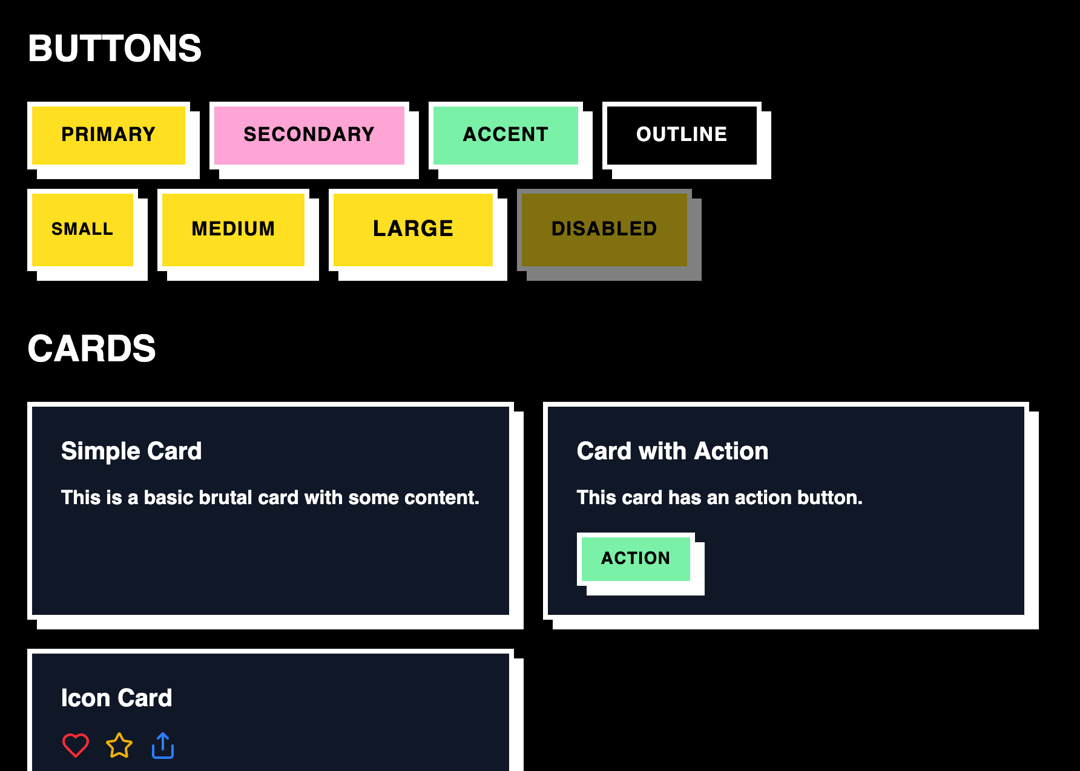
          <h2 className="text-3xl font-black uppercase mb-6 text-black dark:text-white">Buttons</h2>
          <div className="flex flex-wrap gap-4 mb-4">
            <BrutalButton variant="primary">Primary</BrutalButton>
            <BrutalButton variant="secondary">Secondary</BrutalButton>
            <BrutalButton variant="accent">Accent</BrutalButton>
            <BrutalButton variant="outline">Outline</BrutalButton>
          </div>
          <div className="flex flex-wrap gap-4">
            <BrutalButton size="sm">Small</BrutalButton>
            <BrutalButton size="md">Medium</BrutalButton>
            <BrutalButton size="lg">Large</BrutalButton>
            <BrutalButton disabled>Disabled</BrutalButton>
          </div>
        </section>

        {/* Cards Section */}
        <section className="mb-12">
          <h2 className="text-3xl font-black uppercase mb-6 text-black dark:text-white">Cards</h2>
          <div className="grid grid-cols-1 md:grid-cols-2 lg:grid-cols-3 gap-6">
            <BrutalCard>
              <h3 className="text-xl font-black mb-3 text-black dark:text-white">Simple Card</h3>
              <p className="font-bold text-black dark:text-white">This is a basic brutal card with some content.</p>
            </BrutalCard>

            <BrutalCard>
              <h3 className="text-xl font-black mb-3 text-black dark:text-white">Card with Action</h3>
              <p className="font-bold text-black dark:text-white mb-4">This card has an action button.</p>
              <BrutalButton size="sm" variant="accent">Action</BrutalButton>
            </BrutalCard>

            <BrutalCard>
              <h3 className="text-xl font-black mb-3 text-black dark:text-white">Icon Card</h3>
              <div className="flex items-center gap-3 mb-3">
                <Heart className="text-red-500" size={24} />
                <Star className="text-yellow-500" size={24} />
                <Share className="text-blue-500" size={24} />
              </div>
              <p className="font-bold text-black dark:text-white">Card with icons and content.</p>
            </BrutalCard>
          </div>
        </section>

        {/* Form Elements */}
        <section className="mb-12">
          <h2 className="text-3xl font-black uppercase mb-6 text-black dark:text-white">Form Elements</h2>
          <div className="space-y-6 max-w-md">
            <BrutalInput
              placeholder="Enter your text"
              value={inputValue}
              onChange={(e) => setInputValue(e.target.value)}
            />

            <BrutalToggle
              checked={toggleState}
              onChange={(e) => setToggleState(e.target.checked)}
              label="Enable notifications"
            />

            <div>
              <label className="block text-black dark:text-white font-bold mb-2">Progress: {progress}%</label>
              <BrutalProgress value={progress} max={100} />
              <div className="flex gap-2 mt-2">
                <BrutalButton size="sm" onClick={() => setProgress(Math.max(0, progress - 10))}>-</BrutalButton>
                <BrutalButton size="sm" onClick={() => setProgress(Math.min(100, progress + 10))}>+</BrutalButton>
              </div>
            </div>
          </div>
        </section>

        {/* Badges */}
        <section className="mb-12">
          <h2 className="text-3xl font-black uppercase mb-6 text-black dark:text-white">Badges</h2>
          <div className="flex flex-wrap gap-4">
            <BrutalBadge variant="default">Default</BrutalBadge>
            <BrutalBadge variant="success">Success</BrutalBadge>
            <BrutalBadge variant="warning">Warning</BrutalBadge>
            <BrutalBadge variant="error">Error</BrutalBadge>
          </div>
        </section>

        {/* Dropdown */}
        <section className="mb-12">
          <h2 className="text-3xl font-black uppercase mb-6 text-black dark:text-white">Dropdown</h2>
          <BrutalDropdown trigger="Select Option">
            <div className="py-2">
              <button className="block w-full text-left px-4 py-2 font-bold text-black dark:text-white hover:bg-gray-200 dark:hover:bg-gray-700">
                Option 1
              </button>
              <button className="block w-full text-left px-4 py-2 font-bold text-black dark:text-white hover:bg-gray-200 dark:hover:bg-gray-700">
                Option 2
              </button>
              <button className="block w-full text-left px-4 py-2 font-bold text-black dark:text-white hover:bg-gray-200 dark:hover:bg-gray-700">
                Option 3
              </button>
            </div>
          </BrutalDropdown>
        </section>

        {/* Alert */}
        {showAlert && (
          <section className="mb-12">
            <h2 className="text-3xl font-black uppercase mb-6 text-black dark:text-white">Alerts</h2>
            <div className="space-y-4 max-w-2xl">
              <BrutalAlert variant="info" onClose={() => setShowAlert(false)}>
                This is an info alert with a close button!
              </BrutalAlert>
              <BrutalAlert variant="success">
                Success! Your action was completed.
              </BrutalAlert>
              <BrutalAlert variant="warning">
                Warning: Please check your input.
              </BrutalAlert>
              <BrutalAlert variant="error">
                Error: Something went wrong.
              </BrutalAlert>
            </div>
          </section>
        )}

        {/* Modal */}
        <section className="mb-12">
          <h2 className="text-3xl font-black uppercase mb-6 text-black dark:text-white">Modal</h2>
          <BrutalButton onClick={() => setIsModalOpen(true)}>
            Open Modal
          </BrutalButton>

          <BrutalModal
            isOpen={isModalOpen}
            onClose={() => setIsModalOpen(false)}
            title="Brutal Modal"
          >
            <p className="font-bold text-black dark:text-white mb-4">
              This is a modal dialog with the brutal aesthetic. It has thick borders and bold shadows!
            </p>
            <div className="flex gap-3">
              <BrutalButton size="sm" variant="accent">
                Confirm
              </BrutalButton>
              <BrutalButton size="sm" variant="outline" onClick={() => setIsModalOpen(false)}>
                Cancel
              </BrutalButton>
            </div>
          </BrutalModal>
        </section>

        {/* Media Player Example */}
        <section className="mb-12">
          <h2 className="text-3xl font-black uppercase mb-6 text-black dark:text-white">Media Player</h2>
          <BrutalCard className="max-w-md">
            <h3 className="text-lg font-black mb-4 text-black dark:text-white">Now Playing</h3>
            <div className="flex items-center gap-4 mb-4">
              <BrutalButton size="sm" variant="outline">
                <SkipBack size={16} />
              </BrutalButton>
              <BrutalButton variant="primary">
                <Play size={16} />
              </BrutalButton>
              <BrutalButton size="sm" variant="outline">
                <SkipForward size={16} />
              </BrutalButton>
              <BrutalButton size="sm" variant="outline">
                <Volume2 size={16} />
              </BrutalButton>
            </div>
            <BrutalProgress value={67} max={100} />
          </BrutalCard>
        </section>
      </div>
    </ThemeProvider>
  );
};

export default ComponentLibraryDemo;More by Vaibhav Kumar Singh
View all
Stagger Testimonials
2K
Event Manager
1.6K
Expanding Cards
1.4K
FAQ tabs
1.2K
Shuffle Grid
1K
Flip Links
1K
Category List
820
Color Change Card
761
More in Buttons
View all

Button
14
Button
34
Texture Button
92

Button
64
Button Save
46

Button Group
3

Notification Button
103

Button

