
About
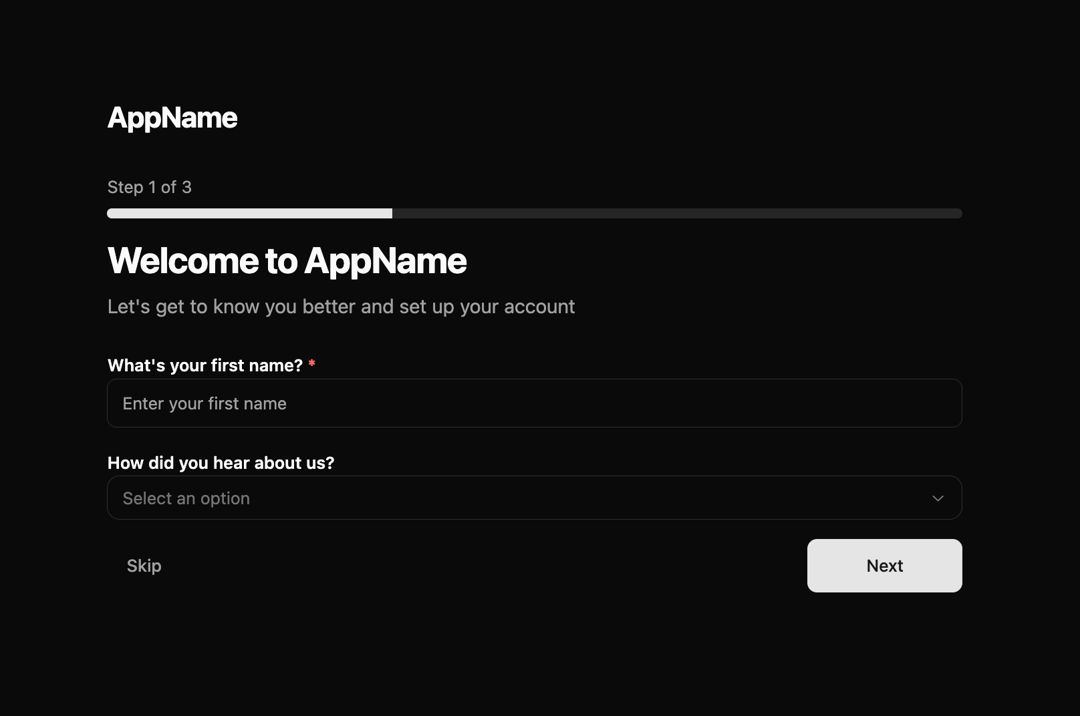
A multi-step user onboarding component with Zod validation, progress tracking, and a delightful completion animation. Features include field validation, error handling, confetti celebration, and a morphing button animation that transforms into a centered checkmark upon completion.
Built with React and Tailwind. Copy the prompt and paste it into Claude Code, Cursor or Lovable: your agent adds Step-based Onboarding Flow to your project and fits it to your theme.
Code
How Step-based Onboarding Flow is used: the demo's code. The component's own source comes with a free account.
Usage.tsx
import { OnboardingFlow, type OnboardingStep } from "@/components/ui/step-based-onboarding-flow"
import { z } from "zod"

export default function OnboardingDemo() {
  const welcomeSchema = z.object({
    firstName: z.string().min(2, "First name must be at least 2 characters").max(50, "First name is too long"),
    referralSource: z.string().optional(),
  })

  const roleSchema = z.object({
    jobTitle: z.string().min(2, "Job title is required").max(100, "Job title is too long"),
    companySize: z.string().optional(),
  })

  const goalsSchema = z.object({
    primaryGoal: z.string().min(1, "Please select your primary goal"),
    additionalInfo: z.string().max(500, "Please keep it under 500 characters").optional(),
  })

  const steps: OnboardingStep[] = [
    {
      id: "welcome",
      title: "Welcome to AppName",
      description: "Let's get to know you better and set up your account",
      schema: welcomeSchema,
      fields: [
        {
          name: "firstName",
          label: "What's your first name?",
          type: "text",
          placeholder: "Enter your first name",
        },
        {
          name: "referralSource",
          label: "How did you hear about us?",
          type: "select",
          placeholder: "Select an option",
          options: [
            { value: "search", label: "Search engine" },
            { value: "social", label: "Social media" },
            { value: "news", label: "In the news" },
            { value: "friend", label: "Friend or colleague" },
            { value: "other", label: "Other" },
          ],
        },
      ],
    },
    {
      id: "role",
      title: "Tell us about your role",
      description: "This helps us personalize your experience",
      schema: roleSchema,
      fields: [
        {
          name: "jobTitle",
          label: "What's your job title?",
          type: "text",
          placeholder: "e.g., Product Manager, Developer, Designer",
        },
        {
          name: "companySize",
          label: "Company size",
          type: "select",
          placeholder: "Select company size",
          options: [
            { value: "1-10", label: "1-10 employees" },
            { value: "11-50", label: "11-50 employees" },
            { value: "51-200", label: "51-200 employees" },
            { value: "201-1000", label: "201-1000 employees" },
            { value: "1000+", label: "1000+ employees" },
          ],
        },
      ],
    },
    {
      id: "goals",
      title: "What are your goals?",
      description: "Help us understand what you want to achieve",
      schema: goalsSchema,
      fields: [
        {
          name: "primaryGoal",
          label: "What's your primary goal?",
          type: "select",
          placeholder: "Select your main goal",
          options: [
            { value: "content", label: "Create content" },
            { value: "productivity", label: "Improve productivity" },
            { value: "collaboration", label: "Team collaboration" },
            { value: "automation", label: "Automate workflows" },
            { value: "analytics", label: "Data analytics" },
          ],
        },
        {
          name: "additionalInfo",
          label: "Anything else you'd like to share?",
          type: "textarea",
          placeholder: "Tell us more about your needs...",
        },
      ],
    },
  ]

  const handleComplete = (data: Record<string, any>) => {
    console.log("Onboarding completed with data:", data)
  }

  const handleSkip = () => {
    console.log("Step skipped")
  }

  return (
    <div className="min-h-screen w-full flex flex-col justify-center p-4">
      <OnboardingFlow
        steps={steps}
        logo={<h1 className="text-2xl font-bold tracking-tight">AppName</h1>}
        onComplete={handleComplete}
        onSkip={handleSkip}
        showSkip={true}
      />
    </div>
  )
}
Dependencies
More by Vaibhav Kumar Singh
View all
Stagger Testimonials
2K
Event Manager
1.6K
Expanding Cards
1.4K
FAQ tabs
1.2K
Shuffle Grid
1K
Flip Links
1K
Category List
821
Color Change Card
762
More in Forms
View all

Premium Auth
500

Login 1
52

Book A Demo 3
83
Authentication Card
47
Book A Demo 1
69

Contact Card
1K

Login Card
32

Login 2
7
