
About
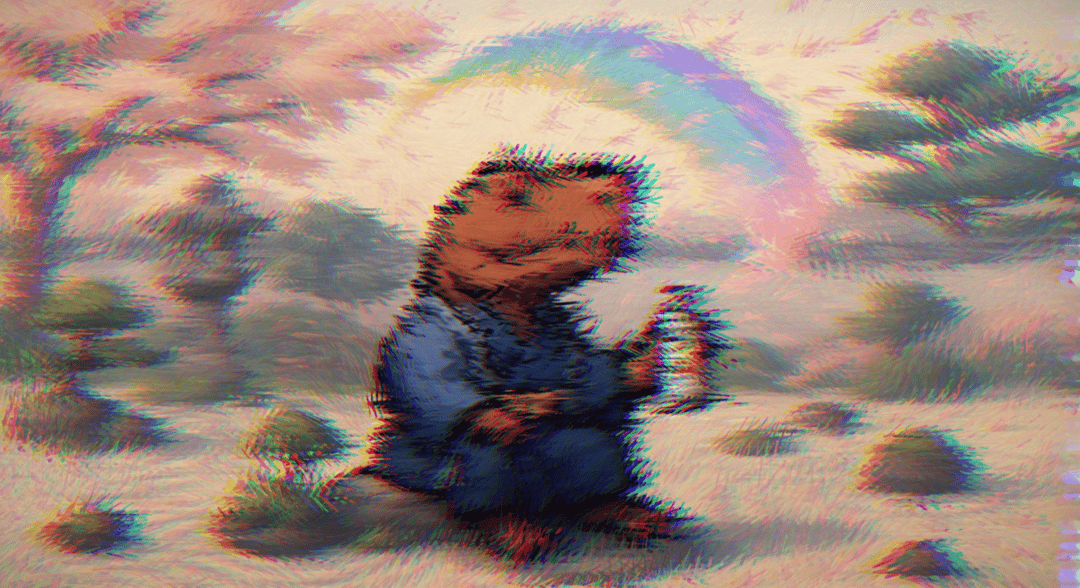
DistortionEffect - Interactive water ripple shader effect with real-time mouse tracking, featuring multi-layered wave distortions, chromatic aberration, and fluid turbulence animations.
Built with React and Tailwind. Copy the prompt and paste it into Claude Code, Cursor or Lovable: your agent adds DistortionEffect to your project and fits it to your theme.
Code
How DistortionEffect is used: the demo's code. The component's own source comes with a free account.
Usage.tsx
"use client";

import React, { useRef, useEffect, useState } from 'react';

const vertexShaderSource = `
  attribute vec2 a_position;
  attribute vec2 a_texCoord;
  varying vec2 v_uv;

  void main() {
    gl_Position = vec4(a_position, 0.0, 1.0);
    v_uv = a_texCoord;
  }
`;

const fragmentShaderSource = `
  precision mediump float;

  uniform float u_time;
  uniform vec2 u_mouse;
  uniform vec2 u_resolution;
  uniform sampler2D u_texture;
  varying vec2 v_uv;

  vec2 waterRipple(vec2 uv, vec2 center, float time, float mouseInfluence) {
      vec2 dir = uv - center;
      float dist = length(dir);

      // Multiple ripple frequencies for complex water effect
      float ripple1 = sin(dist * 25.0 - time * 3.0) * 0.03;
      float ripple2 = sin(dist * 15.0 - time * 2.5) * 0.02;
      float ripple3 = cos(dist * 40.0 - time * 4.0) * 0.01;

      // Combine ripples with decay
      float totalRipple = (ripple1 + ripple2 + ripple3) * mouseInfluence;
      totalRipple *= smoothstep(0.4, 0.0, dist);

      // Add circular distortion
      float angle = atan(dir.y, dir.x);
      vec2 circularDistort = vec2(cos(angle), sin(angle)) * totalRipple;

      return uv + dir * totalRipple + circularDistort * 0.5;
  }

  vec3 chromaticAberration(sampler2D tex, vec2 uv, float strength) {
      float edgeFactor = length(vec2(0.5, 0.5) - uv) * 2.0;
      strength *= edgeFactor * 1.5;

      vec2 offset = vec2(strength, 0.0);

      float r = texture2D(tex, uv - offset).r;
      float g = texture2D(tex, uv).g;
      float b = texture2D(tex, uv + offset).b;

      return vec3(r, g, b);
  }

  float noise(vec2 st) {
      return fract(sin(dot(st.xy, vec2(12.9898, 78.233))) * 43758.5453123);
  }

  float smoothNoise(vec2 st) {
      vec2 ipos = floor(st);
      vec2 fpos = fract(st);

      fpos = fpos * fpos * (3.0 - 2.0 * fpos);

      float bl = noise(ipos);
      float br = noise(ipos + vec2(1.0, 0.0));
      float tl = noise(ipos + vec2(0.0, 1.0));
      float tr = noise(ipos + vec2(1.0, 1.0));

      float b = mix(bl, br, fpos.x);
      float t = mix(tl, tr, fpos.x);

      return mix(b, t, fpos.y);
  }

  void main() {
      vec2 uv = v_uv;

      // Direct use of mouse position without aspect ratio modification
      vec2 mouse = u_mouse;

      // Calculate distance in UV space directly
      float mouseDistance = length(uv - mouse);
      float mouseInfluence = 1.0 - smoothstep(0.0, 0.25, mouseDistance);

      // Flowing water-like noise
      vec2 flowingNoise = vec2(
          smoothNoise(uv * 4.0 + vec2(u_time * 0.1, u_time * 0.15)),
          smoothNoise(uv * 4.0 + vec2(u_time * 0.15, u_time * 0.1))
      ) * 0.015;

      // Apply water ripple effect
      vec2 distortedUV = waterRipple(uv + flowingNoise, mouse, u_time, mouseInfluence);

      // Add turbulence near mouse
      float turbulence = smoothNoise(uv * 10.0 + u_time * 0.5) * 0.02 * mouseInfluence;
      distortedUV += vec2(turbulence, turbulence * 0.5);

      // Sample with chromatic aberration
      vec3 color = chromaticAberration(u_texture, distortedUV, 0.008 + mouseInfluence * 0.015);

      // Water surface highlight effect
      float highlight = pow(max(0.0, 1.0 - mouseDistance * 2.0), 3.0);
      color += vec3(0.1, 0.15, 0.2) * highlight * 0.3;

      // Subtle vignette
      float vignette = smoothstep(1.3, 0.4, length(v_uv - vec2(0.5)));
      color *= vignette;

      // Animated water shimmer
      float shimmer = sin(u_time * 3.0 + mouseDistance * 20.0) * 0.05 * mouseInfluence;
      color += vec3(0.05, 0.08, 0.12) * shimmer;

      gl_FragColor = vec4(color, 1.0);
  }
`;

interface DistortionEffectProps {
  imageUrl?: string;
  className?: string;
}

export default function DistortionEffect({
  imageUrl = 'https://redirect.xubh.fun/ba.png',
  className = ''
}: DistortionEffectProps) {
  const canvasRef = useRef<HTMLCanvasElement>(null);
  const glRef = useRef<WebGLRenderingContext | null>(null);
  const programRef = useRef<WebGLProgram | null>(null);
  const animationRef = useRef<number>();
  const mouseRef = useRef({ x: 0.5, y: 0.5 });
  const startTimeRef = useRef<number>(Date.now());
  const [imageLoaded, setImageLoaded] = useState(false);

  useEffect(() => {
    if (!canvasRef.current) return;

    const canvas = canvasRef.current;
    const gl = canvas.getContext('webgl') || canvas.getContext('experimental-webgl') as WebGLRenderingContext | null;

    if (!gl) {
      console.error('WebGL not supported');
      return;
    }

    glRef.current = gl;

    const createShader = (type: number, source: string) => {
      const shader = gl.createShader(type);
      if (!shader) return null;

      gl.shaderSource(shader, source);
      gl.compileShader(shader);

      if (!gl.getShaderParameter(shader, gl.COMPILE_STATUS)) {
        console.error('Shader compile error:', gl.getShaderInfoLog(shader));
        gl.deleteShader(shader);
        return null;
      }

      return shader;
    };

    const vertexShader = createShader(gl.VERTEX_SHADER, vertexShaderSource);
    const fragmentShader = createShader(gl.FRAGMENT_SHADER, fragmentShaderSource);

    if (!vertexShader || !fragmentShader) return;

    const program = gl.createProgram();
    if (!program) return;

    gl.attachShader(program, vertexShader);
    gl.attachShader(program, fragmentShader);
    gl.linkProgram(program);

    if (!gl.getProgramParameter(program, gl.LINK_STATUS)) {
      console.error('Program link error:', gl.getProgramInfoLog(program));
      return;
    }

    programRef.current = program;
    gl.useProgram(program);

    const positions = new Float32Array([
      -1, -1,
       1, -1,
      -1,  1,
       1,  1,
    ]);

    const texCoords = new Float32Array([
      0, 1,
      1, 1,
      0, 0,
      1, 0,
    ]);

    const positionBuffer = gl.createBuffer();
    gl.bindBuffer(gl.ARRAY_BUFFER, positionBuffer);
    gl.bufferData(gl.ARRAY_BUFFER, positions, gl.STATIC_DRAW);

    const positionLocation = gl.getAttribLocation(program, 'a_position');
    gl.enableVertexAttribArray(positionLocation);
    gl.vertexAttribPointer(positionLocation, 2, gl.FLOAT, false, 0, 0);

    const texCoordBuffer = gl.createBuffer();
    gl.bindBuffer(gl.ARRAY_BUFFER, texCoordBuffer);
    gl.bufferData(gl.ARRAY_BUFFER, texCoords, gl.STATIC_DRAW);

    const texCoordLocation = gl.getAttribLocation(program, 'a_texCoord');
    gl.enableVertexAttribArray(texCoordLocation);
    gl.vertexAttribPointer(texCoordLocation, 2, gl.FLOAT, false, 0, 0);

    const texture = gl.createTexture();
    gl.bindTexture(gl.TEXTURE_2D, texture);

    gl.texParameteri(gl.TEXTURE_2D, gl.TEXTURE_WRAP_S, gl.CLAMP_TO_EDGE);
    gl.texParameteri(gl.TEXTURE_2D, gl.TEXTURE_WRAP_T, gl.CLAMP_TO_EDGE);
    gl.texParameteri(gl.TEXTURE_2D, gl.TEXTURE_MIN_FILTER, gl.LINEAR);
    gl.texParameteri(gl.TEXTURE_2D, gl.TEXTURE_MAG_FILTER, gl.LINEAR);

    const image = new Image();
    image.crossOrigin = 'anonymous';
    image.onload = () => {
      gl.bindTexture(gl.TEXTURE_2D, texture);
      gl.texImage2D(gl.TEXTURE_2D, 0, gl.RGBA, gl.RGBA, gl.UNSIGNED_BYTE, image);
      setImageLoaded(true);
    };
    image.src = imageUrl;

    const handleMouseMove = (e: MouseEvent) => {
      const rect = canvas.getBoundingClientRect();
      mouseRef.current = {
        x: (e.clientX - rect.left) / rect.width,
        y: (e.clientY - rect.top) / rect.height
      };
    };

    const handleTouchMove = (e: TouchEvent) => {
      e.preventDefault();
      const rect = canvas.getBoundingClientRect();
      const touch = e.touches[0];
      mouseRef.current = {
        x: (touch.clientX - rect.left) / rect.width,
        y: (touch.clientY - rect.top) / rect.height
      };
    };

    canvas.addEventListener('mousemove', handleMouseMove);
    canvas.addEventListener('touchmove', handleTouchMove, { passive: false });

    const render = () => {
      if (!gl || !programRef.current) return;

      const currentTime = (Date.now() - startTimeRef.current) / 1000;

      canvas.width = canvas.offsetWidth;
      canvas.height = canvas.offsetHeight;
      gl.viewport(0, 0, canvas.width, canvas.height);

      gl.clearColor(0, 0, 0, 1);
      gl.clear(gl.COLOR_BUFFER_BIT);

      const timeLocation = gl.getUniformLocation(programRef.current, 'u_time');
      gl.uniform1f(timeLocation, currentTime);

      const mouseLocation = gl.getUniformLocation(programRef.current, 'u_mouse');
      gl.uniform2f(mouseLocation, mouseRef.current.x, mouseRef.current.y);

      const resolutionLocation = gl.getUniformLocation(programRef.current, 'u_resolution');
      gl.uniform2f(resolutionLocation, canvas.width, canvas.height);

      const textureLocation = gl.getUniformLocation(programRef.current, 'u_texture');
      gl.uniform1i(textureLocation, 0);

      gl.drawArrays(gl.TRIANGLE_STRIP, 0, 4);

      animationRef.current = requestAnimationFrame(render);
    };

    if (imageLoaded) {
      render();
    }

    return () => {
      if (animationRef.current) {
        cancelAnimationFrame(animationRef.current);
      }
      canvas.removeEventListener('mousemove', handleMouseMove);
      canvas.removeEventListener('touchmove', handleTouchMove);
    };
  }, [imageUrl, imageLoaded]);

  return (
    <div className={`w-full h-screen bg-black overflow-hidden relative ${className}`}>
      <canvas
        ref={canvasRef}
        className="w-full h-full cursor-pointer"
        style={{ touchAction: 'none' }}
      />
      {!imageLoaded && (
        <div className="absolute inset-0 flex items-center justify-center">
          <div className="text-white text-xl animate-pulse">Loading...</div>
        </div>
      )}
    </div>
  );
}

export function Component() {
  return <DistortionEffect />;
}More by Kain Xu
View all

SpiralAnimation
2.3K
ParticleTextEffect
2.1K
Wave Background
1.4K
FlowButton
1.2K
Entropy
1.1K
layered text
1K
LiquidRadio
848
BlurTextAnimation
478
More in Shaders
View all
Glass Fold
213

Neural Noise
718
Water Caustic
44
Shader Background
2K
Wave
688
Stripe like gradient-shader
265
Black Hole
23

Waves shaders Homlu UI
92

